
About Mod Options
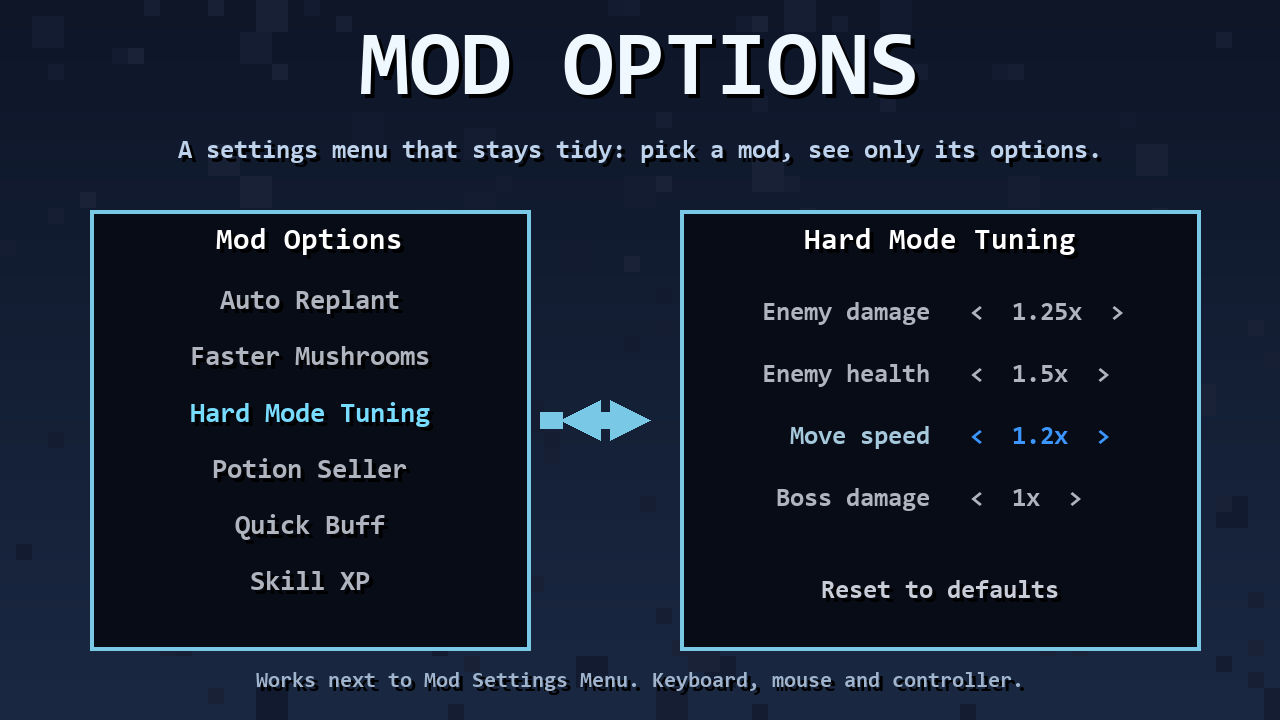
From mod.ioA general settings menu for Core Keeper mods: Settings > Mod Options lists your mods, and each one gets its own page with its options, arrows to change values and Reset to defaults. Works alongside Mod Settings Menu.
A general settings menu for Core Keeper mods. Adds Mod Options to the game's Settings menu
(main menu and pause menu): a list of mods, and one page per mod with its options.
- Left/right (keyboard, controller) or click the
</>side of a value to change it. - Each page shows the mod's description and has Reset to defaults (click twice to confirm).
- Values are saved immediately to
<mod name>/config.cfgin the game's mod config folder (CoreLib).
Independent of Mod Settings Menu: both can be installed at the same time, each with its own button.
Built into Sid's Overhaul; the standalone mods depend on this one.
For modders
</code>csharp<br>using ModOptions;</p> <p>private static Setting<string> _speed;</p> <p>public void Init()<br>{<br> SettingsPages.Create(this, "My Mod")<br> .Hint("What this mod does.")<br> .Choice(out _speed, "Speed", new[] { "1x", "2x", "3x" }, "1x")<br> .Build();<br> _speed.OnChanged += token => Apply(token);<br>}<br><code>
Options: Toggle (bool), Choice (string list, wraps around), Stepper (int range), Slider
(float range with a step). SettingsPages.Create(mod, title, keyPrefix) lets one mod own several
pages in one config file (Sid's Overhaul uses it to keep the keys of earlier versions).
How the menu works: the game's Gameplay settings screen is cloned twice at runtime (list and page);
their rows are replaced with SettingsRow components (subclass of RadicalMenuOption), and the
pages are pushed with MenuManager.PushMenu, so scrolling, navigation and Back are vanilla. The
Settings menu gets an extra row cloned from "Gameplay settings". Requires CoreLib.
Highlights
From source dataFootprint
Rated a light load on a server.
Last update
Its author last shipped an update 48d ago.
Mod Options on Nxeon
From our catalogue- One-click install
- Supported on Nxeon Core Keeper servers. We download it from mod.io, place it, and restart the server.
- Server side
- Required on the server
- Server load
- light
- Smallest plan we suggest
- Core Keeper — 2 GB (2 GB RAM). This follows our own load rating above, not a benchmark.
- Latest build
- 1.0.0, released 2026-10-04
Run Mod Options on a Core Keeper server
Pick a server or deploy a new one above; it is installed in one click.
What kind of mod it is
From the catalogLibraries & compatibility
Foundations and fixes other mods build on. Usually installed because something else needs it.
Runs on your server
From source side supportmod.io lists Mod Options as required on the server. Check its mod.io page to see whether players need it too.
Compatibility
- Game
- Core Keeper
- Runs on
- Serverrequired on the server
Verified at the source
- ✓mod.ioOfficial listing, checked 2026-10-27Open ↗
- ✓Authorcoopdedoop, as published on mod.io
- ✓LicenseNot published by the sourceFree