Drilly
Hover for alerts, click to zoom to problems. Drilly tracks all mining drills with real-time insights into performance, efficiency, and resource yields. Easily monitor drill statuses and productivity bonuses through a simple in-game interface. Supports modded content and works for any base size (Tested to 8000+ Drills on 15 surfaces). Auto Deconstruct spent drills (Configurable).
Description
Drilly Mod
Drilly is a sophisticated Factorio mod designed to provide an intuitive graphical interface for inspecting and managing resource miners across multiple surfaces. Whether you're overseeing a single planet or navigating through various asteroid belts, Drilly offers comprehensive insights into your resource extraction operations, enhancing your gameplay experience through efficient monitoring and management.
🌟 Features
- Comprehensive Drill Summary by Resource Type: Instantly view the number of drills mining each specific resource, allowing for quick assessments and optimizations.
- Surface Selection & Management: Seamlessly switch between different surfaces or aggregate data across all surfaces to maintain a holistic view of your mining operations.
- Resource Visualization: Visual representations of resources with real-time data on the total amount being mined, facilitating easier tracking and decision-making.
- Drill Type Breakdown: Detailed counts of each drill type dedicated to mining specific resources, helping you balance and optimize your mining infrastructure.
- Drill Alerts: Hover over a drill to trigger an alert on the map, click a drill to zoom to its location.
- Auto Deconstruct: Drills with no minable resources are automatically marked for deconstruction to streamline cleanup and resource management (Configurable Global Setting).
- Dynamic & Auto-Refresh:
- Manual Refresh: Use the "Refresh" button to update the displayed data on-demand.
- Configurable Auto-Refresh: Set automatic update intervals in the mod settings to keep your data current without manual intervention.
- Optimized Performance: Drilly processes drills efficiently by updating only active drills or those that have recently changed status, ensuring minimal impact on game performance.
- Progress Indicators: Visual progress bars and indicators provide real-time feedback on the processing status of your drills.
- Mod Support: Works seamlessly with popular mods like Krastorio 2, Angels mods and Bob's mods by detecting the additional resources and drill types they introduce. Built in support for space exploration will always be prioritized (Its why I built this). Supports Dredgeworks Ore Grouping.
- User-Friendly GUI: Intuitive and responsive graphical interface designed for ease of use, with clear categorization and actionable insights.
🛠 Installation
You can install Drilly either through the Factorio Mod Portal or manually by downloading the mod files. Follow the steps below based on your preferred installation method.
1. Install via Factorio Mod Portal
- Launch Factorio:
- Open the Factorio game on your computer.
- Open the Mods Menu:
- From the main menu, click on the Mods button to access the mod management interface.
- Search for Drilly:
- Use the search bar within the Mods menu to locate the "Drilly" mod.
- Install the Mod:
- Click on Drilly in the search results.
- Click the Install button to add the mod to your game.
- Enable the Mod:
- After installation, ensure that Drilly is enabled in your mod list.
- You can toggle the mod's activation status by checking or unchecking the box next to it.
- Start the Game:
- Return to the main menu and click Play to enter your game world.
- Drilly's features will now be available for monitoring your resource miners.
2. Manual Installation
- Download the Mod:
- Visit the Factorio Mod Portal or your preferred source to download the latest version of Drilly.
- Ensure you download the correct version compatible with your Factorio installation.
- Extract the Mod Files:
- Locate the downloaded
drilly.zip(or similar) file. - Extract the contents to obtain the
drillyfolder.
- Move the Mod to Factorio's Mods Directory:
- Place the
drillyfolder into your Factorio mods directory: - Windows:
C:\Users\<YourUsername>\AppData\Roaming\Factorio\mods - Linux:
~/.factorio/mods/ - macOS:
~/Library/Application Support/factorio/mods/
- *Note*: If the
modsfolder does not exist, you can create it manually.
- Enable the Mod:
- Launch Factorio.
- Navigate to the Mods section in the main menu.
- Locate Drilly in the list and ensure it is enabled by checking the corresponding box.
- Start the Game:
- Click Play to enter your game world.
- Drilly's graphical interface for monitoring resource miners will now be active.
🎮 Usage
- Access the Drill Inspector GUI:
- Via Interface: Click the Drilly button added to your game’s toolbar.
- Select a Surface:
- Choose a specific surface from the dropdown menu or select "By Surface"/"Aggregate" to view dis/aggregated data across all surfaces.
- View Resource and Drill Data:
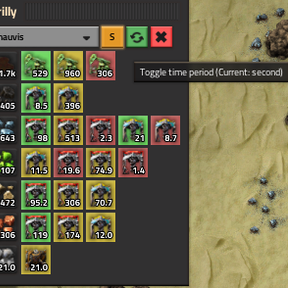
- Resource Rows: Each row displays a resource icon, the total amount being mined, and a breakdown of drill types assigned to that resource.
- Visual Indicators: Use color-coded buttons to quickly assess the status of each drill:
- Green: Drills are actively working.
- Yellow: Drills are experiencing minor issues (e.g., waiting for space in destination).
- Red: Drills are facing critical problems (e.g., no power, insufficient resources).
- Manage Drill Data:
- Manual Refresh: Click the green refresh button to update the data immediately.
- Auto-Refresh Interval Setting: Adjust the auto-refresh interval in the mod settings to control how frequently Drilly updates the data automatically.
- Auto-Refresh Enabled Setting: Uncheck this box to disable automatic updates and rely solely on manual refreshes.
- Monitor Drills:
Ratings & reviews
Sign in to leave a rating or comment.