




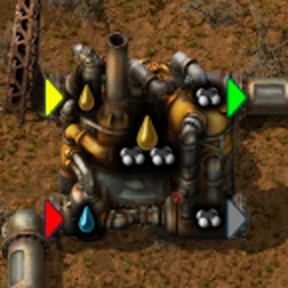

About Connection Indicators
From Factorio Mod PortalShows indicators when fluid connections, inserters, and miners which are connected or obstructed
Shows indicators on fluid connections, inserters, and mining drills.
Fluid connections
Lightweight mode (default)
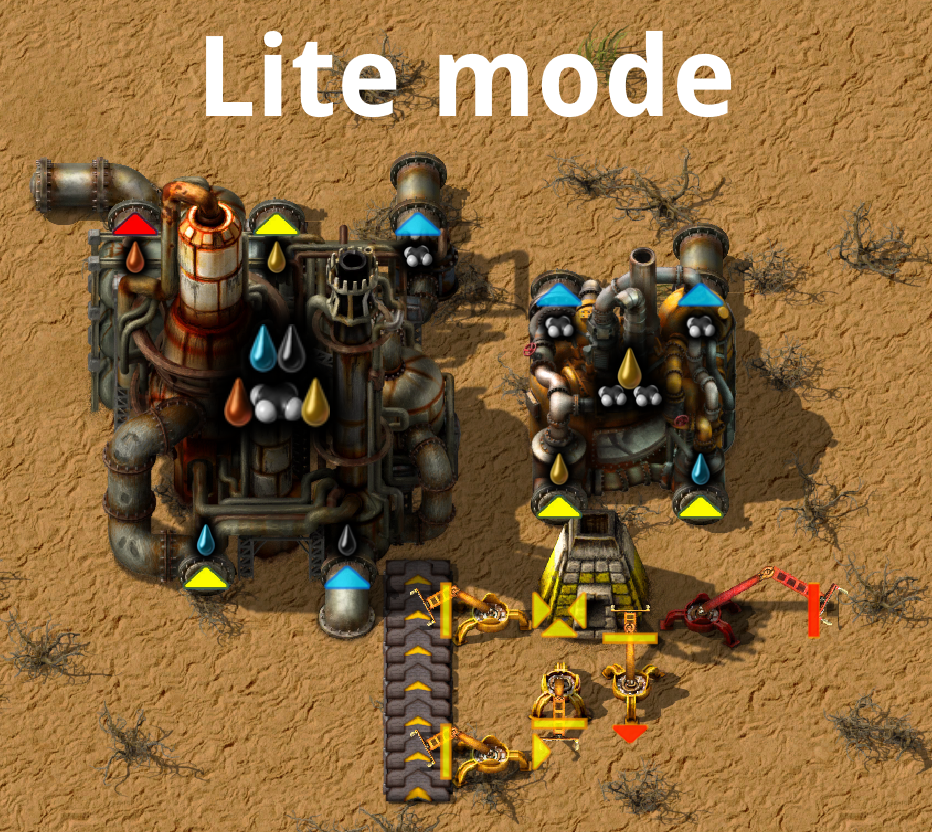
Less cluttered. Only shows indicators when attention is required.
- Blue - Pipe is connected, or this fluid is connected in another pipe
- Yellow - Pipe connection is blocked by another entity, or this fluid is not connected
- Red - Pipe connection is blocked by an entity with fluid connections e.g. pipe to ground. Also when entities with different fluid filters are connected.
When a fluid is connected in another pipe, the indication level goes down.
Full mode (old default)
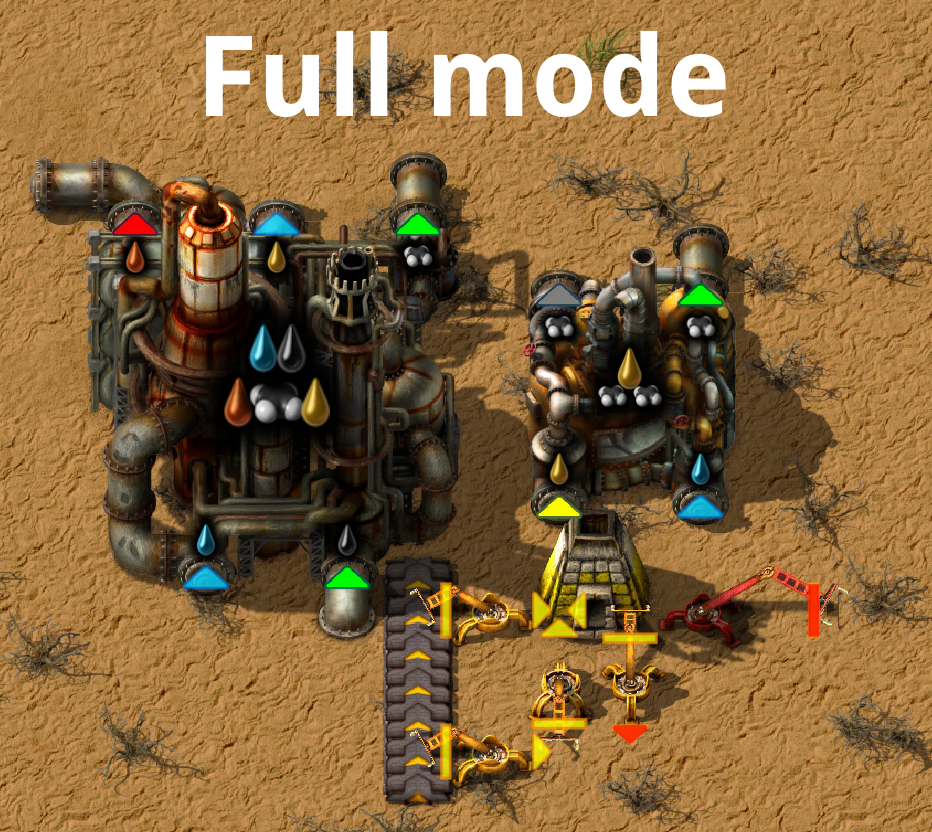
More colorful. Shows indicators also on active and unnecessary connections.
- Green - Pipe is connected
- Blue - Pipe is not connected
- Gray - Pipe is not connected but this fluid is connected in another pipe
- Yellow - Pipe connection is blocked by another entity
- Red - Pipe connection is blocked by an entity with fluid connections e.g. pipe to ground. Also when entities with different fluid filters are connected.
When a fluid is connected in another pipe, the indication level goes down.
Inserters and mining drills
- Red - When pickup or drop position is obstructed or an open space not served by an inserter/drill
- Yellow/nothing - Connected to a relevant entity or an open space served by another inserter/drill
Settings
- Enable indicators on fluid connection entities
- Off - Disabled
- Lite - Only show indicators on issues
- Full - Shows indicators in more cases
- Enable indicators on inserters and mining drills
- Only show indicators when hovering over entities
- Ignore entities by name, for compatibility with mods that don't raise events on entity destruction
Known issues
- Indicators only disappear a frame after entities are removed or changed.
- Mods that destroy entities without raising can cause indicators to get stuck. Use ignore entities to exclude them.
Highlights
From source dataGame versions
Built for Factorio 2.1.
Footprint
Rated a light load on a server.
License
Published under MIT.
Connection Indicators on Nxeon
From our catalogue- One-click install
- Supported on Nxeon Factorio servers. We download it from Factorio Mod Portal, place it, and restart the server.
- Server side
- Required on the server
- Server load
- light
- Smallest plan we suggest
- Factorio — 2 GB (2 GB RAM). This follows our own load rating above, not a benchmark.
- Latest build
- 0.2.9, released 2026-07-01
Run Connection Indicators on a Factorio server
Pick a server or deploy a new one above; it is installed in one click.
What kind of mod it is
From the catalogQuality of life & UI
Small conveniences, tweaks and interface improvements players notice straight away.
Runs on your server
From source side supportFactorio Mod Portal lists Connection Indicators as required on the server. Check its Factorio Mod Portal page to see whether players need it too.
Compatibility
- Game
- Factorio
- Runs on
- Serverrequired on the server
- Game versions
- 2.1
Verified at the source
- ✓Factorio Mod PortalOfficial listing, checked 2026-10-08Open ↗
- ✓AuthorSoul-Burn, as published on Factorio Mod Portal
- ✓LicenseMITFree