







About Lua API global Variable Viewer (gvv)
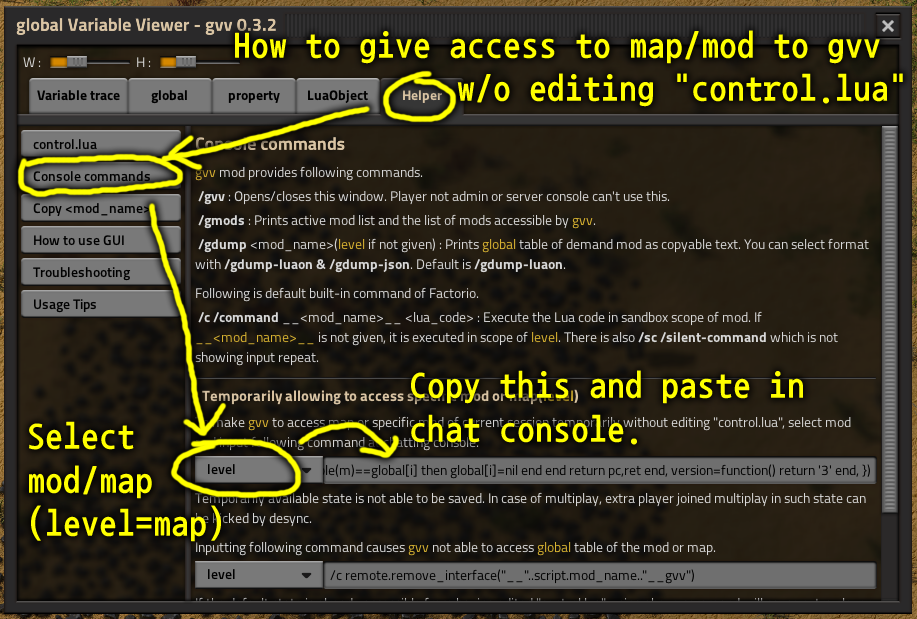
From Factorio Mod PortalThis is a debugging tool. This mod adds commands /gvv and others and a hotkey(Ctrl+Shift+V) to allow you to check _G and global table of map or each mods. Only admins can use command if it is multiplay game. You have to input some code for temporary accessibility or have to edit "control.lua" of other mod or map to access global table of the mod or map. See "Helper" tab for instructions.
Type /gvv or press CTRL+SHIFT+V (you can change key bindings) to open GUI. Only admins can use the mod if it is multiplay game. To allow gvv to access global table of mod, savefile or scenario(start from beginning), you need to modify "control.lua" file of demand mod or map. Input following code at first line or last line of "control.lua" file of the mod or map.
if script.active_mods["gvv"] then require("__gvv__.gvv")() end
In case of savefile, extract "control.lua" from it first. Then, edit code and overwrite it at same location of "control.lua" inside of the zipped file. There is also a way to make the mod or map accessible temporarily without editing "control.lua", introduced in in-game GUI. Most of other helpful words are inside of Helper tab in gvv in-game GUI.
###Commands added by this mod
- /gvv : Opens/closes gvv main GUI window. Only admins or player in singleplay can use this command.
- /gmods : Prints loaded mod list and global accessible mod list.
- /gdump : Same as /gdump-luaon
- /gdump-luaon <mod_name>(optional) : Prints global data of accessible mod in lua object notation format.
If no <mod_name> is given, level(current map) will be used.
- /gdump-json <mod_name>(optional) : Prints global data of accessible mod in js object notation format.
If no <mod_name> is given, level(current map) will be used.
###LuaRemote interfaces added by this mod
- remote.call("__<mod_name>__gvv","storage")
: Returns global table of the mod.
- remote.call("__<mod_name>__gvv","_G")
: Returns _G table of the mod. Some data types can not be brought.
- remote.call("__<mod_name>__gvv","diag")
: Need to be used only internally. Performs diagnosis of global table of the mod and returns problematic paths as table.
- remote.call("__<mod_name>__gvv","fix")
: Need to be used only internally. Performs diagnosis and kills entries that LuaRemote cannot handle in global table of the mod.
- remote.call("__<mod_name>__gvv","c",<lua_code>, ...)
: Runs a lua code(string type) in sandbox of the mod, "..." becomes local table named "arg" in the lua code.
###Server console exclusive
- /sc \_\_gvv\_\_ settings.global["gvv-mod_enable-on-tick"]={value= false }
: Turns off(true for on) that, "on_tick" event used for tracking variables. Admin player already can do this in game GUI.
Highlights
From source dataGame versions
Built for Factorio 2.1.
Footprint
Rated a light load on a server.
License
Published under Unlicense.
Lua API global Variable Viewer (gvv) on Nxeon
From our catalogue- One-click install
- Supported on Nxeon Factorio servers. We download it from Factorio Mod Portal, place it, and restart the server.
- Server side
- Required on the server
- Server load
- light
- Smallest plan we suggest
- Factorio — 2 GB (2 GB RAM). This follows our own load rating above, not a benchmark.
- Latest build
- 0.5.21, released 2026-10-25
Recent builds
| Build | Released | Game versions | Loaders |
|---|---|---|---|
| 0.5.21 | 2026-10-25 | 2.1 | n/a |
| 0.5.20 | 2026-09-12 | 2.1 | n/a |
| 0.5.19 | 2026-07-11 | 2.1 | n/a |
| 0.5.17 | 2026-05-29 | 2.0 | n/a |
| 0.5.16 | 2026-05-17 | 2.0 | n/a |
| 0.5.15 | 2025-07-15 | 2.0 | n/a |
Run Lua API global Variable Viewer (gvv) on a Factorio server
Pick a server or deploy a new one above; it is installed in one click.
What kind of mod it is
From the catalogLibraries & compatibility
Foundations and fixes other mods build on. Usually installed because something else needs it.
Runs on your server
From source side supportFactorio Mod Portal lists Lua API global Variable Viewer (gvv) as required on the server. Check its Factorio Mod Portal page to see whether players need it too.
Compatibility
- Game
- Factorio
- Runs on
- Serverrequired on the server
- Game versions
- 2.1
Verified at the source
- ✓Factorio Mod PortalOfficial listing, checked 2026-10-26Open ↗
- ✓AuthorRitn, as published on Factorio Mod Portal
- ✓LicenseUnlicenseFree












