






About Ore Mountain
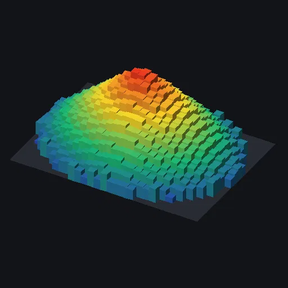
From Factorio Mod PortalSelect an ore patch and view it as a rotatable 3D bar-graph mountain: one bar per tile, height = ore remaining.
Select an ore patch and see it as a 3D bar graph you can rotate: one bar per tile, with height showing how much ore is left.
How to use
- Click the Ore mountain shortcut (or press Alt+M) to get the selector.
- Drag over any part of a patch to view the whole connected patch.
- Shift-drag to view only the tiles inside the box (useful for oil fields).
The viewer
- Rotation, tilt and height sliders, ±45° buttons and an auto-spin option.
- Height scale: linear, square root or logarithmic.
- Colour: heat map or the ore's own colour.
- View size: Small, Medium, Large or Extra large.
- Stats: total ore, tile count, average per tile, poorest and richest tile, and how much has been mined since you selected the patch. Infinite resources like oil are shown as yield %.
- Rescan re-reads the patch after mining. It follows the patch as it shrinks or splits, and keeps the footprint fixed so the view doesn't jump around.
- Auto-rescan repeats the rescan every 1, 5, 10, 30 or 60 seconds of game time while the window is open. Game time keeps it in step with a sped-up game.
- Very large patches are averaged into blocks to keep the view fast. The bar limit is a per-player setting.
- Orthographic view: bars don't change size with distance.
Advanced mode (timelapses)
Turn on Advanced mode in per-player mod settings to get a Peak value box. Whatever you enter becomes full height, instead of the richest tile. This keeps the scale and camera fixed while a patch is mined out, so depletion actually shows in timelapse recordings. Combined with auto-rescan and a large view size, a timelapse needs no clicking.
Settings (per player)
- Patch gap tolerance: how far apart tiles can be and still count as one patch.
- Maximum bars: the detail limit before tiles are averaged into blocks.
- Maximum tiles to scan.
- Advanced mode.
Languages
- English
- German (Deutsch), contributed by Eddy_Karacho
Want it in your language? Copy locale/en/locale.cfg from the mod zip, translate the text after each =, and send it to me in the discussion tab. I'll add it in the next update.
Works in multiplayer; each player sees only their own viewer. Safe to add to or remove from existing saves.
Highlights
From source dataFootprint
Rated a light load on a server.
License
Published under MIT.
Last update
Its author last shipped an update 38d ago.
Ore Mountain on Nxeon
From our catalogue- One-click install
- Supported on Nxeon Factorio servers. We download it from Factorio Mod Portal, place it, and restart the server.
- Server side
- Required on the server
- Server load
- light
- Smallest plan we suggest
- Factorio — 2 GB (2 GB RAM). This follows our own load rating above, not a benchmark.
- Latest build
- 0.1.14, released 2026-10-15
Recent builds
| Build | Released | Game versions | Loaders |
|---|---|---|---|
| 0.1.14 | 2026-10-15 | 2.1 | n/a |
| 0.1.13 | 2026-10-15 | 2.0 | n/a |
| 0.1.12 | 2026-10-14 | 2.1 | n/a |
| 0.1.11 | 2026-10-14 | 2.0 | n/a |
| 0.1.8 | 2026-10-14 | 2.1 | n/a |
| 0.1.7 | 2026-10-12 | 2.1 | n/a |
Run Ore Mountain on a Factorio server
Pick a server or deploy a new one above; it is installed in one click.
What kind of mod it is
From the catalogWorld generation
Changes or adds to how new terrain, biomes and structures are created.
Runs on your server
From source side supportFactorio Mod Portal lists Ore Mountain as required on the server. Check its Factorio Mod Portal page to see whether players need it too.
Compatibility
- Game
- Factorio
- Runs on
- Serverrequired on the server
Verified at the source
- ✓Factorio Mod PortalOfficial listing, checked 2026-10-15Open ↗
- ✓Authorherrabanani, as published on Factorio Mod Portal
- ✓LicenseMITFree












