






About Platform Schedule Sync
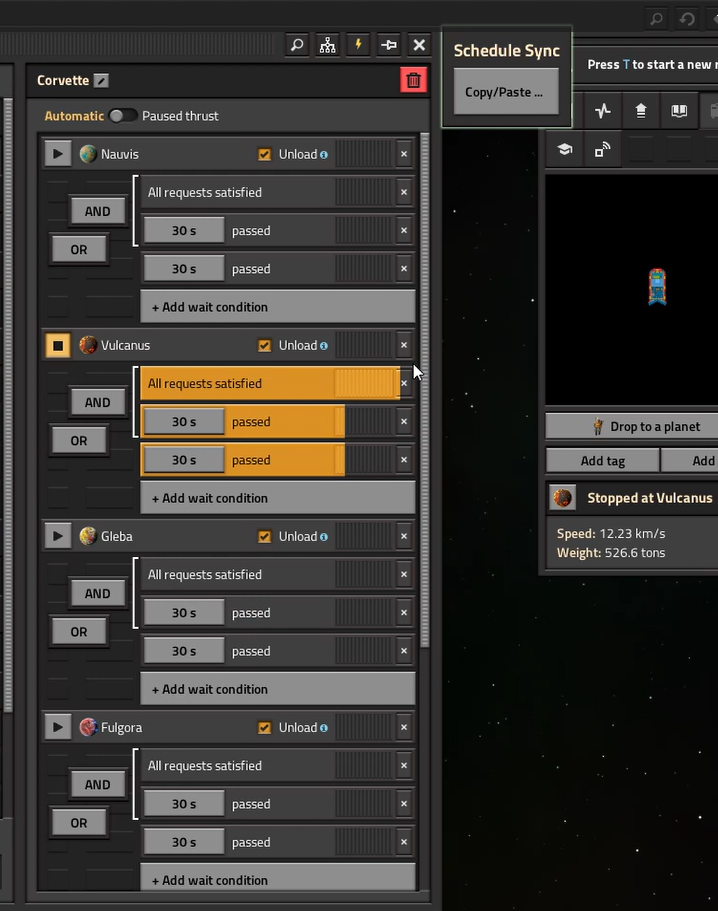
From Factorio Mod PortalAdds a button to the space platform hub that lets you copy a stop's wait conditions and paste them onto another stop in the same schedule - handy when you add a new planet and want it to use the same conditions as an existing one.
Platform Schedule Sync
Stop re-entering the same wait conditions every time you add a new planet to a space platform's schedule.
Platform Schedule Sync adds a small "Schedule Sync" panel directly into the space platform hub GUI. Open it, copy the wait conditions from any stop in the schedule, and paste them onto any other stop—including a planet you just added—with just two clicks.
Features
- Built-in UI: Copy/Paste Conditions button built right into the space platform hub window—no menus to dig through.
- Stop Overview: Lists every stop in the platform's schedule along with its current condition count.
- Full Copy: "Copy" grabs all wait conditions from a stop (time, inactivity, cargo, fuel, etc.—whatever you've set up).
- Smart Paste: "Paste" replaces the target stop's conditions with the copied set, maintaining the exact same order.
- Visual Clipboard: The copied stop is highlighted so you always know what's in your clipboard.
- Backup Hotkey: Press
Ctrl + Shift + Mto open the tool from anywhere on the platform. - Vanilla Style: Features a subtle, green-tinted UI that seamlessly matches the vanilla game look.
How to Use
- Open your space platform's hub.
- Click the Copy/Paste Conditions button on the right side of the hub window.
- Click Copy next to the stop whose conditions you want to reuse.
- Click Paste next to the new stop (or any other stop) to apply those same conditions.
> Result: That's it—your new planet now behaves exactly like your existing ones!
Notes
- Requirement: Requires the Space Age expansion (as space platforms are a Space Age feature).
- Save-Game Safe: This is a pure UI/utility mod. It doesn't change any recipes, prototypes, or balance, making it completely safe to add to or remove from existing saves.
- Multiplayer Friendly: Works perfectly in multiplayer; each player maintains their own independent clipboard.
Feedback
Found a bug or have an idea for an improvement? Leave a comment! This is an actively maintained QoL (Quality of Life) mod.
PS: This was developed with the help of Claude.
Highlights
From source dataFootprint
Rated a light load on a server.
License
Published under MIT.
Last update
Its author last shipped an update 5 mo ago.
Platform Schedule Sync on Nxeon
From our catalogue- One-click install
- Supported on Nxeon Factorio servers. We download it from Factorio Mod Portal, place it, and restart the server.
- Server side
- Required on the server
- Server load
- light
- Smallest plan we suggest
- Factorio — 2 GB (2 GB RAM). This follows our own load rating above, not a benchmark.
- Latest build
- 1.0.1, released 2026-06-25
Recent builds
| Build | Released | Game versions | Loaders |
|---|---|---|---|
| 1.0.1 | 2026-06-25 | 2.1 | n/a |
| 1.0.0 | 2026-06-13 | 2.0 | n/a |
Run Platform Schedule Sync on a Factorio server
Pick a server or deploy a new one above; it is installed in one click.
What kind of mod it is
From the catalogWorld generation
Changes or adds to how new terrain, biomes and structures are created.
Runs on your server
From source side supportFactorio Mod Portal lists Platform Schedule Sync as required on the server. Check its Factorio Mod Portal page to see whether players need it too.
Compatibility
- Game
- Factorio
- Runs on
- Serverrequired on the server
Verified at the source
- ✓Factorio Mod PortalOfficial listing, checked 2026-10-16Open ↗
- ✓Authortherage_guy, as published on Factorio Mod Portal
- ✓LicenseMITFree












