






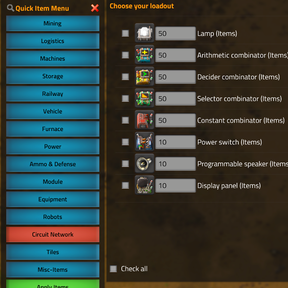
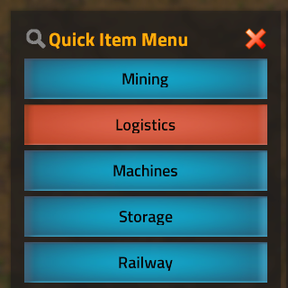
About Quick Item Menu
From Factorio Mod PortalAn updated/refactored version of Quick Start Menu (Revived) with a bunch of new features and improvements for Factorio 2.0. Use a custom shortcut, the quick launch icon or /qimenu to add any item or stacks of items to your inventory with optional quality support and more.
Quick Item Menu
What is this?
This is a sandbox/cheat mod designed to give you any item in any amount in the game throughout your playthrough of said game (Factorio), based on Quick Start Menu and its revived variant, with improvemets.
Use the shortcut Ctrl + Shift + Q, the shortcut in your shortcut bar or the /qimenu command to open up a menu that gives you the ability to select items to add to your inventory. You can choose any items you want and their quantities, and optionally by right clicking on any items the quality level, and then you can click apply. The menu can be reopened as needed later or stay open if you'd like—convenient, isn't it?
Features:
- Add any item in the game whenever you want, even late game or modded.
- Search for items with dynamic updates to the list as you type.
- Mod compatibility: Automatically categorizes modded items into their respective categories or falls back to a default "Misc-Items" category if no match is found. (Mod not supported? Let me know, I can add support for it!)
- Perfect for the impatient and the lazy (e.g., when you're outposting and need one more yellow belt or underground).
- Doesn't remove achievements from your save, if you care about those.
- Useful to give yourself a customized bot start or if you want to immediately build out a proper starter base to skip the game's burner phase, even when using mods.
Changes from Quick Start Menu (Revived):
- Updated for Factorio 2.0 and the Space Age Expansion.
- Renamed and now... blue™ (I guess). Renamed to imply usefulness beyond just the start of the game.
- Customization through mod settings within the options menu.
- Hide unresearched items for a tiny bit less cheaty/spoilery experience.
- Choose between stacks of items or individual items.
- Support for Quality so you can triple wield legendary pistols.
- Remember last selected items so you can quickly add them again.
- Menu no longer closes automatically after applying (but can be enabled again if you miss it).
- Set a default category to always open on.
- Sorting options (not that useful with live search, and will pull things apart, but it’s there).
- Refactored code with better performance and stability. (New 2024 technology: No longer crashes when you accidentally put a bracket in the search field instead of the letter p!)
- More categories: Circuit Network Items, Tiles, and Modules.
- Multilingual with complete translations for 15 languages: German, French, Spanish, Brazilian Portuguese, Russian, Chinese (Simplified & Traditional), Japanese, Polish, Dutch, Finnish, Hungarian, Czech, Catalan, and Estonian.
- Shortcuts! Fill your inventory quickly from the shortcut bar, the top left (optionally) or with Ctrl+Shift+Q (customizable in settings)
- Undockable so you can move it wherever you want. Also doesn't interfere with mods that are also docked to the left. Handy!
- Things I forgot to write down, which could be nothing at all, or maybe a lot of things, but probably nothing at all.
Maybe Todo:
- Implement support for Factoriopedia (when the API allows it).
- Add a counter next to the selected item because it's not really obvious how many you're about to add right now.
- Got ideas? Suggest them! Maybe I'll add them.
Credits:
This mod is based on Quick Start Menu by vibes81, and the Quick Start Menu Revived by kreeg.
How to Use:
- Open the game.
- Optionally tweak mod settings from the options -> mod settings to customize the experience (woohoo!)
- Enter a game and hit the
~tilde key. - Run the command
/qimenu, use one of the shortcuts or use ctrl+shift+q to open the item menu. - Search, select, and apply items directly into your inventory.
Have fun, and remember, the sky is not the limit—the inventory size is.
Highlights
From source dataGame versions
Built for Factorio 2.1.
Footprint
Rated a light load on a server.
License
Published under GNU GPLv3.
Quick Item Menu on Nxeon
From our catalogue- One-click install
- Supported on Nxeon Factorio servers. We download it from Factorio Mod Portal, place it, and restart the server.
- Server side
- Required on the server
- Server load
- light
- Smallest plan we suggest
- Factorio — 2 GB (2 GB RAM). This follows our own load rating above, not a benchmark.
- Latest build
- 0.3.0, released 2026-06-23
Run Quick Item Menu on a Factorio server
Pick a server or deploy a new one above; it is installed in one click.
What kind of mod it is
From the catalogWeapons, items & crafting
New weapons, gear, items and the recipes to make them.
Runs on your server
From source side supportFactorio Mod Portal lists Quick Item Menu as required on the server. Check its Factorio Mod Portal page to see whether players need it too.
Compatibility
- Game
- Factorio
- Runs on
- Serverrequired on the server
- Game versions
- 2.1
Verified at the source
- ✓Factorio Mod PortalOfficial listing, checked 2026-10-08Open ↗
- ✓AuthorSolusCaelum, as published on Factorio Mod Portal
- ✓LicenseGNU GPLv3Free












