Quick Adjustable Inserters
Adjust inserter pickup and drop positions in world, without GUI.
Description
Quick Adjustable Inserters
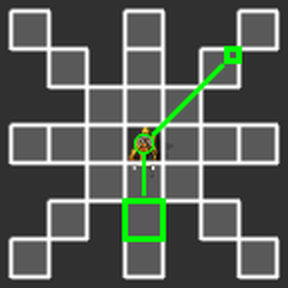
Quickly adjust inserter pickup and drop positions in world using a single key bind, SHIFT + F.
- Hover an inserter,
SHIFT + F - Hover the desired pickup position,
SHIFT + F - Or hover the inserter and
SHIFT + Fto keep the current position - Hover the desired drop position,
SHIFT + F
Stop adjusting an inserter by pressing SHIFT + F anywhere else, or instantly switch to adjusting a different inserter.
(If you are using SHIFT + F for another mod already, the community suggested ALT + SPACE or middle mouse button - maybe with a modifier - if you have it free.)
No Belt Stacking Support
Due to my lack of time to properly understand and implement belt stacking support (because my house/home got flooded), this library cannot estimate throughput when belt stacking is involved in any way.
(This sentence is copy pasted from Inserter Throughput Library, since it is maintained by me and QAI uses it.)
Place and Adjust
While having an inserter in hand/cursor, place it and instantly adjust it by pressing SHIFT + F instead of the usual left click.
Known Issue: Sometimes the inserter will be placed facing the wrong way. The mod tries its best to get it right, but there are cases that simply cannot be handled. Pipette an existing inserter (or entity with direction) and it will face the right way the next time you place an inserter again.
Mirrored Inserters only
There is a map setting (off by default) to restrict how inserters can be adjusted. WHen enabled the pickup and drop positions (tiles) must be exactly mirrored/opposite of each other in relation to the center of the inserter. Basically if you like a bit of adjustment, but being able to make inserters pickup and drop on 2 adjacent tiles is too over powered, this setting might just be for you.
Pipette copies Vectors
This is an opt in feature (a mod settings) to make smart pipette (Q) remember the pickup and drop vectors of the inserter that got picked, and applies these vectors to newly placed inserters. This stays in effect so long as the inserter is in hand/cursor.
Inserter Direction
While adjusting an inserter there are 4 big selection boxes on the outside of the adjustment grid. Hovering them and pressing SHIFT + F changes the base direction of the inserter while keeping the pickup and drop positions the same. This is useful to have consistent inserter directions for predictable copy paste and placement behavior.
Disabled by Script
Inserters are disabled by script while being adjusted, which works nicely with place and adjust. They won't start moving until adjustment is complete.
Inserter Throughput Estimation
This mod shows estimated inserter speed. By default only while choosing a drop position, but this can be changed in the mod settings.
It is using the Inserter Throughput Library, see there for technical details. If you are a mod creator yourself and one of your mods would benefit from inserter speed calculations and estimations, I'd recommend to take a look. The library also helps with ghost support.
Ghosts Support
This mod supports ghosts. Quite a bit went into it, but for you it's just that simple. It supports adjusting ghost inserters and throughput estimation works with ghosts as well.
Balancing
As a modded player there's some degree of balancing that you put upon yourself, to make the game and features fit for you. Many people consider adjusting inserters to be very over powered or they simplify the challenge of arranging setups properly too much. These are very valid concerns.
But what if you just wanted to be able to do some of the following?
- only change the drop position ever so slightly within a tile (aka changing the drop offset, aka near/far inserters)
- only change the range of inserters between 1 and 2, or maybe 3, keeping the drop offset unchanged and having inserters always swing 180 degrees
- change inserters between cardinal directions and diagonal
Well with the settings this mod provides all of those restrictions are possible to be enforced. Simply by disabling some of the technologies through startup settings, as well as through the map setting to only allow mirrored inserters (180 degree swings).
The default settings are the least restrictive and therefore most powerful.
Compatibility
This mod handles all kinds of weird inserters. Not to say all of them, but a lot. Like diagonal inserters, off center, off grid or non square inserters. It can also co-exist with other inserter adjustment mods.
The technologies this mod uses are the same as Bob's Adjustable Inserters, but if it isn't present this mod provides its own technologies with the same names. This is not a dependency.
Smart Inserters
Ratings & reviews
Sign in to leave a rating or comment.