







About Quick Item Search (1.1 ONLY)
From Factorio Mod PortalQuickly and easily search for items in your inventory or connected logistic network. Set temporary requests and quickly trash any items above your minimum requests. This mod will not be updated to Factorio 2.0.

NOTICE: This mod will not be updated to 2.0. Its primary features (temporary requests and trash unrequested) are now built into the game.
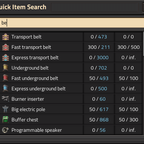
Quick Item Search is the quick and easy way to retrieve items buried deep in your inventory or connected logistic network. Simply hit Shift + F to bring up the GUI and type the name of the item you are looking for.
Click on an item to set it into your cursor, or set the ghost cursor if you don't have it on hand. Shift + click on an item to modify its logistic request. Set a temporary request that will be cleared once satisfied.
Use the _quick-trash all_ hotkey (default Control + Shift + T) to instantly create temporary requests for all items in your inventory, set to the minimum amount of their existing request. This allows you to quickly and easily clean your inventory of excess items.
When in cheat mode or the map editor, items that you don't have will be spawned into your cursor. Additionally, in the map editor, you can modify your infinity inventory filters in the same way as logistic requests, and quick-trash excess in the same manner.
Along with using the mouse to navigate, all GUIs can be navigated using the keyboard. After searching, hit Enter to begin result selection, and use the arrow keys (or Shift + J and Shift + K) to navigate to the result you want. Press E to set the item in your cursor, or Shift + E to edit its logistic request / infinity filter. Use enter or tab to cycle between the textfields, then E to set the request, Shift + E to set a temporary request, or Control + E to clear the request. When editing infinity filters, press Space to cycle between filter modes.
Highlights
From source dataGame versions
Built for Factorio 1.1.
Footprint
Rated a light load on a server.
License
Published under MIT.
Quick Item Search (1.1 ONLY) on Nxeon
From our catalogue- One-click install
- Supported on Nxeon Factorio servers. We download it from Factorio Mod Portal, place it, and restart the server.
- Server side
- Required on the server
- Server load
- light
- Smallest plan we suggest
- Factorio — 2 GB (2 GB RAM). This follows our own load rating above, not a benchmark.
- Latest build
- 2.1.10, released 2024-05-08
Run Quick Item Search (1.1 ONLY) on a Factorio server
Pick a server or deploy a new one above; it is installed in one click.
What kind of mod it is
From the catalogWeapons, items & crafting
New weapons, gear, items and the recipes to make them.
Runs on your server
From source side supportFactorio Mod Portal lists Quick Item Search (1.1 ONLY) as required on the server. Check its Factorio Mod Portal page to see whether players need it too.
Compatibility
- Game
- Factorio
- Runs on
- Serverrequired on the server
- Game versions
- 1.1
Verified at the source
- ✓Factorio Mod PortalOfficial listing, checked 2026-10-08Open ↗
- ✓Authorraiguard, as published on Factorio Mod Portal
- ✓LicenseMITFree












