






About Quicksearch
From Factorio Mod PortalQuickly search for items by name from your inventory/chests/craftables/logistic supply.
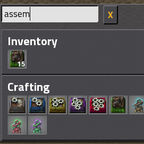
Quicksearch adds a search box for finding items in your inventory, crafting recipes, logistics networks, and any open chests. It's useful for keyboard junkies - for me, it's a lot easier to type "Fas6F" (F is the key to trigger the search to open/close) to find "assembly machine 6" than to hunt through a big list of items.
Key bindings
The keybindings are configurable, but the default settings are:
- F to open the window and begin a search. The search box starts in focus so you don't have to click the window before typing.
- F while typing to pick up the first result. e.g. if the search is "chemical" and the results are "chemical plant 1" and "chemical plant 2", hitting F will pick up the stack of "chemical plant 1".
- Q to close the search box without selecting anything.
Match types
Quicksearch looks for results from your inventory, crafting recipes, logistics networks, and open chests. Clicking on a result does something slightly different, depending on where the item was found.
- Inventory / chest. Click on these to pick up a stack. Common Factorio modifiers apply for transferring items (e.g. ctrl+click to transfer all items of that type between chest and inventory).
- Crafting. Click on these to create a ghost blueprint of the item. Alternatively, hold ctrl or shift to craft a different amount of the item.
- Logistics Networks. Click on these to create a ghost blueprint of the item. Alternatively, hold ctrl or shift to request a certain amount from the logistics network. The request will be cleared once bots fulfill it.
Search string
Your search will match any item that contains any of the letters you typed, in that order, regardless of letters in between. This allows you to search for a substring of a term, like "yser" for "electrolyser". Other examples:
- "stta4" - "STorage-TAnk-4"
- "xtb" - "eXpress-Transport-Belt"
- "dee" - "meDium-ElEctric-Pole"
Also, for technical reasons, Quicksearch searches on the item's in-game type name, not the translated name.
Highlights
From source dataGame versions
Built for Factorio 2.0.
Footprint
Rated a light load on a server.
License
Published under MIT.
Quicksearch on Nxeon
From our catalogue- One-click install
- Supported on Nxeon Factorio servers. We download it from Factorio Mod Portal, place it, and restart the server.
- Server side
- Required on the server
- Server load
- light
- Smallest plan we suggest
- Factorio — 2 GB (2 GB RAM). This follows our own load rating above, not a benchmark.
- Latest build
- 1.1.7, released 2026-07-16
Run Quicksearch on a Factorio server
Pick a server or deploy a new one above; it is installed in one click.
What kind of mod it is
From the catalogWeapons, items & crafting
New weapons, gear, items and the recipes to make them.
Runs on your server
From source side supportFactorio Mod Portal lists Quicksearch as required on the server. Check its Factorio Mod Portal page to see whether players need it too.
Compatibility
- Game
- Factorio
- Runs on
- Serverrequired on the server
- Game versions
- 2.0
Verified at the source
- ✓Factorio Mod PortalOfficial listing, checked 2026-10-08Open ↗
- ✓Authorzysnarch, as published on Factorio Mod Portal
- ✓LicenseMITFree












