







About Rate Calculator
From Factorio Mod PortalCalculate maximum production and consumption rates for the selected machines.


Rate Calculator
Calculate maximum production and consumption rates for the selected machines.
Installation
Usage
Select some machines with the selection tool (found on the shortcut bar, or use the hotkey Alt + X) to calculate the maximum production and consumption rates for those machines. The rates will be displayed in the GUI:
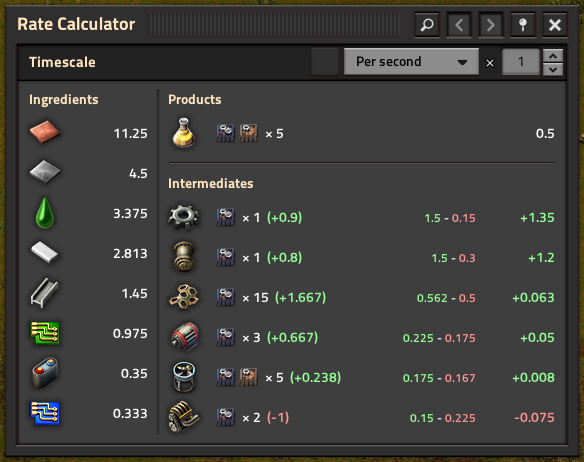
The GUI shows rates in several categories:
- Ingredients: Materials that the machines import.
- Products: Materials that the machines export.
- Intermediates: Materials that some machines produce and others consume.
The displayed rate is the "net rate" of that intermediate material.
With a given set, your goal is to make all of the intermediate net rates positive (green) or neutral (white). The numbers in parenthesis next to the machine counts denote "net producers" i.e. how many fewer or more similarly-configured machines you need to build to produce the material at the required rate.
The above screenshot shows that this yellow science set needs at least 1.07 more assemblers producing engine units to achieve the required input rates. It also shows that there is an extra assembler making low density structures that can safely be removed from the set.
Use the dropdown to change the timescale for the measurements. Select a container or cargo wagon with the entity selector to scale the measurements to that container or wagon's capacity (accounting for stack sizes). Select a transport belt or inserter to measure against that belt or inserter's maximum item transfer rate.
Use the manual multiplier input and/or buttons to scale the entire subfactory's rates and machine counts by that multiplier.
You can access the previous ten sets by using the navigation buttons in the titlebar.
Tips and tricks
- Selecting normally will produce a new selection. Alternatively, you can also hold shift to append the existing selection, or use shift + right click
to remove machines from the selection.
- Press the shortcut / use the hotkey again when already holding the tool to show the GUI.
- Power input rates are not shown by default, but can be enabled in the mod settings.
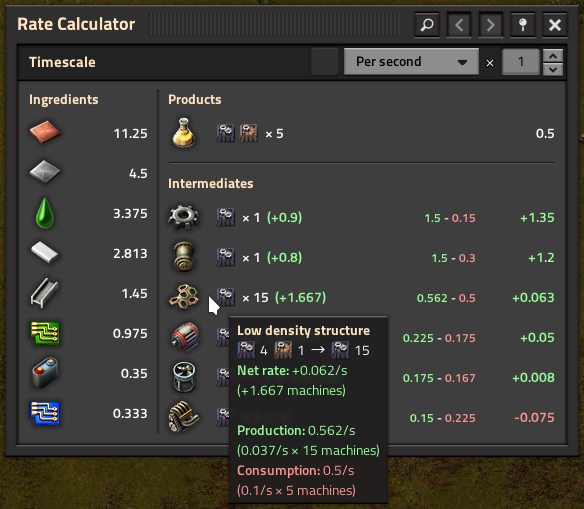
- Hovering over an entry will give more detailed information about that rate:
Highlights
From source dataGame versions
Built for Factorio 2.1.
Footprint
Rated a light load on a server.
License
Published under MIT.
Rate Calculator on Nxeon
From our catalogue- One-click install
- Supported on Nxeon Factorio servers. We download it from Factorio Mod Portal, place it, and restart the server.
- Server side
- Required on the server
- Server load
- light
- Smallest plan we suggest
- Factorio — 2 GB (2 GB RAM). This follows our own load rating above, not a benchmark.
- Latest build
- 3.4.2, released 2026-10-15
Recent builds
| Build | Released | Game versions | Loaders |
|---|---|---|---|
| 3.4.2 | 2026-10-15 | 2.1 | n/a |
| 3.4.1 | 2026-07-14 | 2.1 | n/a |
| 3.4.0 | 2026-06-23 | 2.1 | n/a |
| 3.3.8 | 2026-01-18 | 2.0 | n/a |
| 3.3.7 | 2025-03-26 | 2.0 | n/a |
| 3.3.6 | 2025-01-25 | 2.0 | n/a |
Dependencies
- Required: Factorio Library
Declared by the newest build that lists any. Required ones are installed with it on one-click installs.
Run Rate Calculator on a Factorio server
Pick a server or deploy a new one above; it is installed in one click.
What kind of mod it is
From the catalogTechnology & automation
Machines, power, logistics and automation.
Runs on your server
From source side supportFactorio Mod Portal lists Rate Calculator as required on the server. Check its Factorio Mod Portal page to see whether players need it too.
Compatibility
- Game
- Factorio
- Runs on
- Serverrequired on the server
- Game versions
- 2.1
Verified at the source
- ✓Factorio Mod PortalOfficial listing, checked 2026-10-18Open ↗
- ✓Authorraiguard, as published on Factorio Mod Portal
- ✓LicenseMITFree












