







About Remote Configuration
From Factorio Mod PortalAllows the player to configure any machine from the map, without allowing item transfer so it maintains the vanilla feel. Allows wire placement and entity settings copy/paste at any distance. Press R to issue a rotation request, right-click to mark for deconstruction. Less cheaty alternative to Far Reach. Similar to Space Exploration's Navigation Satellite, but works entirely within map view.
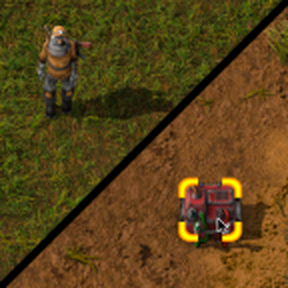
Remote Configuration allows you to click on any machine in map view and open its GUI. While the GUI is open, you can change configurations (e.g. combinator signals, chest limits, spidertron logistic requests) but you can't transfer any items. Since you need to be able to select the machines, radar coverage is required.
Also allows red/green wire and copper cable placement and entity settings copy/paste in map view.
Press _R_ over a machine to create a rotation request for it (or _Shift + R_ for reverse rotation). Assembling machines are rotated instantly because that's what vanilla does when you paste a blueprint with a rotated machine on top of an existing one. For other entity types, a construction bot must come and rotate them.
_Right-click_ on a machine to mark it for deconstruction. _Shift + Right-click_ to cancel deconstruction.
Attempting to build in map view replaces the item in cursor with a ghost so that you don't have to hold _Shift_. When building after exiting map view, the ghost cursor is replaced with a real item again. This can be disabled in mod settings. (This feature doesn't work if "Automatic ghost cursor" from Cursor Enhancements is enabled).
All interactions can be disabled by removing their keybind in Settings > Controls. There is a setting in mod settings to additionally enable these interactions when not in map mode, but when trying to do something out of range.
Compatibility
- Compatible with any mod, including Far Reach
- Works with Space Exploration, although functionality is mostly superseded by SE's Navigation Satellite, which also works cross-surface
- Recommended with Wire Shortcuts X or Wire Shortcuts for long distance wire connections
- Utilises vanilla's permissions system, so may break if you aren't using the Default permissions group. Let me know if you'd like me to improve the interactions in this area
Highlights
From source dataGame versions
Built for Factorio 1.1.
Footprint
Rated a light load on a server.
License
Published under MIT.
Remote Configuration on Nxeon
From our catalogue- One-click install
- Supported on Nxeon Factorio servers. We download it from Factorio Mod Portal, place it, and restart the server.
- Server side
- Required on the server
- Server load
- light
- Smallest plan we suggest
- Factorio — 2 GB (2 GB RAM). This follows our own load rating above, not a benchmark.
- Latest build
- 1.2.6, released 2024-04-07
Run Remote Configuration on a Factorio server
Pick a server or deploy a new one above; it is installed in one click.
What kind of mod it is
From the catalogMaps & scenarios
Custom maps, arenas and scenarios to play on.
Runs on your server
From source side supportFactorio Mod Portal lists Remote Configuration as required on the server. Check its Factorio Mod Portal page to see whether players need it too.
Compatibility
- Game
- Factorio
- Runs on
- Serverrequired on the server
- Game versions
- 1.1
Verified at the source
- ✓Factorio Mod PortalOfficial listing, checked 2026-10-08Open ↗
- ✓AuthorXorimuth, as published on Factorio Mod Portal
- ✓LicenseMITFree












