Space Elevator (BETA)
Adds space elevators to planets for fast, efficient item transfer to space platforms. A late-game alternative to rocket launches. (BETA)
Description
Space Elevator
A late-game alternative to rockets for transferring items, fluids, and players between planets and space platforms.
What is this mod?
Space Elevator adds a new mega-structure to Factorio 2.0 / Space Age: a planetary space elevator that connects your surface base directly to orbiting space platforms. Once constructed, it provides fast, energy-efficient transfers without the constant rocket part consumption of traditional silos.
Key Features:
- Bidirectional item transfer - Upload and download items between surface and platform
- Fluid transfer - Move fluids without barreling (direct pipe-to-pipe)
- Player transport - Fast travel between surface and orbit (3 seconds)
- Configurable transfer rates - Choose your throughput (10 to 250 items per cycle)
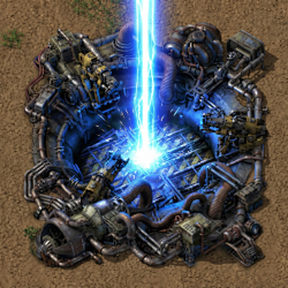
- Visual feedback - Colored beams indicate active transfers
- Channel-based auto-reconnect - Assign channel names to elevators and docks for automatic reconnection when platforms return to orbit
How It Works
1. Research & Build
Research Space Elevator technology (requires Cryogenic Science Pack - you'll need to have visited all 4 planets).
Place the Space Elevator Construction Kit on any planet surface to begin construction.
2. Multi-Stage Construction
The elevator requires 5 construction stages, each needing materials from across the galaxy:
| Stage | Name | Key Materials | |-------|------|---------------| | 1 | Site Preparation | Stone, Concrete, Steel | | 2 | Foundation | Refined Concrete, Gears, Pipes | | 3 | Tower Assembly | Processing Units, LDS, Tungsten, Superconductors, Bioflux | | 4 | Tether Deployment | LDS, Accumulators, Rocket Fuel | | 5 | Activation | Processing Units, Superconductors, Rocket Fuel |
Insert materials into the elevator's inventory and click Begin Construction for each stage.
3. Platform Docking
Build a Space Elevator Dock on your space platform while it orbits the planet. Open the elevator GUI on the surface and connect via the Docking tab.
- Single platform? Auto-connects!
- Multiple platforms? Choose from a dropdown.
Channel-Based Auto-Reconnect (v0.4.0):
Assign matching channel names to an elevator and dock (like train station names) and they will automatically reconnect whenever the platform returns to orbit. This enables fully automated supply routes - no manual reconnection needed!
- Open the elevator's Docking tab and type a channel name (e.g., "Vulcanus Atmosphere")
- Open the dock on the platform and set the same channel name
- When the platform arrives in orbit, the elevator auto-connects within 5 seconds
Leave the channel empty for manual-only connection (default behavior).
4. Transfer Items & Fluids
Use the Transfer tab to move cargo:
- Select your transfer rate (10, 25, 50, 100, or 250 items per cycle)
- Click Upload/Download for manual transfers
- Enable Auto-Upload/Download for continuous operation
- Higher rates = wider beams = more energy consumption
Fluid Transfer:
- Surface: Connect pipes to the fluid tank (6 tiles north of elevator)
- Platform: Place a Dock Fluid Tank within 5 tiles of the dock
5. Player Travel
Use the Travel tab to teleport between surface and platform. 3-second travel time, no special equipment needed! (but hold your breath). If you want to get back down to the planet, just hit "enter" on or around the hub on the platform, then drop to the planet like normal.
Balance
| Aspect | Value | |--------|-------| | Base Power Draw | 10 MW constant | | Transfer Energy | 10 kJ per item | | Rocket Parts | 1 per launch (vs 100 for standard silo) | | Tech Requirement | Cryogenic Science Pack | | Construction | Materials from all 4 planets |
Transfer Rate Energy Costs
| Rate | Energy/Cycle | Throughput | |------|-------------|------------| | 10 items | 100 kJ | 20 items/sec | | 25 items | 250 kJ | 50 items/sec | | 50 items | 500 kJ | 100 items/sec | | 100 items | 1 MJ | 200 items/sec | | 250 items | 2.5 MJ | 500 items/sec |
Customisation Options
The mod includes several settings to tailor the experience to your playstyle. Access these via Settings > Mod Settings.
Startup Settings (require restart)
| Setting | Default | Range | Description | |---------|---------|-------|-------------| | Power Consumption | 10 MW | 1-100 | Base power draw when operational | | Rocket Parts Required | 1 | 1-100 | Parts needed per launch (vanilla silo uses 100) (may not be fully implemented, we skipped rockets and just use lasers to beam items and fluids up and down | | Fluid Tank Capacity | 25,000 | 1k-100k | Capacity of elevator and dock fluid tanks | | Construction Time Multiplier | 1.0x | 0.1-10x | Speed up (0.5) or slow down (2.0) construction | | Material Cost Multiplier | 1.0x | 0.1-10x | Reduce (0.5) or increase (2.0) material requirements |
Runtime Settings (change anytime)
| Setting | Default | Range | Description | |---------|---------|-------|-------------| | Manual Item Transfer | 10 | 1-1000 | Items per manual upload/download click | | Auto Transfer Rate | 10 | 1-1000 | Default rate for new auto-transfers | | Manual Fluid Transfer | 1,000 | 100-10k | Fluid per manual transfer click | | Travel Time | 3 sec | 1-30 | Player transport duration |
Debug Mode: Skip Construction
Want to test the mod's features without waiting through construction? Or just want to have some fun?
- Go to Settings > Mod Settings > Map
- Enable "Show Debug Button"
- Open any space elevator's GUI
- Click the red [DEBUG] Complete Construction button in the Construction tab
This instantly completes all 5 construction stages, making the elevator fully operational. Great for testing, exploring features, or if you just want to skip straight to the space logistics!
#
Ratings & reviews
Sign in to leave a rating or comment.