




About Space Platform Organizer - Enhanced
From Factorio Mod PortalSort your space platforms into named, color-coded folders in the remote view (M). Subfolders, favorites, search, status filters, auto-grouping, build progress with time estimate, markers for the platform you look at and where your character stands. Create several platforms at once with a ship blueprint book and a live material check. Backup export/import, recycle bin. English, German, French, Spanish, Chinese, Russian. Based on AkitaAttribute/SpacePlatformOrgUI (MIT).
Space Platform Organizer - Enhanced
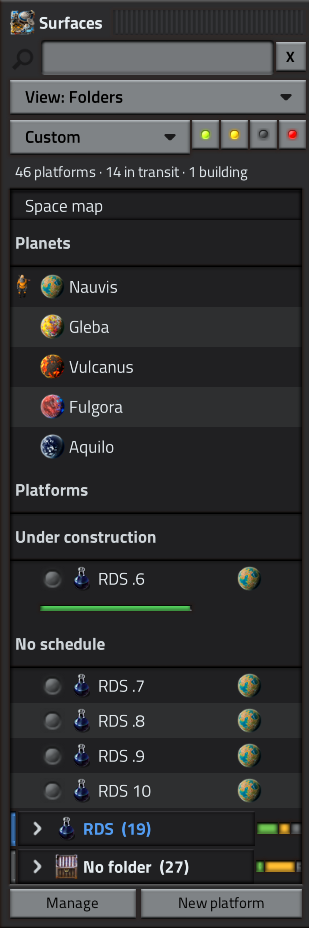
Keep your space platforms tidy. Instead of one endless list in the remote view (M), you get a panel with named, color-coded folders.
Features
- Folder panel in the remote view, draggable, can be hidden or switched back to the original list; an option keeps the panel from opening by itself when you open the map (original list with a "To folders" button instead)
- Folders and one level of subfolders, custom colors, icons and notes, with a colored stripe, drawn folder symbols and a status bar per folder (in transit / in orbit / paused / no schedule)
- Favorites, "Recently visited", search, view by folder or by location
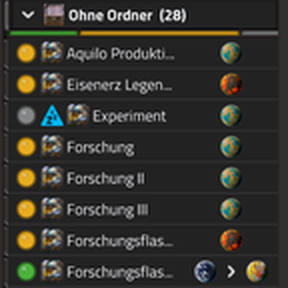
- Status filter buttons next to the search field (in transit / in orbit / paused / no schedule), combinable, with a colored status dot in front of every platform
- Markers that show where you are: a marker for the platform you are looking at and a player figure for the planet or platform your character stands on. Both have their own icon and a checkbox in the settings; the current row is also highlighted in orange (checkbox to switch it off)
- Sorting A-Z / Z-A with natural numbers and Roman numerals, by build progress, or your own custom order
- Build progress bar with time estimate for platforms under construction, updated in place so clicks are never lost
- Finished platforms without a schedule get their own group (like "Under construction"), so you notice them at a glance
- Auto-grouping by keywords with an editable rules window; new platforms are sorted automatically or offered an assign dialog
- Create and rename platforms from the panel
- Calm, flat rows with thin separator lines for planets and platforms, an orange highlight over the whole row, and sharp 64x64 symbols for 4K screens
- Preview when you hover a platform: live view with route, progress, speed, weight, arrival time and main cargo (can be switched off)
- Warning icons for paused platforms and platforms without a schedule (optional)
- Gear button next to the search field for the settings; the default platform and folder symbols can be hidden (your own symbols stay)
- Open with the shortcut bar button, Ctrl+Shift+P, or /spo
- Adjustable panel size: sliders in the settings window for the height and the width (both in percent of the screen), or type a value
- Backup tab: export folders, rules, assignments, favorites, icons, notes and panel settings as a text; import it again with a preview and a choice per section (skip / add / replace)
- Recycle bin for deleted folders (restore with rules and assignments) and an automatic backup file (every 30 minutes, can be turned off)
- Assign tip: when a new platform is assigned to a folder, a small tip reminds you to turn on “Auto request missing construction materials” at the hub (a mod cannot switch it on); it can be hidden in the settings tab “Notices”
- Organize planets (optional, off by default): folders with your own symbol and color, favorites and a custom order for the planet list, managed in the Manage window; the search also finds planets
- Delete platforms: tick platforms in the Manage window and delete them with the trash button, after a confirmation that lists their names (can be hidden in the settings)
- Short introduction with a symbol legend on first start, reachable again via the Help button
- Mod settings for history length and notices
- English, German, French, Spanish, Simplified Chinese and Russian
New in 2.1
- Extended "New platform" dialog: create up to 10 platforms at once, consecutive numbering, target folder, ship icon and start planet
- Ship book: collect up to 20 ship blueprints per savegame (from your hand, a blueprint book, your personal storage or pasted text), reorder, rename, preview the parts per quality level, hand the book out as a real blueprint book and read it in again in other savegames
- Automatic ship blueprint on new platforms as soon as their hub exists
- Space map row at the top of the list, like in the original list, and a "To folders" button on the original list to get back
- Live material check: the dialog shows whether the logistic network of the chosen planet holds enough material for the selected ship (per quality level) and lists what is missing
Notes
- Requires Space Age.
- Works with Factorio 2.0 and Factorio 2.1 (experimental): the mod page offers a file for each game version, both with the same features.
- The French, Spanish and Simplified Chinese translations were made with the help of AI and have not been checked by native speakers yet. Corrections are very welcome.
- The Russian translation was contributed by weydarkend; the newer texts (planets, deleting platforms, symbol legend, map option, preview, warning icons) were added with the help of AI and have not been checked by a native speaker yet.
- Build progress and time estimate are approximations (ghosts vs. built parts).
- The material check only compares with the current stock of the planet's logistic network (the one of the cargo landing pad); items already on their way are not counted.
/spo_checkprints a self-test to the chat - handy for bug reports.
Credits
Based on SpacePlatformOrgUI by AkitaAttribute (MIT license).
Thanks to Ingo_Igel for the detailed feedback on the layout, the markers and the icons, and to weydarkend for the Russian translation.
Highlights
From source dataFootprint
Rated a light load on a server.
License
Published under MIT.
Last update
Its author last shipped an update 29d ago.
Space Platform Organizer - Enhanced on Nxeon
From our catalogue- One-click install
- Supported on Nxeon Factorio servers. We download it from Factorio Mod Portal, place it, and restart the server.
- Server side
- Required on the server
- Server load
- light
- Smallest plan we suggest
- Factorio — 2 GB (2 GB RAM). This follows our own load rating above, not a benchmark.
- Latest build
- 2.1.19, released 2026-10-25
Recent builds
| Build | Released | Game versions | Loaders |
|---|---|---|---|
| 2.1.19 | 2026-10-25 | 2.1 | n/a |
| 2.1.18 | 2026-10-25 | 2.0 | n/a |
| 2.1.17 | 2026-10-22 | 2.1 | n/a |
| 2.1.16 | 2026-10-22 | 2.0 | n/a |
| 2.1.15 | 2026-10-21 | 2.1 | n/a |
| 2.1.14 | 2026-10-21 | 2.0 | n/a |
Dependencies
- Required: [reserved]
Declared by the newest build that lists any. Required ones are installed with it on one-click installs.
Run Space Platform Organizer - Enhanced on a Factorio server
Pick a server or deploy a new one above; it is installed in one click.
What kind of mod it is
From the catalogVehicles & ships
Cars, boats, aircraft, ships and other things to drive or fly.
Runs on your server
From source side supportFactorio Mod Portal lists Space Platform Organizer - Enhanced as required on the server. Check its Factorio Mod Portal page to see whether players need it too.
Compatibility
- Game
- Factorio
- Runs on
- Serverrequired on the server
Verified at the source
- ✓Factorio Mod PortalOfficial listing, checked 2026-10-26Open ↗
- ✓AuthorAmageddon86, as published on Factorio Mod Portal
- ✓LicenseMITFree