






About Time Control
From Factorio Mod PortalControl the day/night cycle per planet. Set each surface to always day, always night, or normal cycle via a GUI shortcut.
Time Control
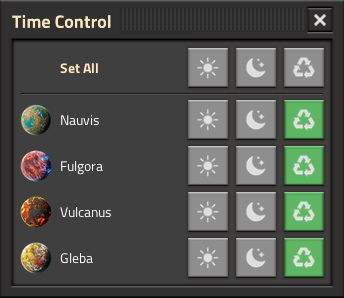
Control the day/night cycle on each planet individually. Set any surface to always day, always night, or normal cycle with a simple click.
Features
- Per-planet control — Each planet gets its own day/night setting
- Three modes — Day (frozen at noon), Night (frozen at midnight), Normal (natural cycle)
- "Set All" button — Apply the same mode to every planet at once
- Planet icons — Visual identification with each planet's icon
- Space platform aware — Platforms are automatically excluded (always_day has no effect on them)
- New surfaces — Automatically default to day mode when discovered
- Space Age optional — Works with or without the Space Age DLC
How to Use
- Click the Time Control shortcut button (Nauvis icon) in your shortcut bar
- A panel shows all your planets with three buttons each: Day, Night, Normal
- Click a mode to apply it to that planet
- Use Set All to change every planet at once
- Press Escape or the X button to close
FAQ
Does this work without Space Age?
Yes! Without Space Age you'll just see Nauvis in the list. The mod works with base Factorio 2.0.
Why are space platforms not shown?
The always_day / freeze_daytime properties have no visual effect on space platforms, so they are excluded from the list to avoid confusion.
What does each mode do?
- Day — Freezes time at noon (maximum brightness)
- Night — Freezes time at midnight (maximum darkness)
- Normal — Restores the natural day/night cycle
Does this affect UPS or performance?
No. The mod only changes surface properties when you click a button. There are no per-tick handlers.
New planets don't appear in the list?
Close and reopen the Time Control panel — it rebuilds the list each time. New surfaces automatically default to day mode.
Highlights
From source dataFootprint
Rated a light load on a server.
License
Published under MIT.
Last update
Its author last shipped an update 4 mo ago.
Time Control on Nxeon
From our catalogue- One-click install
- Supported on Nxeon Factorio servers. We download it from Factorio Mod Portal, place it, and restart the server.
- Server side
- Required on the server
- Server load
- light
- Smallest plan we suggest
- Factorio — 2 GB (2 GB RAM). This follows our own load rating above, not a benchmark.
- Latest build
- 1.1.0, released 2026-07-11
Recent builds
| Build | Released | Game versions | Loaders |
|---|---|---|---|
| 1.1.0 | 2026-07-11 | 2.1 | n/a |
| 1.0.0 | 2026-04-15 | 2.0 | n/a |
Dependencies
- Optional: [reserved]
Declared by the newest build that lists any. Required ones are installed with it on one-click installs.
Run Time Control on a Factorio server
Pick a server or deploy a new one above; it is installed in one click.
What kind of mod it is
From the catalogWorld generation
Changes or adds to how new terrain, biomes and structures are created.
Runs on your server
From source side supportFactorio Mod Portal lists Time Control as required on the server. Check its Factorio Mod Portal page to see whether players need it too.
Compatibility
- Game
- Factorio
- Runs on
- Serverrequired on the server
Verified at the source
- ✓Factorio Mod PortalOfficial listing, checked 2026-10-16Open ↗
- ✓AuthorNerfTwitch, as published on Factorio Mod Portal
- ✓LicenseMITFree












