






About Train Network for Players
From Factorio Mod PortalQoL and advanced functionality for players using trains for transport, including improved destination selection dialog and automated train calling.
Train Network for Players (Factorio Mod)
About
QoL and advanced functionality for players using trains for transport, including improved destination selection dialog and automated train calling.
There are two core concepts for this mod:
- When onboard a train, provide the ability to go to any train stop (or even just a rail segment) easily and without manually modifying schedules.
- Allow one (or more) trains to be designated for player use, which can then be automatically dispatched to wherever the player is. In effect, player trains become more like taxis.
Station Select Dialog
The station select dialog provides a quick way of moving between stations and can be opened when onboard any train via either the input hotkey (ALT-P default) or toolbar shortcut:
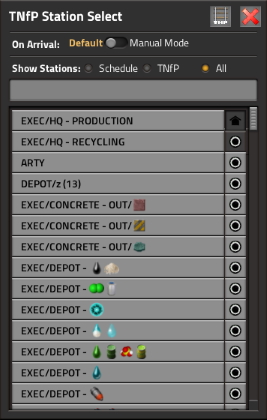
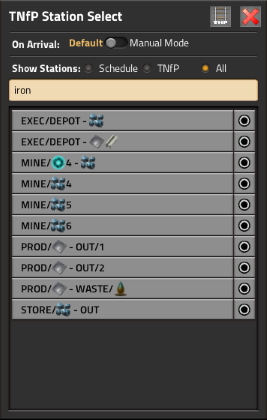
- Selecting a station will temporarily add it to the trains schedule and dispatch the train there, where it will wait for the player to exit before resuming its previous schedule.
- Quickly filter between stations in the trains schedules, TNfP designated stations or all stations. Mod setting controls the default.
- Filter the list of stations further via the search bar.
- Submit the search bar with enter, and the first station in the list will be selected.
- Home stations can be pinned to the very top of the 'all stations' and 'tnfp stations' lists via a circuit signal.
- Any station can be pinned to the top of the 'all stations' list via the GUI.
- The railtool button will provide a railtool and open the map, allowing the train to be dispatched to any valid rail segment.
TNfP Network
If one or more trains are assigned into a TNfP network they can be automatically dispatched to the players location using the two shortcuts:
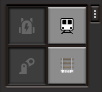
- Request TNfP Train (default ALT-P) will dispatch a train to the nearest valid train stop. If a request is active, selecting it again will cancel the request.
- Provide TNfP Rail Tool (default SHIFT-ALT-P) will provide a railtool under the cursor, which can be used to select a rail segment to create a temporary stop.
- Provide TNfP Rail Tool and Open Map (no default) will provide a railtool under the cursor and open the map.
Misc
Miscellaneous features:
- Adds a custom input control for switching the current train to manual mode. This also works for a train which has just arrived after dispatch.
TNfP Network Creation
Trains are available for players if they have a train stop marked for TNfP use anywhere in their schedule, which is done via a single combinator signal.
To assign trains into a TNfP network:
- Research trains, train stops and the circuit network.
- Have a train stop thats only intended for player use.
- Have a train thats only intended for player use, with the player train stop anywhere in its schedule.
- Place a Constant Combinator near your personal train stop.
- Set the combinator to output the new 'TNfP Station' virtual signal (with any value) -- found under 'Signals'.
- Connect the combinator to the train stop, with either red or green wire.
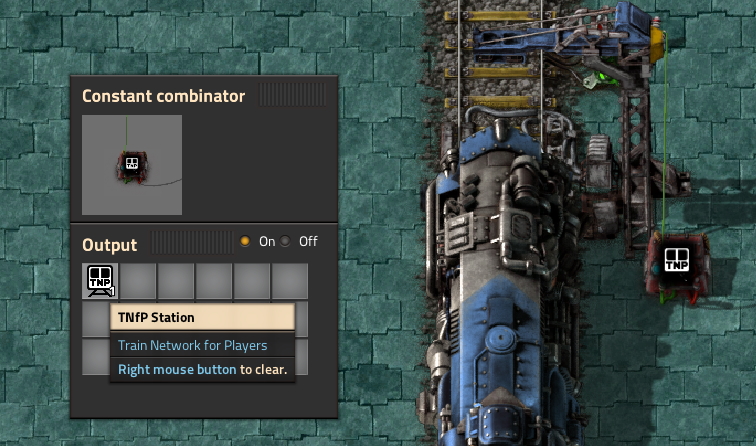
When dispatching trains TNfP will find the nearest train which has anywhere in its schedule a train stop receiving the 'TNfP Station' signal.
TNfP Rail Tool
The railtool provides a way of creating temporary train stops and is used by selecting/dragging over an area containing rail segments, from either the standard player view or map view:
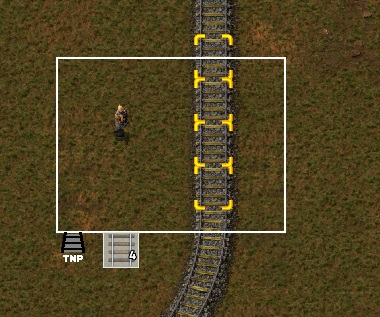
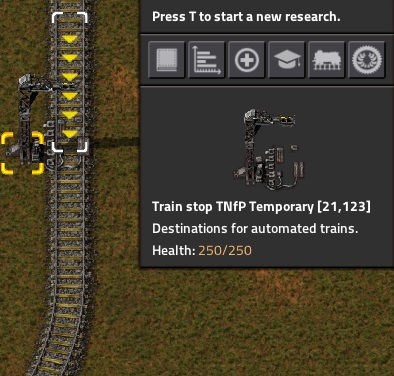
- If a valid train stop is found, that is used for dispatch. If a valid train stop is found, a new temporary stop will be created at that location.
- When onboard a train the destination is temporarily added to the trains schedule and dispatched there.
- When not onboard a train a player train will be dispatched there from the TNfP network.
- When used in alternate mode (by holding shift), the trains arrival behaviour will change so that it instead switches to manual mode instead of resuming its schedule.
- To remove a rail tool from your inventory, drop it on the ground near the player (default 'z') and it will be automatically destroyed.
TNfP Home Station
The 'TNfP Home Station' is an additional circuit signal found under 'Signals'. When this signal is provided to a train stop, that train stop becomes marked as a home station.
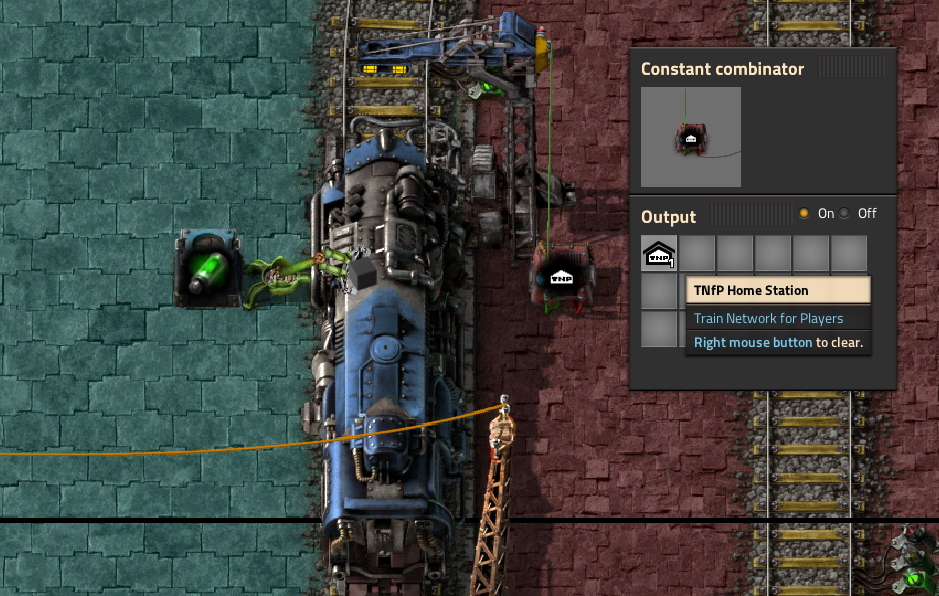
Home stations appear at the very top of the 'all stations' and 'tnfp stations' lists in the Station Select Dialog above pinned stations, allowing them to be quickly selected for dispatch.
Important Notes
This mod should be mostly stable for both single player and multiplayer. Bug reports, feature requests or any comments are preferred via github.com or via the forum. Please include the crash log and version information about both factorio and the mod in bug reports.
TNfP should be compatible with all mods relating to trains, providing they don't change train schedules or add custom types of train stops. When used with mods which add custom types of train stops, TNfP will work as follows:
Highlights
From source dataGame versions
Built for Factorio 1.1.
Footprint
Rated a light load on a server.
License
Published under MIT.
Train Network for Players on Nxeon
From our catalogue- One-click install
- Supported on Nxeon Factorio servers. We download it from Factorio Mod Portal, place it, and restart the server.
- Server side
- Required on the server
- Server load
- light
- Smallest plan we suggest
- Factorio — 2 GB (2 GB RAM). This follows our own load rating above, not a benchmark.
- Latest build
- 0.12.6, released 2022-09-12
Run Train Network for Players on a Factorio server
Pick a server or deploy a new one above; it is installed in one click.
What kind of mod it is
From the catalogVehicles & ships
Cars, boats, aircraft, ships and other things to drive or fly.
Runs on your server
From source side supportFactorio Mod Portal lists Train Network for Players as required on the server. Check its Factorio Mod Portal page to see whether players need it too.
Compatibility
- Game
- Factorio
- Runs on
- Serverrequired on the server
- Game versions
- 1.1
Verified at the source
- ✓Factorio Mod PortalOfficial listing, checked 2026-10-08Open ↗
- ✓Authorleeh, as published on Factorio Mod Portal
- ✓LicenseMITFree