
Upcycler Planner
Choose an item and a target quality, the mod designs and gives you an entirely configurable upcycling loop blueprint.
Description
Choose an item and a target quality, the mod designs and gives you an entirely configurable upcycling loop blueprint.
Like Mining Patch Planner designs mining outposts, or P.U.M.P. designs oil outposts, Upcycler Planner designs quality upcycling loops.
You can entirely configure the Upcycling Loop elements and let the mod design it:

Some configuration options are:
- You can configure every entity you want to use (assembling machine, recycler, modules, poles, inserters, chests...)
- Supports beaconed layouts (enable "Show All Build Options" setting) (useful for modded beacons like Maraxis quality beacon)
- Supports recipes with fluids
- You can define circuit conditions so the upcycling loop stops after a certain target amount is reached or a minimum amount of lower quality items to keep in the logistics network. The limits sit on a constant combinator you can edit in place, and lamps show when the loop is done. The maximum can also count your whole logistic network.
- Automatically proposes the best ratio of modules (considering modded machines/modules), see: Quality Math.
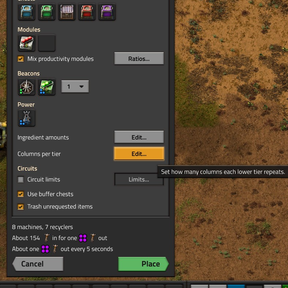
- You can configure the number of columns for each quality tier to boost output
Works with your mods
This is the main advantage of it, no matter what mods you're using, you don't have to create new blueprints. The mod is entirely configurable. You can choose modded machines, recyclers, belts, modules, beacons... they can all be picked, and the layout adapts itself to whatever you choose. By default only researched options are offered, but it can be changed in the planner/mod settings.

How to use it
- The mod is only enabled after the Recycling tech has been researched. Then this button appears in your shortcut bar:

You can also press Ctrl+U (rebindable under Settings → Controls → Mods).
- After clicking it, pick the item you want to upcycle and the quality you are aiming for.
- Under Build options you can change what the loop is made of: belts, inserters, chests, modules, electric poles and more. Each one defaults to the best you have researched, and each can be built at a quality of your choice. The Edit... buttons there let you set how many of each ingredient the loop requests, and how many columns each quality builds. Options with only one choice are hidden, and so are the five chests and the beacons. Click Settings in the title bar and tick Show all build options to bring them all back.
- Press Place. The loop arrives as a blueprint in your hand, so you can look it over, move it, rotate it and flip it before you commit.
Good to know
- Layout processing algorithm is quite demanding in layouts with lots of columns, version 1.0 of the mod benchmarked 5s processing an 8000 column layout (this means like 8000 quality tiers or having 1000+ columns for each quality tier, it requires crazy mods to reach those numbers). Higher durations can cause the game to crash.
- Recipes with more than 10 ingredients are not supported (an inserter filters at most 5 items, and the loop feeds each machine from up to two inserters).
- Recipes with spoilable items are not supported.
- Recipes that need two different fluids, or that give back a fluid (like the quantum processor), are not supported.
- Items that recycle into themselves (like steel) are not supported.
Highlighted Features
Best Ratios + Stats
If the recipe you chose supports productivity modules, the mod is able to mix quality/productivity modules with the best ratio:

You can always take a look at the footer for the expected production stats so it can help you to tweak your settings.

Quality Tiers Column Count
You can configure the column count for each quality tier in a way to increase the output of your upcycler at a cost of a bigger blueprint.

Pipes + Beaconed Layouts
The mod fully supports layouts that require usage of pipes and beacons (enable "Show All Build Options" to see beacon config settings):

Circuit Conditions
You can define a minimum amount of the lower quality items to keep as reserve in the logistics network, and also a maximum amount for the target quality item that stops the loop after the target amount is reached.
The numbers live on a constant combinator inside the loop, so you can change them in place without a new blueprint. Switch the combinator off to pause a loop that has a maximum, or tick Start paused in the Limits window to place it switched off while your bots are still bringing the modules. Without a maximum the switch only removes the reserves, so leave it on. Two lamps and a display panel show what the loop is doing: blue while it runs, green when the output chest is full or the loop is paused, and the panel's icon is visible on the map.
A checkbox at the foot of the Limits window switches the maximum to count every item at the target quality across your logistic network, not just the output chest. The loop only runs inside roboport range in this mode. The minimum reserves stay on the combinator and work the same way. To change the maximum afterwards, set it in the planner and place the new blueprint over the loop: the game updates the machines in place. The combinator still pauses: switch it off, or set its C row to 0. The lamps count the ne
Ratings & reviews
Sign in to leave a rating or comment.