






About A Balanced Diet
From ModrinthA customizable food group-based nutrition and diet system, forked from the Diet mod.
A Balanced Diet
About
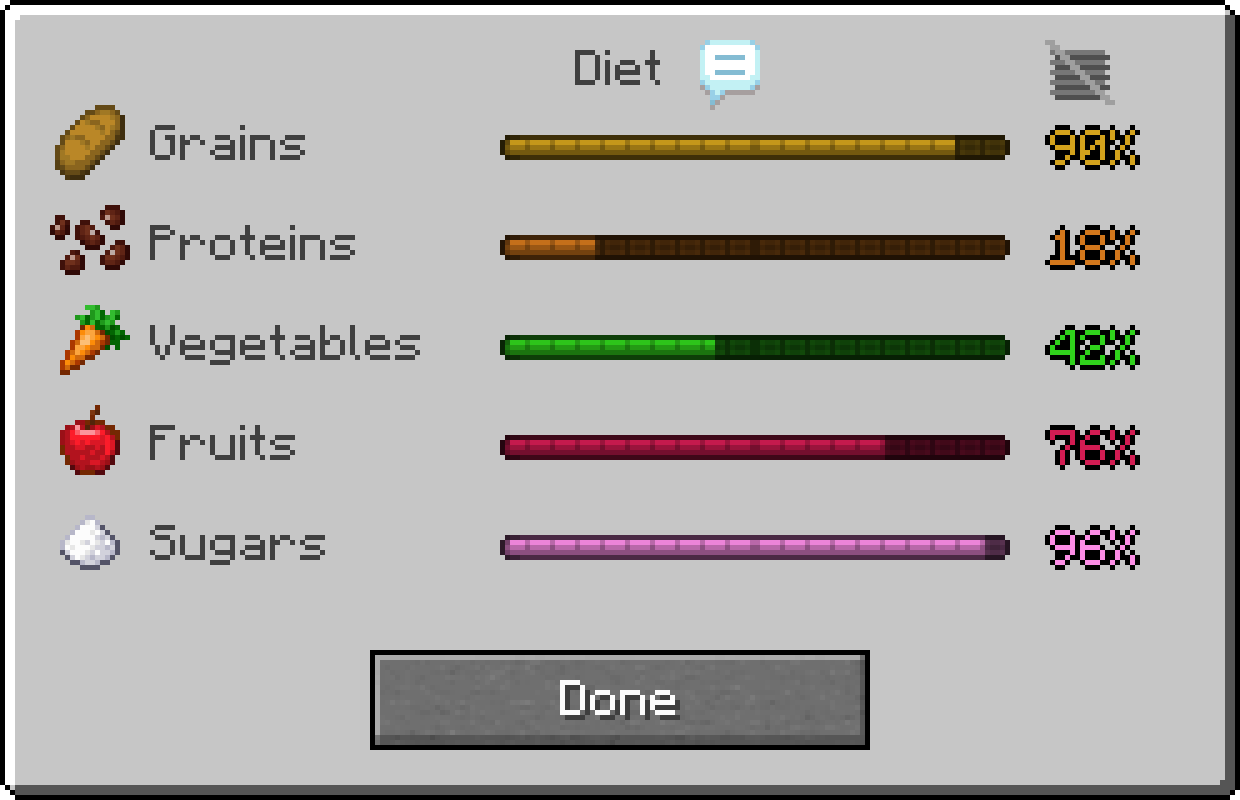
A Balanced Diet is a fork of the Diet, which facilitates the creation and management of dietary food groups in Minecraft. Diet comes with a default configuration that creates five classical food groups (fruits, grains, vegetables, proteins, and sugars). The mod is highly configurable; users and modpack developers can define their own food groups, classifications, diet effects, notifications, etc.
This fork was created to add some additional clarity, balance, and quality of life features. These would have been made as a PR to the original mod, but the author stated the mod is not likely to have any further 1.20.1 updates. These new features are almost entirely optional and data-driven, and include a notification system for crossing specified thresholds, quality overlays to the diet bars that show what thresholds start providing positive or negative effects, and per-food nutrition definition.
Downloads


Features
Food Groups

Food groups are custom dietary groups that represent the types of food that you have eaten. Each group has a value ranging between 0% and 100% depending on how much of that particular category that a player has eaten. These values increase depending on what types of food a player eats and every group gradually decays when the player uses up their hunger bar.
By default, Diet comes with five classical food groups: Fruits, Grains, Proteins, Vegetables, and Sugars. Nutrition values are typically determined by tags. However, if enabled in the config, they can be set per-food instead.
By creating data files, users and modpack developers can create their own custom food groups. Data files can be loaded as part of a datapack or using a mod like KubeJS or Open Loader. Configurable options include:
- Name
- Item Icon
- Hexcode Color
- Ordering
- Default Value
- Gain Multiplier
- Decay Multiplier
- Beneficial or not
Dietary Effects

Dietary effects are custom rewards or penalties applied to players based on certain, configurable food group values. These effects are defined in diet suites, which are created through data files in the same way as food groups. A diet suite lists the food groups it uses along with the effects that come from them.
Possible effects can include any registered potion effect, vanilla and modded, as well as modifying attributes directly (i.e. increasing maximum health by an arbitrary value). The conditions for these effects are highly configurable, including checking specific values, checking only subsets of groups, applying effects cumulatively for each matching test, and much more.
Quality View
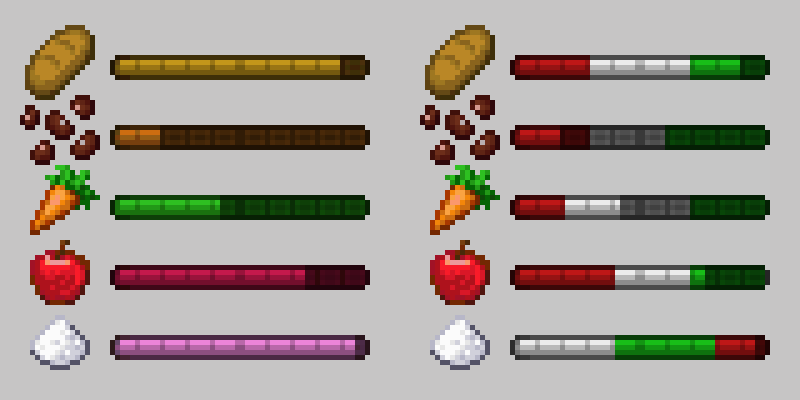
The quality view shows the "quality" of a food group, which indicates to players what thresholds will provide positive or negative effects. Using the qualityDisplayMode option in the client config, it can be set to appear upon hovering over a group bar, by clicking a button in the corner of the Diet screen, both, or neither (the default).
Quality values can be defined for any effect in a diet suite using the quality field, which is set to a string containing a hex color code (ex: "#3FDF3F"). This color is drawn over that region of the bar whenever the quality view is visible.
Per-Food Nutrition
If the enableDataFoodValues option is enabled in the server config, nutrition values can be set per-food rather than generated based on tags. Diet will reference data files at diet/food_values to get food values on a per-food basis, which are used in place of the tag-based ones.
The default datapack has values configured for ~20 mods. The list of compatible mods in these data files can be viewed here.
Notifications
Notifications are an optional system that alerts players in chat when their food group values cross a threshold. They are customized from within a diet suite by adding a notification object to a diet effect. Configurable options include:
- Notification ID
- Message (uses translation keys)
- Notification Sets (used for bulk-muting)
- Trigger (controls what causes the notification to appear)
- Default Frequency (how many times the notification will appear)
always, notification will appear every time its trigger is metonce, notification will appear once and then set itself to nevernever, notification will not appear unless triggered by testing commands
If a notification's frequency is set to always, it will provide a prompt for the player to mute it. When clicked, the mute menu opens in chat with options to mute this notification, all notifications in the same set, all notifications for the same food group, or all diet notifications. Players can also adjust their notification settings manually using the /diet notifications commands and the entire notification system can be disabled with the notificationsEnabled option in the server config.
Further Reading
Highlights
From source dataGame versions
Supports 7 Minecraft versions, the newest being 1.20.6.
Loaders
Runs on Fabric and Forge.
Footprint
Rated a light load on a server.
What kind of mod it is
From the catalogGameplay & overhauls
New mechanics, content and overhauls that change how the game plays.
Runs on your server
From source side supportModrinth lists A Balanced Diet as required on the server. Check its Modrinth page to see whether players need it too.
Compatibility
- Game
- Minecraft
- Loaders
- FabricForge
- Runs on
- Serverrequired on the server
- Game versions
- 1.20.6 and 6 earlier
Verified at the source
- ✓ModrinthOfficial listing, checked 2026-10-01Open ↗
- ✓Authorpawjwp, as published on Modrinth
- ✓LicenseLGPL-3.0-or-laterFree








