






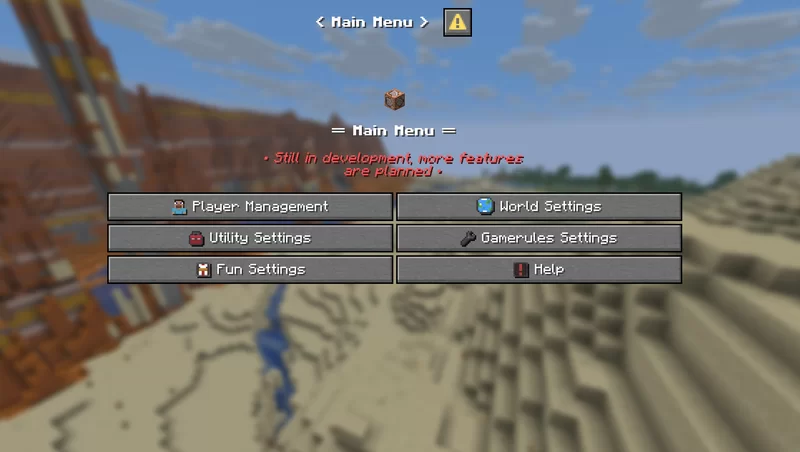

About The Admin Tool
From ModrinthA device that opens a menu with a lot of useful options

The Admin Tool
- An advanced and user-friendly in-game interface designed for both server admins and singleplayer users.
▶️ The Tool

▶️ How to use
> You can get a dedicated Admin Tool item to access all menus from your hotbar (Creative only).
Run this command to open the admin tool main menu:
/dialog show @s admin_tools:main_menuTo get the Admin Tool item (Creative only):
/function admin_tools:1_give_admin_tool> Note: In Datapack Version, the resource pack is required to display the Admin Tool correctly.
▶️ Current Features
■ Player Settings
Ban a player
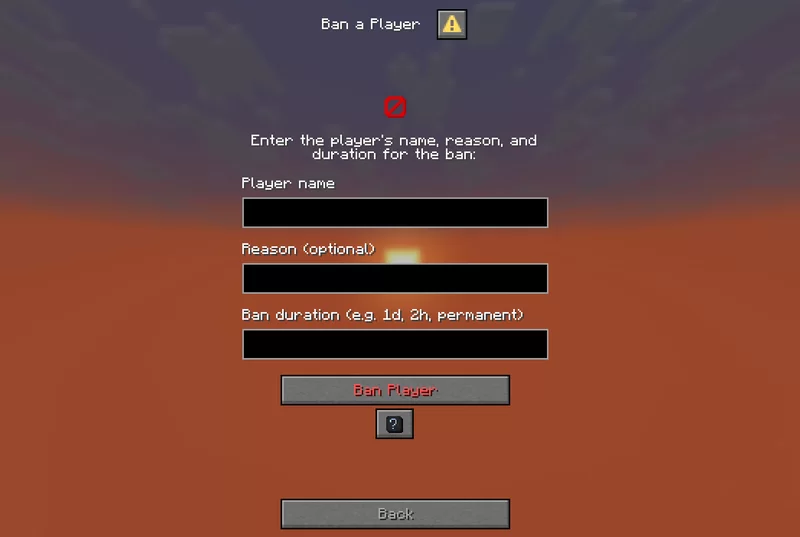
Allows banning a player by entering their name, reason, and duration.
Kick a player

Disconnects a specified player from the server without banning them.
Kill a player

Kills a specified player instantly using the /kill command.
Apply effect

Apply potion effects to yourself or another player, choosing effect type, duration, and level.
Apply effect (advanced)

Allows applying a custom potion effect to yourself or another player by setting effect ID, duration, and level.
Gamemode switcher

Switch gamemode for yourself or others quickly.
Teleport to player / location

Teleports you to a specified player or coordinates by entering the exact player name or position.
Modify player attributes

Modify a player’s attribute base value by selecting the player, attribute, and new value
Set player spawnpoint

Set a player’s spawnpoint by specifying the player and coordinates X, Y, Z.
Give Armor Kit

Select an armor kit material and give it to the targeted player.
■ World Settings
####
Time changer

Set the time of day by choosing ticks.
Weather changer

Set custom weather type and duration in ticks.
Set world spawn

Set the global spawn point by entering X, Y, Z coordinates.
Difficulty changer

Select the world difficulty (peaceful, easy, normal, hard).
Advanced mob spawner

Summon a mob with detailed options: name, attributes, equipment, effects, size, visibility, and more.
Mob control

Spawn or kill selected mobs easily by choosing the mob type and amount.
Modify entity attributes

Edit the base attribute value of the nearest mob within 10 blocks.
Set Custom Mob Spawner

Configure a custom mob spawner by adjusting spawn parameters, equipment, effects, and custom light conditions.
■ Utility Settings
####
Broadcast title

Send global announcements with formatted messages.
Items cleaner

Removes dropped items.
Custom item creator

Create custom items with names, lore, enchantments, and attribute modifiers.
Dimension switcher

Select a dimension to teleport to. Custom IDs allowed.
Create text display

Create text_display entities with full control over text style, alignment, size, color, visibility, rotation, and more.
Edit text display

Edit existing text_display entities in the world directly.
Teams manager:
Create a team

Highlights
From source dataGame versions
Supports 7 Minecraft versions, the newest being 1.21.11.
Loaders
Runs on Data pack, Fabric, Forge, NeoForge and Quilt.
Footprint
Rated a light load on a server.
The Admin Tool on Nxeon
From our catalogue- One-click install
- Supported on Nxeon Minecraft servers. We download it from Modrinth, place it, and restart the server.
- Server side
- Required on the server
- Server type needed
- Data pack, Fabric, Forge, NeoForge, Quilt
- Server load
- light
- Smallest plan we suggest
- Minecraft — 1.5 GB (2 GB RAM). This follows our own load rating above, not a benchmark.
- Latest build
- 0.6.3 (beta), released 2025-12-16
Game versions by loader
| Loader | Game versions | Newest |
|---|---|---|
| Fabric | 1.21.6 to 1.21.11 (3 versions) | 1.21.11 |
| Forge | 1.21.6 to 1.21.11 (3 versions) | 1.21.11 |
| NeoForge | 1.21.6 to 1.21.11 (3 versions) | 1.21.11 |
| Quilt | 1.21.6 to 1.21.11 (3 versions) | 1.21.11 |
| Data pack | 1.21.7 to 1.21.11 (2 versions) | 1.21.11 |
From 5 recorded builds of The Admin Tool.
Recent builds
| Build | Released | Game versions | Loaders |
|---|---|---|---|
| 0.6.3 beta | 2025-12-16 | 1.21.11 | Fabric, Forge, NeoForge, Quilt |
| 0.6.3 beta | 2025-12-16 | 1.21.11 | Data pack |
| 0.6.2 beta | 2025-07-13 | 1.21.7 | Fabric, Forge, NeoForge, Quilt |
| 0.6.2 beta | 2025-07-13 | 1.21.7 | Data pack |
| 0.6.1 beta | 2025-06-28 | 1.21.6 | Fabric, Forge, NeoForge, Quilt |
Run The Admin Tool on a Minecraft server
Pick a server or deploy a new one above; it is installed in one click.
What kind of mod it is
From the catalogAdmin & protection
Permissions, moderation, anti-cheat and land protection for the people running the server.
Runs on your server
From source side supportModrinth lists The Admin Tool as required on the server. Check its Modrinth page to see whether players need it too.
Compatibility
- Game
- Minecraft
- Loaders
- Data packFabricForgeNeoForgeQuilt
- Runs on
- Serverrequired on the server
- Game versions
- 1.21.11 and 6 earlier
Verified at the source
- ✓ModrinthOfficial listing, checked 2026-10-17Open ↗
- ✓AuthorShinnyx, as published on Modrinth
- ✓LicenseLicenseRef-All-Rights-ReservedFree









