







About Advanced Skills: Remastered
From ModrinthA large number of skills give you a more enjoyable combat experience
Required Mods:
Fabric Language Kotlin/Kotlin for ForgeArchitectury API
Gameplay Introduction:
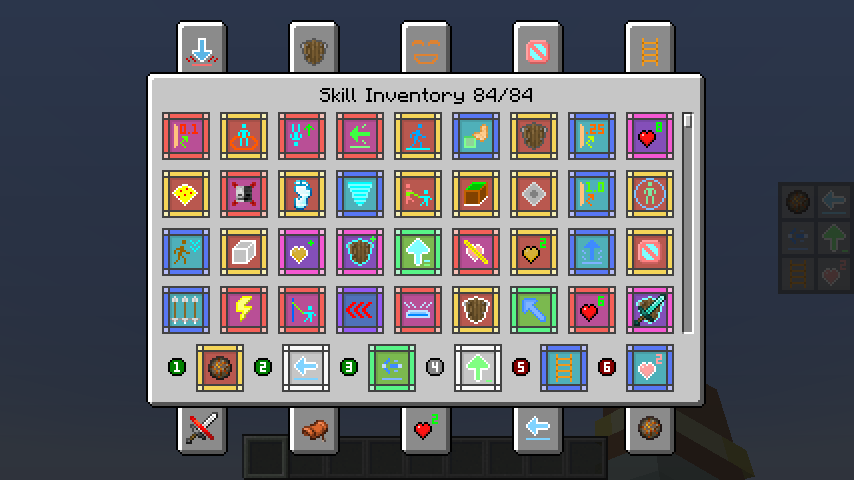
- Players can gain Skill Experience alongside Vanilla Experience (viewable in the skill list screen). Every few levels, they can randomly choose to learn a new skill.
- Open the skill list with the hotkey (K by default), equip skills to the skill slots, and press the corresponding hotkey to use the skill. Alternatively, hold the Quick Cast hotkey (R by default) and move the mouse to select or use the skill. When a skill is selected, pressing the Quick Cast hotkey again will instantly release the skill.
- Players start with 6 skill slots:
- 3 Active slots
- 1 Generic slot
- 2 Passive slots
Except for the Generic slot, other slots can only equip corresponding types of skills. A maximum of 10 skill slots can be active at once.
- Players can modify the number of skill slots and the types of skills in each slot via commands.
- Using skills does not consume any resources, but most skills have a cooldown after use (Can be modified by command).
- Some skills are continuous and require holding down the button to charge up. However, if the skill is cast using Quick Cast, no need to hold the button—it will persist until it ends, unless manually interrupted by using the skill again.
Sample Skills:
- Reflective Skills: Skills that have a certain chance of reflecting the first incoming damage within a specific time.
Different types of reflective effects exist.
- Movement Skills: Includes various movement abilities, such as dashing, teleporting, dodging, jumping, grappling, etc.
- Control Skills: Includes various control abilities, such as immobilizing, slowing, silencing, etc.
- Passive Skills: All skills that are not passive are considered active. Passive skills include self-healing, passive effects, wall climbing, invisibility, and more.
- Enhancement Skills: Various enhancement skills, such as X-ray vision, water bypassing, and resistance to negative effects.
- Summoning Skills: Includes summoning duplicates, mounts, minions, etc.
- Healing Skills: Different healing skills restore varying amounts of health.
- Destructive Skills: Includes fireballs, TNT, meteorites, etc.
Enhancement System:
When drawing skills, there is a chance to get enhancements for learned skills. Enhancements can improve skill values or provide additional effects. Different types of enhancements have different effects, which can increase the skill's damage, speed, range, duration, and more.
Command Overview:
/skills (Click to expand)
equip [skill] [slot: 1-10]- Equip a skill to a skill slotunequip [slot: 1-10]- Unequip the skill from the specified slotlist- List all learned skillslearn [skill]- Learn a new skilllearn-all- Learn all skillsforget [skill]- Forget a skillforget-all- Forget all skillsreset- Reset all skill datareset-cooldown- Reset all skills' cooldownsslotadd [active/passive/generic]- Add a new skill slotremove [slot: 1-10]- Remove a skill slotreset- Reset to default skill slotsslots- Query default skill slot numbersactive- Query default active skill slot number[slot: 1-10]- Set default active skill slot numbergeneric- Query default generic skill slot number[slot: 1-10]- Set default generic skill slot numberpassive- Query default passive skill slot number[slot: 1-10]- Set default passive skill slot numberreset- Reset to default skill slot numbersxpadd [amount] [points/levels]- Add skill experience/levelsset [amount] [points/levels]- Set skill experience/levelsquery [points/levels]- Query current skill experience/levelsmultiplierget [local/global]- Get local/global skill experience multiplierset [local/global] [multiplier]- Set local/global skill experience multiplierreset [local/global]- Reset local/global skill experience multiplierreset- Reset skill experience and levelscooldown- Query global skill cooldown multiplierreset [local/global]- Reset local/global skill cooldown multiplierget [local/global]- Get local/global skill cooldown multiplierset [local/global] [multiplier]- Set local/global skill cooldown multiplierblacklistadd [local/global] [skill]- Add skill to local/global blacklistremove [local/global] [id]- Remove skill from local/global blacklistlist [local/global]- List local/global blacklisted skillsclear [local/global]- Clear local/global skill blacklistenhance [skill][id] [level]- Enhance skill to specified levelall- Enhance all skills to maximum levelde-enhance [skill] [id/all]- Remove skill enhancement
Skill Fruit:
Each rarity has a corresponding skill fruit. After eating it, you can randomly learn a skill. The highest rarity depends on the rarity of the skill fruit.
How to get it (Probability can be modified through configuration file):
- Oak Leaves - 0.5%
- Dark Oak Leaves - 0.5%
- Fishing - Same as the treasure
- Ancient City Chest - 25%
- Buried Treasure Chest – 25%
- End City Treasure Chest - 25%
- Spawn Bonus Chest - 100%
Rarity Weight (Weight can be modified through configuration file):
| Rarity | Weight | |:-------------:|:----------:| | Common | 8 | | Uncommon | 7 | | Rare | 6 | | Superb | 5 | | Epic | 4 | | Legendary | 3 | | Mythic | 2 | | Unique | 1 |
Useful Tips:
Highlights
From source dataGame versions
Supports 2 Minecraft versions, the newest being 1.20.1.
Loaders
Runs on Fabric and Forge.
Footprint
Rated a light load on a server.
What kind of mod it is
From the catalogGameplay & overhauls
New mechanics, content and overhauls that change how the game plays.
Runs on your server
From source side supportModrinth lists Advanced Skills: Remastered as required on the server. Check its Modrinth page to see whether players need it too.
Compatibility
- Game
- Minecraft
- Loaders
- FabricForge
- Runs on
- Serverrequired on the server
- Game versions
- 1.20.1 and 1 earlier
Verified at the source
- ✓ModrinthOfficial listing, checked 2026-10-01Open ↗
- ✓AuthoriMoonDay, as published on Modrinth
- ✓LicenseMITFree








