






About Armor Stands
From ModrinthPlace, pose, and dress armor stands with an easy-to-use UI.

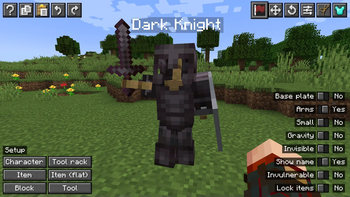
Place, pose, and dress armor stands with an easy-to-use UI. Simply right click armor stands to edit them!
On servers, players either need OP permissions or need to be explicitly added with the command /armorstands add playername.

Helpful tips
- When the armor stands UI is open, you can still move around! Use your normal keys to move and jump, and if you want to unlock your camera, simply hold the ALT key!
- The mod comes with clipboard and undo/redo systems. Typical keyboard shortcuts apply, or use the buttons at the top left.
- In case you're working with a bunch of stands at the same time, you can highlight the current one! The mod includes a keybinding (you'll need to assign it a key!) to highlight the stand while the UI is open.
- If a stand is inside a block with gravity turned on, it will fall through! This is a vanilla mechanic and in some cases the stand can fall all the way down through bedrock.
- The undo/redo function is especially helpful for testing out the features! Try hitting a button to see what it does, then simply _undo_ it to try something else!
- You can navigate between screens by clicking the buttons at the top right or using 1-6 on your keyboard.
Screens
Utilities — quick-setup actions and toggles
On the utilities screen, you'll find a lot of helpful tools to get you started with editing armor stands!
On the bottom left there are several quick-setup actions, many of which actually come from the book in Vanilla Tweaks! The one you'll likely use most often is "Character", which sets up the armor stand with a set of presets useful for creating characters around your world.
On the right is a list of toggles. Most of them are self-explanatory, but play around with them if you're not sure what they do!

Move — position the stand precisely
On the move page, you'll find tools to easily position your armor stand around your world.
At the top left there are two helpful blocks of text that resemble the F3 menu. These give the current position of both yourself and the stand you're editing in exact and block positions.
On the bottom left there are several quick actions. They all have tooltips to help you figure out what they can do.
On the right is a large wall of buttons. At the bottom, you'll see buttons for moving the armor stand by the specified amount and in the direction labelled on the left. Just above those is a helpful label showing which direction you are currently facing for reference. Above that are two buttons that let you change the parameters for how the stand will be moved.

Rotate — aim the stand where you want it
On the rotate page, you'll find tools to easily rotate your armor stand the direction you want it to face.
Similar to the move page, the left side features helpful text blocks and quick action buttons, and the right side has buttons to nudge the direction, plus a slider to quickly move it large amounts!

Pose — per-body-part rotation and scale
On the pose page, you'll find everything you'll need to tweak the armor stand's pose exactly how you want it.
On the left are several buttons to select the body part you wish to edit, and a button at the bottom to mirror the currently set up pose.
On the right, the current body part is displayed, and underneath it is a button that will change the sensitivity/range of the sliders below. Beneath that are the three sliders for the independent rotations that each body part can have, with a few buttons for each for getting the numbers _just_ right.
As of version 2.0.0, there is also a scale slider! Use this to adjust the size of your armor stand.

Presets — poses from Vanilla, Bedrock, and Vanilla Tweaks
On the presets page, you'll find a list of all the pre-configured poses that come with the mod!
Each pose has a source (Vanilla (Java), Bedrock, Vanilla Tweaks, and some of my own custom ones), as well as a category (standing, sitting, etc). You can filter the list of presets using the two buttons at the top.
You can scroll through the pages of presets using the arrow buttons at the bottom of the screen or by using your mouse's scroll wheel while hovering over anywhere on the presets list.

Inventory — arm your stand
On the inventory page, you'll see a very familiar UI, where you can quickly arm your stand!
In addition to the inventory management, the bottom right includes two of the toggles from the utilities page relevant to the inventory for quick access.

Mannequin
On the mannequin page, you can turn your armor stand into a posable character that wears a real player's skin!
Highlights
From source dataGame versions
Supports 29 Minecraft versions, the newest being 26.3.
Loaders
Runs on Fabric, Forge, NeoForge and Quilt.
Footprint
Rated a light load on a server.
What kind of mod it is
From the catalogWeapons, items & crafting
New weapons, gear, items and the recipes to make them.
Runs on your server
From source side supportModrinth lists Armor Stands as required on the server. Check its Modrinth page to see whether players need it too.
Compatibility
- Game
- Minecraft
- Loaders
- FabricForgeNeoForgeQuilt
- Runs on
- Serverrequired on the server
- Game versions
- 26.3 and 28 earlier
Verified at the source
- ✓ModrinthOfficial listing, checked 2026-10-01Open ↗
- ✓AuthorRoundaround, as published on Modrinth
- ✓LicenseMITFree








