






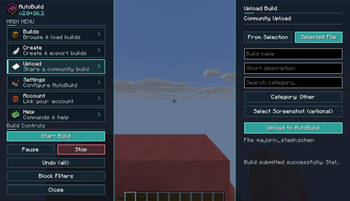

About AutoBuild
From ModrinthAutoBuild lets you automatically place blocks to build faster and easier in Minecraft. Perfect for large and repetitive builds.
AutoBuild
AutoBuild is a Fabric mod for loading, previewing, transforming, and automatically building Minecraft schematics.
Load a .schem or .litematic file, position the ghost preview exactly where you want it, choose a building mode, and let AutoBuild place the structure while you remain in control.
AutoBuild also connects to its own community platform, where you can discover schematics, share creations, create a builder profile, and load community builds directly into the mod.
Preview

Features
Load and Preview Schematics
- Load
.schemand.litematicfiles - Preview structures using transparent ghost blocks
- Move previews in every direction
- Raise and lower the preview
- Rotate structures
- Flip previews across the X or Z axis
- Move the preview directly to your position
- Adjust preview transparency
- Hide selected blocks using block filters
Flexible Building Modes
Choose how AutoBuild places your structure:
- Per Block, Places a configurable number of blocks per tick
- Per Layer, Builds the structure layer by layer
- Instant, Places the complete structure immediately
You can also:
- Pause, resume, stop, or unload a build
- Keep or hide the preview after pausing or stopping
- Enable or disable block-placement sounds
- Undo recent building steps or the complete build history
- Adjust the building speed
Survival-Friendly Building
AutoBuild is designed for Survival projects as well as Creative building.
- Uses materials from your inventory
- Shows all materials required for a structure
- Reports which materials are missing
- Can collect materials from nearby chests, trapped chests, and barrels
- Includes a configurable container search radius
- Offers an optional safety check to prevent replacing existing blocks
- Allows Creative players to receive missing materials instantly
Community Schematic Library
AutoBuild connects directly to the AutoBuild community platform.
- Browse public schematics
- Link your website account to the mod
- Load community builds directly in-game
- Upload and publish your own schematics
- Add screenshots, categories, and visibility settings
- Create a public builder profile
- Track downloads and AutoBuild loads
- Discover builds shared by other creators
Find a build → Load it into AutoBuild → Position the preview → Start building
Export Your Own Schematics
Use the included Selection Tool to select two corners in your world and export the selected structure as a schematic.
Keep exported structures locally or publish them on your AutoBuild profile to share them through the community library.
In-Game Controls
AutoBuild includes configurable keybinds for:
- Moving the preview left, right, forward, and backward
- Raising and lowering the preview
- Rotating the structure
- Flipping across the X or Z axis
- Moving the preview to the player
- Undoing a build step
- Starting a build
- Opening the AutoBuild menu
Controls can be changed through Minecraft’s keybind settings.
Commands
/autobuild list— List local schematics/autobuild load <file>— Load a local schematic/autobuild start— Start or resume building/autobuild pause— Pause the current build/autobuild stop— Stop the current build/autobuild unload— Unload the current schematic/autobuild preview <on|off>— Show or hide the preview/autobuild speed <value>— Adjust the building speed/autobuild undo <steps|all>— Undo placed blocks/autobuild materials— View the required materials/autobuild missing— Receive missing materials in Creative/autobuild give previewtool— Get the Preview Mover Tool/autobuild give selectiontool— Get the Selection Tool/autobuild menu— Open the AutoBuild menu
Perfect For
- Large Survival projects
- Fast Creative building
- Multiplayer server projects
- Technical farms and redstone builds
- Repetitive construction work
- Testing schematic placement
- Videos, streams, and other content
- Community building events
- Sharing your own Minecraft creations
Multiplayer Support
AutoBuild supports separate building states and settings for multiple players.
> Important: AutoBuild must be installed on both the client and the server when playing multiplayer.
Requirements
- Fabric Loader
- Fabric API
- AutoBuild installed on the client and server for multiplayer
Videos
AutoBuild combines schematic discovery, accurate previews, material management, automatic construction, exporting, and community sharing in one complete Minecraft building workflow.
Highlights
From source dataGame versions
Supports 14 Minecraft versions, the newest being 26.2.
Loaders
Runs on Fabric.
Footprint
Rated a light load on a server.
What kind of mod it is
From the catalogBuilding & decoration
Blocks, furniture, decorations and building tools.
Runs on your server
From source side supportModrinth lists AutoBuild as required on the server. Check its Modrinth page to see whether players need it too.
Compatibility
- Game
- Minecraft
- Loaders
- Fabric
- Runs on
- Serverrequired on the server
- Game versions
- 26.2 and 13 earlier
Verified at the source
- ✓ModrinthOfficial listing, checked 2026-10-01Open ↗
- ✓AuthoroDilan, as published on Modrinth
- ✓LicenseMITFree








