







About Building Blueprint
From ModrinthBuilding Blueprint lets players save buildings as blueprint items, preview them in the world, rotate the preview, and place the saved structure later.
Building Blueprint
Building Blueprint lets players save buildings as blueprint items, preview them in the world, rotate the preview, and place the saved structure later.
Features
- Save a selected building area as a blueprint
- Choose a preset blueprint style: House, Bridge, Tower, or Farm
- Set a custom level number for the blueprint
- Optionally save entities inside the selected area
- Preserve block entity data, such as chest contents
- Preview the saved building before placement
- Rotate the previewed building
- Place the building by sneaking and right-clicking
- Manage saved blueprint entries from an in-game library screen
Creative Tab
The mod adds a new creative tab named Building Blueprints. 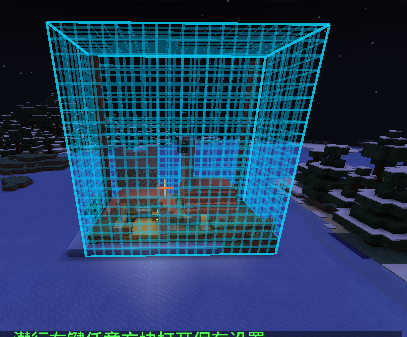
It contains:
- Blueprint Tool
- Empty blueprint sample
- Saved building blueprints
An empty sample blueprint does not contain a saved building. It is mainly intended for creative use, testing, or modpack integration.
Saving A Building
- Hold the
Blueprint Tool. - Right-click the first corner of the building area.
- Right-click the second corner of the building area.
- Sneak and right-click any block to open the save screen.
- Choose a blueprint style.
- Enter a level number.
- Choose whether entities should be saved.
- Click
Save.
After saving, the player receives a usable building blueprint item.
If a blueprint with the same style and level already exists, saving again will overwrite the previous saved blueprint data.
Using A Blueprint
- Hold a blueprint that contains saved building data.
- Right-click a block to show the building preview.
- Right-click again to rotate the previewed building.
- Right-clicking air also rotates the preview while it is active.
- Sneak and right-click to place the building.
Blueprints are consumable. A blueprint disappears after successfully placing its building.
Switching to another item cancels the current preview.
Blueprint Library
Default key: B
Press B to open the blueprint library screen.
The library shows saved blueprint entries and allows players to delete entries they no longer need.
Deleting an entry removes the saved building data file. It does not remove blueprint items that are already in player inventories.
Styles And Levels
Built-in styles:
- House
- Bridge
- Tower
- Farm
The level number is chosen when saving a blueprint. It is rendered on the item icon.
Only one saved entry is kept for each style and level combination, so the creative tab will not fill up with duplicate level 1 blueprints.
Modpack Integration
The mod does not include built-in survival recipes.
Modpack authors are expected to add acquisition methods with tools such as:
- KubeJS
- CraftTweaker
- Data packs
- Quest rewards
- Shops
- Loot tables
Recommended integration ideas:
- Add a recipe for the Blueprint Tool
- Add recipes or quest rewards for empty blueprint samples
- Use shops, NPCs, or loot containers to distribute specific blueprint styles and levels
This keeps the mod flexible for different modpack economies and progression systems.
Saved Data Location
Saved building data is stored in:
config/building_blueprint/blueprints/
Each saved blueprint entry corresponds to one .nbt file.
Deleting an entry from the blueprint library deletes the matching .nbt file.
Notes
- Make sure the target area is clear before placing a large building.
- Entity data is only saved when the save-entities option is enabled.
- If the saved
.nbtfile is missing, the blueprint item cannot place its building. - Manual editing of blueprint
.nbtfiles is not recommended unless you know exactly what you are changing.
_________
Building Blueprint Changelog
1.0.2
Added
- Added blueprint file import and sharing support.
- Saved blueprints are now grouped by style under the config folder:
config/building_blueprint/blueprints/house/config/building_blueprint/blueprints/bridge/config/building_blueprint/blueprints/tower/config/building_blueprint/blueprints/farm/- Imported
.nbtfiles can appear directly as blueprint items in the Building Blueprints creative tab.
How To Share Blueprint NBT Files
- Save a building with the Blueprint Tool.
- Choose a style and level in the save screen.
- Find the generated
.nbtfile in the config folder.
Example:
- House, level 1:
config/building_blueprint/blueprints/house/house1.nbt
- Bridge, level 3:
config/building_blueprint/blueprints/bridge/bridge3.nbt
Send that .nbt file to another player.
The other player should put the file into the matching style folder. For example:
config/building_blueprint/blueprints/house/house1.nbt
After entering the world or refreshing the creative tab, the imported blueprint will show up as a usable blueprint item.
Notes
- If the
.nbtfile contains style and level metadata, the mod uses that data. - If style metadata is missing, the mod reads the style from the folder name, such as
houseorbridge. - If level metadata is missing, the mod tries to read the level from the file name, such as
house1.nbt. - Blueprint files should stay inside the matching style folder to avoid confusing players.
Highlights
From source dataGame versions
Supports 7 Minecraft versions, the newest being 1.21.1.
Loaders
Runs on Forge and NeoForge.
Footprint
Rated a light load on a server.
What kind of mod it is
From the catalogBuilding & decoration
Blocks, furniture, decorations and building tools.
Runs on your server
From source side supportModrinth lists Building Blueprint as required on the server. Check its Modrinth page to see whether players need it too.
Compatibility
- Game
- Minecraft
- Loaders
- ForgeNeoForge
- Runs on
- Serverrequired on the server
- Game versions
- 1.21.1 and 6 earlier
Verified at the source
- ✓ModrinthOfficial listing, checked 2026-10-01Open ↗
- ✓AuthorKuzhizaizheli, as published on Modrinth
- ✓LicenseLicenseRef-All-Rights-ReservedFree








