







About Catenary
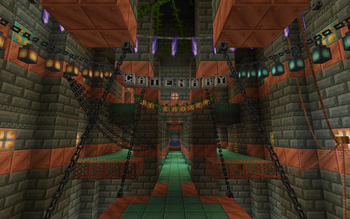
From ModrinthAdds hanging chains and ropes as decorations, no resourcepack required. Now with ziplines!

Catenary is a datapack that adds decorative catenaries to Minecraft. You can place a catenary using custom Firework Rocket items, which lets you place the anchor points off the block grid for extra customisation. Once placed, you can also ride the catenary like a zipline.
Crafting Catenaries

The other 2 slots are for decoration materials. These are optional, and you can also just use the first slot while leaving the second slot empty. Materials placed here will be placed hanging below the catenary's rope. They can also give off block light. You can mix different decorations in the two slots to have them alternating. The button to the left controls how much space there is between the decorations.
There is a special type of decoration called the "spelling", which can be crafted by placing any type of sign in the first decoration slot. If you do this, the second slot can no longer accept other decoration materials, but instead it will accept a material to set the "font". A spelling spells out whatever text you name the item in an Anvil using player heads. The "font" changes the textures of those player heads.
***


Placing and breaking catenaries
To place a catenary, right-click the catenary item onto a block. This will select the clicked location as one of the end points of the catenary, and you will see colourful particles moving from your cursor to that location. If you place the catenary item again in a different spot, a catenary will be created between the two spots. There is a minimum and maximum distance between the two points which can be changed in the config.
Once you place a catenary, it will have two thick endpoints. These points can be clicked to interact with the catenary. If you right-click one of these endpoints with a new catenary item, you can select it as one of the endpoints for the new catenary. This means you can connect multiple catenaries to the same endpoint.
Left-clicking on either of the endpoints will break the catenary, giving you back the item you used to place it. If you want to prevent accidental breakage, you can wax a catenary by right-clicking with a honeycomb. Right-clicking with any axe undoes the waxing, allowing the catenary to be broken again.
Ziplines
If you right-click an endpoint with a bow, you can ride the catenary like a zipline. The zipline mechanic uses realistic physics like acceleration and drag, so you can't just zip upwards against gravity. If you reach the end of one catenary and there is another catenary connected to the endpoint, you will continue ziplining on the new catenary. This will preserve your momentum.
There are two craftable items that make ziplines even more interesting:
Zipline Mount Pad

Zipline Lift Upgrade

Highlights
From source dataGame versions
Supports 15 Minecraft versions, the newest being 26.2.
Loaders
Runs on Data pack, Fabric, Forge, NeoForge and Quilt.
Footprint
Rated a light load on a server.
What kind of mod it is
From the catalogBuilding & decoration
Blocks, furniture, decorations and building tools.
Runs on your server
From source side supportModrinth lists Catenary as required on the server. Check its Modrinth page to see whether players need it too.
Compatibility
- Game
- Minecraft
- Loaders
- Data packFabricForgeNeoForgeQuilt
- Runs on
- Serverrequired on the server
- Game versions
- 26.2 and 14 earlier
Verified at the source
- ✓ModrinthOfficial listing, checked 2026-10-01Open ↗
- ✓AuthorEroxen, as published on Modrinth
- ✓LicenseLicenseRef-All-Rights-ReservedFree








