







About CobblePass
From ModrinthA battle pass side-mod for Cobblemon 1.6+
CobblePass - The Ultimate Battle Pass for Cobblemon
Welcome to the completely revamped CobblePass! This mod provides a deeply integrated and highly customizable battle pass system for your Cobblemon server. Engage your players with a rewarding progression system, complete with free and premium tracks, seasonal content, and a wide array of configurable rewards.

Features
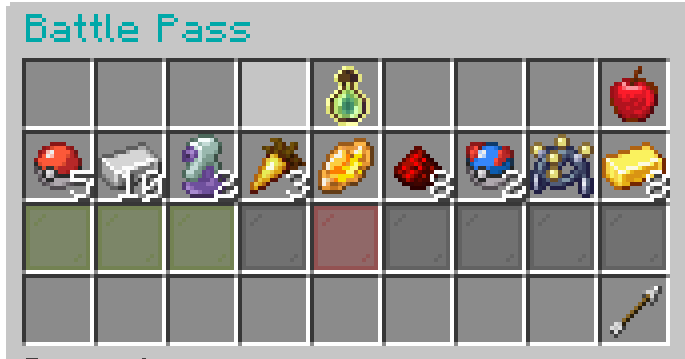
- Seasons: Create unique battle pass seasons with configurable durations and rewards.
- Dual Reward Tracks: Implement both
freeandpremiumreward tiers. - Dynamic GUI: A clean, intuitive, and paginated GUI (
/bp) for players to view progress and claim rewards. - XP Progression:
- Gain XP from various in-game actions: catching, defeating, evolving, hatching, and trading Pokémon.
- Two XP progression models:
FORMULA: XP required per level increases based on a configurable multiplier.MANUAL: Manually define the exact XP required for each level.- Diverse Reward Types:
ITEM: Grant any item from Minecraft or other mods, with full NBT support.POKEMON: Reward players with specific Pokémon, including level, shininess, and other attributes.COMMAND: Execute any server command as a reward, with placeholders for player name and UUID.- Admin Management:
- A full suite of commands for managing seasons, players, and configurations.
- Create, start, stop, and delete seasons.
- Modify player XP, levels, and premium status on the fly.
- Reload configurations without a server restart.
- Economy Integration: Charge for the premium pass using any Impactor-compatible economy plugin.
- Highly Configurable: Tweak everything from XP values to reward templates and season settings through intuitive JSON files.
- Data Integrity: Player data is saved reliably and includes safeguards against corruption.
Dependencies
CobblePass requires the following mods to be installed on your server:
- Fabric API
- Cobblemon (v1.6+)
- Impactor (For economy features)
- GooeyLibs
Installation
- Ensure you have a Fabric server running Minecraft 1.21.1 or later.
- Download the latest versions of CobblePass and all required dependencies.
- Place the
.jarfiles into your server'smodsfolder. - Start your server. CobblePass will generate its default configuration files in the
config/cobblepass/directory.
Getting Started: Your First Season
Setting up a new Battle Pass is easy with the in-game creation tool.
Step 1: Create the Battle Pass
- As an operator, run the command:
/battlepass create - This will open a GUI where you can set:
- Duration: The length of the season in days.
- Max Level: The highest level players can achieve.
- Premium Toggle: Whether this season will have a premium track.
- Click "Create Battle Pass". This generates
config.jsonandtiers.jsonfiles and resets all player progress for a fresh start.
Step 2: Configure Your Rewards
- Open
config/cobblepass/tiers.json. - By default, it's filled with placeholder rewards (Apples). Customize each level's
freeRewardandpremiumReward. See the detailed tiers.json Configuration section below for examples of Item, Pokémon, and Command rewards. - This is where you can also define reusable reward
templates!
Step 3: Configure Settings
- Open
config/cobblepass/config.json. - Adjust XP gain values (
catchXP,defeatXP, etc.), the cost of the premium pass (premiumCost), and the XP progression model (xpProgression). See the config.json Configuration section for more details.
Step 4: Reload the Configuration
- Once you've saved your changes to the JSON files, run the command:
/battlepass reload - This will load all your new settings and rewards into the server without needing a restart.
Step 5: Start the Season!
- When you're ready for the season to begin, run:
/battlepass season start - The timer will start, and players can now begin earning XP!
Commands
The base command is /battlepass with aliases /bp and /pass.
Player Commands
| Command | Description | | :--- | :--- | | /bp | Opens the main Battle Pass GUI to view progress and claim rewards. | | /bp premium | Shows information about the premium pass, including cost and status. | | /bp premium buy | Purchases the premium pass if premiumMode is enabled and the player has enough funds. | | /bp claim <level> [premium] | A command-based way to claim a reward for a specific level. The GUI is the primary method. |
Admin Commands (Permission Level 4)
| Command | Description | | :--- | :--- | | /bp create | Opens a GUI to create a new Battle Pass season from scratch. | | /bp delete confirm | Deletes all Battle Pass files (config.json, tiers.json, and all player data). This is irreversible. | | /bp season start | Starts the currently configured season. | | /bp season stop | Stops the active season, pausing the timer. | | /bp reload | Reloads config.json and tiers.json from the disk. Player data is unaffected. | | /bp addxp <player> <amount> | Adds a specified amount of XP to a player's pass. | | /bp addlevels <player> <amount>| Adds a specified number of levels to a player's pass. | | /bp premiumanage add <player> | Grants a player premium status for free. | | /bp premiumanage remove <player>| Revokes a player's premium status. |
Configuration Files
All configuration is located in the config/cobblepass/ directory.
config.json
Highlights
From source dataGame versions
Built for Minecraft 1.21.1.
Loaders
Runs on Fabric.
Footprint
Rated a light load on a server.
What kind of mod it is
From the catalogGameplay & overhauls
New mechanics, content and overhauls that change how the game plays.
Runs on your server
From source side supportModrinth lists CobblePass as required on the server. Check its Modrinth page to see whether players need it too.
Compatibility
- Game
- Minecraft
- Loaders
- Fabric
- Runs on
- Serverrequired on the server
- Game versions
- 1.21.1
Verified at the source
- ✓ModrinthOfficial listing, checked 2026-10-01Open ↗
- ✓AuthorTuriddu, as published on Modrinth
- ✓LicenseMITFree








