







About Construction Wands Revived
From ModrinthConstruction Wands make building easier! (A new take on the Builder's Wand) ported 1.21.1 NeoForge
Construction Wand Revived
This is an unofficial 1.21.1 port of the original version by ThetaDev.
Since the mod is licensed under MIT, I am allowed to fork and update it.
With a Construction Wand you can place multiple blocks (up to 1024) at once, extending your build on the side you're facing. If that's not enough: you can upgrade your wand with additional cores, allowing you to place a block behind the block you are facing, conjure blocks in mid air or destroy lots of blocks very fast.

Wands
There are basic wands made from stone, iron and diamond and the Infinity wand. Wands from higher tiers are more powerful and last longer. These properties can be changed in the config.
| Wand |Durability |Max. Blocks |Upgradeable |Angel distance |Max. Blocks (Destroy) | | --------- |----------- |----------- |----------- |-------------- |--------------------- | | Stone |131 |9 |No |- |- | | Iron |250 |27 |Yes |1 |9 | | Diamond |1561 |128 |Yes |4 |25 | | Netherite |
Crafting
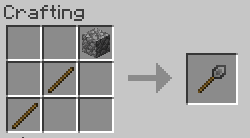
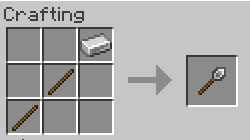
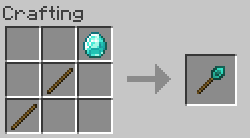
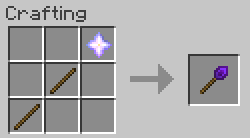
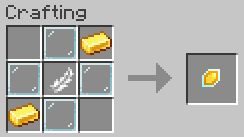
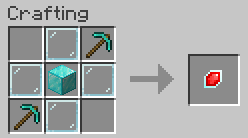
OPTKEY
To change a wand's core and options or undo your placement you need to hold down the wand option key (refered as OPTKEY). By default, this is CTRL, but it can be changed in the client config file. To prevent unwanted changes to your options, you can configure that you have to hold down SNEAK as well to change options or open up the GUI.
Wand cores
Wand cores are magical gemstones that make your wand do its thing.
Every wand comes with a Construction core. You can make your wand even better by putting aditional cores into it. Put your new core together with your wand in a crafting grid to install it. To switch between cores, hold down OPTKEY and left click empty space with your wand. Stone wands can't be upgraded.
Construction core
Extend your build on the side facing you. Maximum number of blocks depends on wand tier. Hold down OPTKEY and scroll to change placement restriction (Horizontal, Vertical, North/South, East/West, No lock).
Angel core
Place a block on the opposite side of the block (or row of blocks) you are facing. Maximum distance depends on wand tier. Right click empty space to place a block in midair (similar to angel blocks, hence the name). To do that, you'll need to have the block you want to place in your offhand. You can't place a block in midair if you've fallen more than 10 blocks deep (no easy rescue tool from falling into the void).
Destruction core
Destroy blocks (no tile entities) on the side facing you. Maximum number of blocks depends on wand tier. Restrictions work just like with the Construction core. Destroyed blocks disappear into the void, you can use the undo feature if you've made a mistake.
Options
SNEAK+OPTKEY+Right clicking empty space opens the option screen of your wand.
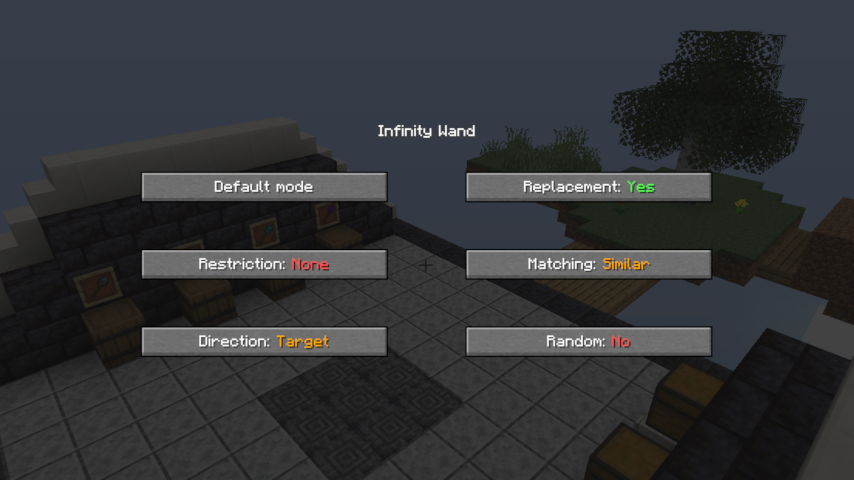
Restriction: If restriction is enabled the wand will only place blocks in one row or column (choose between North/South, East/West on a horizontal plane and Horizontal, Vertical on a vertical plane). If the direction lock is switched off, the wand will extend the entire face of the building it's pointed at. This option has no effect in Angel mode.
Direction: If set to "Player" the wand places blocks in the same direction as if they were placed by yourself. Target mode places the blocks in the same direction as their supporting block. See the picture below:
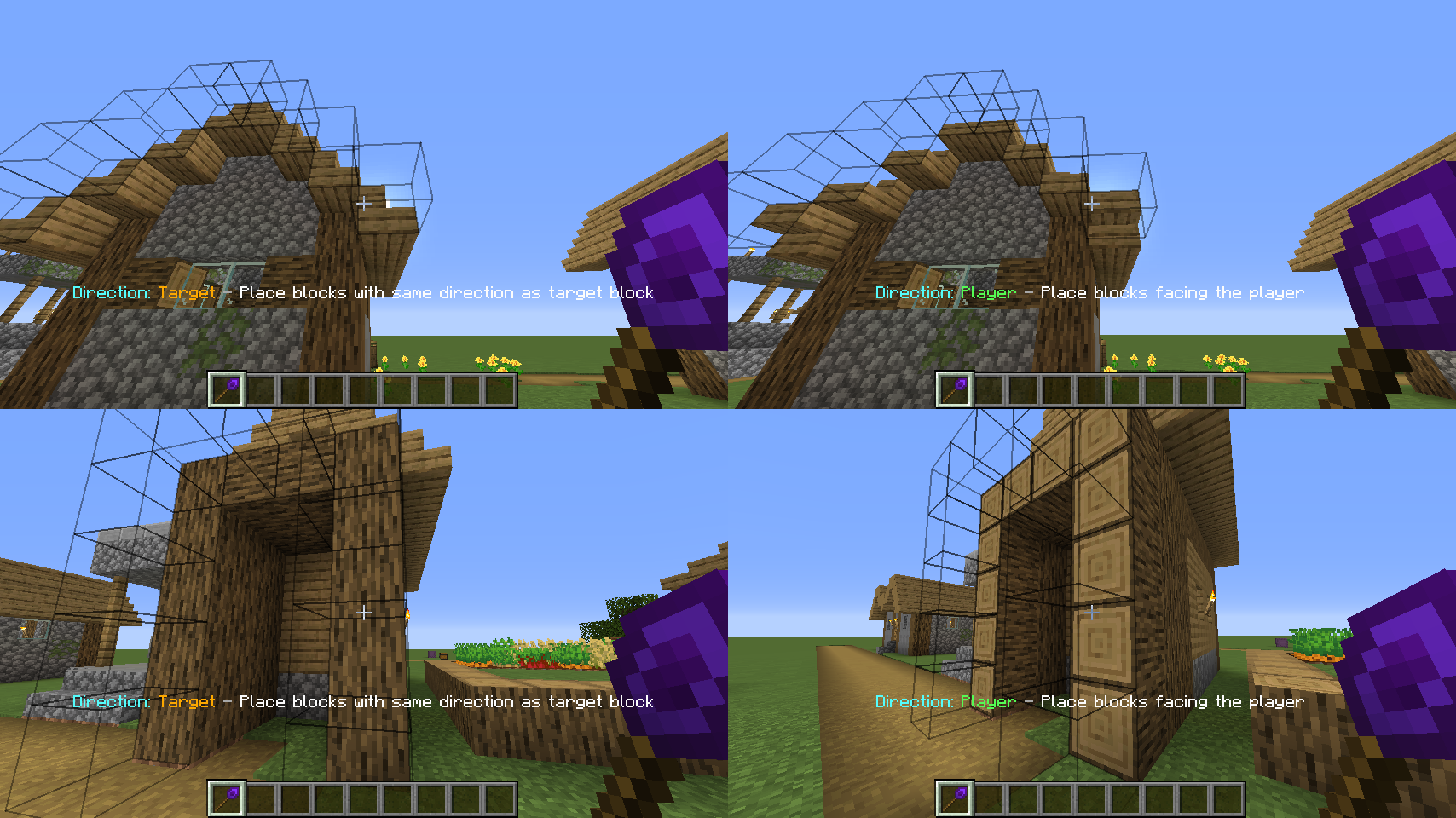
Replacement: Enables/disables the replacement of replaceable blocks (Fluids, snow, tallgrass).
Matching: Select which blocks are extended by the wand. If set to "EXACT" it will only extend blocks that are exactly the same as the selected block. "SIMILAR" will treat similar blocks equally (e.g. extend dirt and grass blocks). "ANY" will extend any block on the face of the building you're looking at.
Random: If random mode is enabled, the wand places random blocks from your hotbar. ~~Shamelessly stolen~~ Inspired by the Trowel from Quark.
Undo
Holding down SHIFT+CTRL while looking at a blocks will show you the last blocks you placed with a green border around them. SHIFT+CTRL+Right clickking any of them will undo the operation, giving you all the items back. If you used the Destruction core, it will restore the blocks.
Additional features
Highlights
From source dataGame versions
Supports 7 Minecraft versions, the newest being 26.1.2.
Loaders
Runs on NeoForge.
Footprint
Rated a light load on a server.
Construction Wands Revived on Nxeon
From our catalogue- One-click install
- Supported on Nxeon Minecraft servers. We download it from Modrinth, place it, and restart the server.
- Server side
- Required on the server
- Server type needed
- NeoForge
- Server load
- light
- Smallest plan we suggest
- Minecraft — 1.5 GB (2 GB RAM). This follows our own load rating above, not a benchmark.
- Latest build
- 4.0.0, released 2026-07-30
Game versions by loader
| Loader | Game versions | Newest |
|---|---|---|
| NeoForge | 1.21 to 26.1.2 (7 versions) | 26.1.2 |
From 4 recorded builds of Construction Wands Revived.
Recent builds
| Build | Released | Game versions | Loaders |
|---|---|---|---|
| 4.0.0 | 2026-07-30 | 1.21.8 | NeoForge |
| 4.0.1 | 2026-07-30 | 1.21.11 | NeoForge |
| 4.0.2 | 2026-07-30 | 26.1 to 26.1.2 (3 versions) | NeoForge |
| 4.2.2 | 2026-07-30 | 1.21 to 1.21.1 (2 versions) | NeoForge |
Run Construction Wands Revived on a Minecraft server
Pick a server or deploy a new one above; it is installed in one click.
What kind of mod it is
From the catalogBuilding & decoration
Blocks, furniture, decorations and building tools.
Runs on your server
From source side supportModrinth lists Construction Wands Revived as required on the server. Check its Modrinth page to see whether players need it too.
Compatibility
- Game
- Minecraft
- Loaders
- NeoForge
- Runs on
- Serverrequired on the server
- Game versions
- 26.1.2 and 6 earlier
Verified at the source
- ✓ModrinthOfficial listing, checked 2026-10-16Open ↗
- ✓AuthorNadienDev, as published on Modrinth
- ✓LicenseMITFree









