







About Create: Filters Anywhere
From ModrinthEnhances Create's Attribute and List Filters and allows their usage in other mods!
Create: Filters Anywhere
This mod adds a few extra feature's to the Create mod's excellent Attribute and List Filters!
The main feature (and the namesake of the mod) is added compatability to use Create's filters in other mod's filter slots! Additional mods will be added over time, but here are the supported mods so far:
- Filters now work inside the filter slots of upgrades, such as the pickup and void upgrades.
- Filters now work inside the filter slots of upgrades, such as the filter and void upgrades.
- Filters now work inside of View Cells, Import Bus, Export Bus, Storage Bus, and Formation Planes. Supports normal and Fuzzy card operation.
- Filters now work as filter items inside modules.
- Filters now work inside MR's Bulk Item Filter.
Tom's Simple Storage Mod (v1.1+)
- Filters now work inside of Tom's Basic Item Filter.
- Filters now work inside of LaserIO's Basic Filter cards.
Refined Storage (v1.3+, 1.20.1 only)
- Filters now work inside Exporters, Importers, Grid Filters, Destructors, and External Storages.
New Attributes:
In addition to compatability with existing mods, as of v1.2+, I have now started adding new attributes as well. You can see the current list below.
- "is a backpack with a UUID of <UUID>".
- "is a backpack with a <Upgrade Type>" (like Pickup Upgrade, Filter Upgrade, Magnet Upgrade.
Compatability will only be applied when the mods are present, you should be able to use the mod whether all of the above mods are present or not.
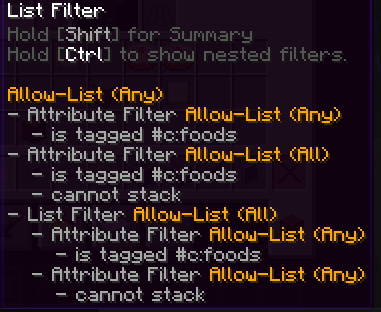
In addition to this compatablity, this mod also adds some nifty QOL features to Create's filters, such as the ability to view details on the filters inside of List Filters by using the CTRL key while hovering the filter.
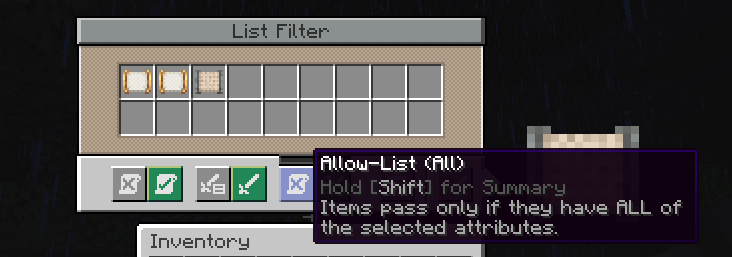
There is also the super useful addition of "Match All" to the List Filter, which when set, requires all of the filters to match inside of a List Filter instead of any of them for it to pass the filter.
Thank you to the incredible developers: Joseph Franci, rizek (radimous), and JustAHuman. As this is a port of the incredible original project, \Vault Filters\](https://www.curseforge.com/minecraft/mc-mods/vault-filters\))!
New features coming soon when I have time!
Highlights
From source dataGame versions
Supports 8 Minecraft versions, the newest being 1.21.1.
Loaders
Runs on Forge and NeoForge.
Footprint
Rated a light load on a server.
What kind of mod it is
From the catalogGameplay & overhauls
New mechanics, content and overhauls that change how the game plays.
Runs on your server
From source side supportModrinth lists Create: Filters Anywhere as required on the server. Check its Modrinth page to see whether players need it too.
Compatibility
- Game
- Minecraft
- Loaders
- ForgeNeoForge
- Runs on
- Serverrequired on the server
- Game versions
- 1.21.1 and 7 earlier
Verified at the source
- ✓ModrinthOfficial listing, checked 2026-10-01Open ↗
- ✓Authoriwolfking1, as published on Modrinth
- ✓LicenseAGPL-3.0-onlyFree








