






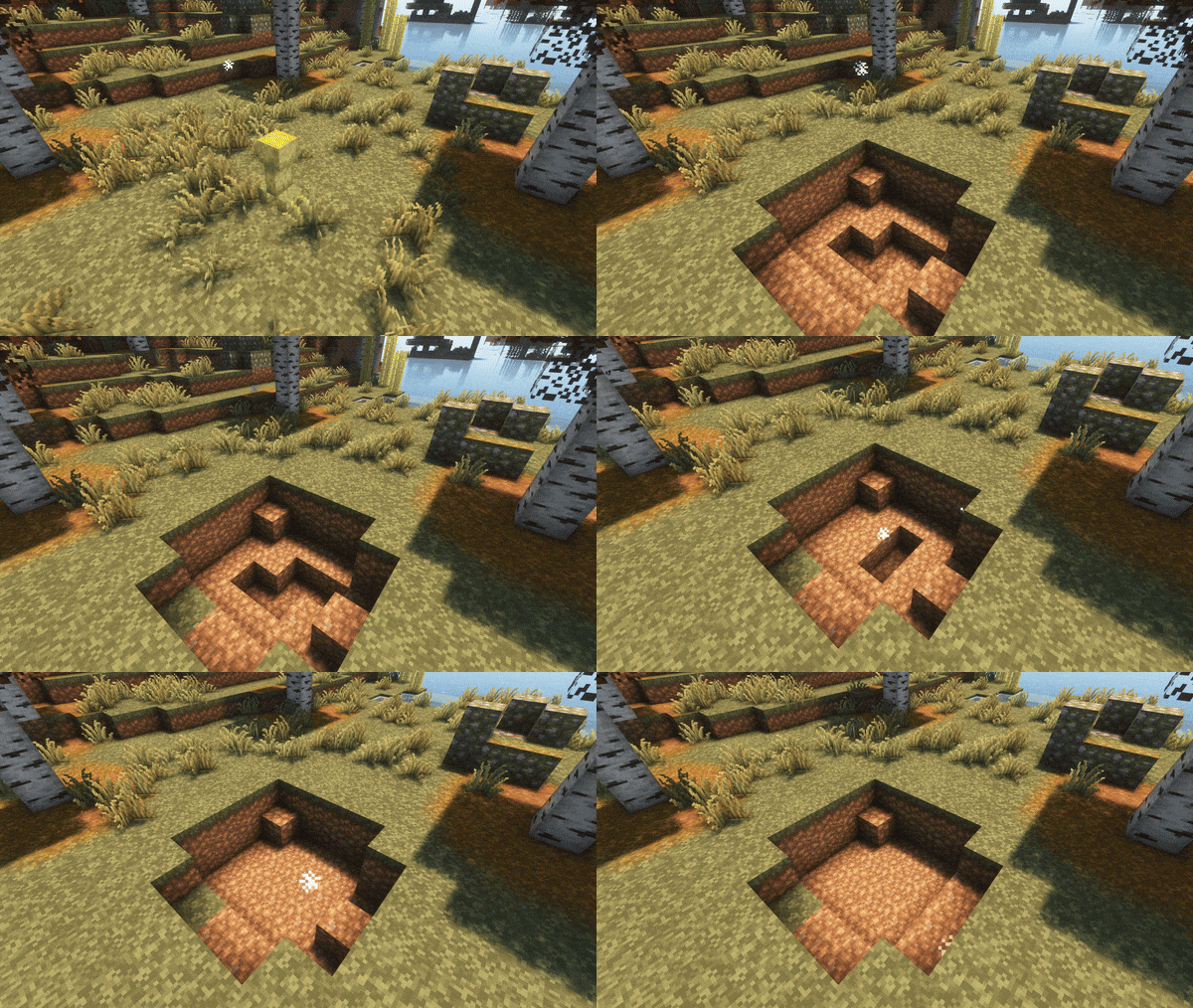
About Creeper Healing
From ModrinthA server side, customizable Fabric mod to automatically and naturally heal Creeper explosions (and other kinds of explosions!).
Creeper Healing
This server and client side, customizable mod allows the world to automatically heal Creeper explosions. It has support for configuring a custom block-replace list, for telling the mod what blocks to use to replace a previously broken one, allowing for balancing and preventing potential abuse of this mod.
Sponsored by Ember Host
Check out Ember Host if you are looking for a Minecraft server host that offers exceptional value for price. You can support my development by using the banner below, which gives a 50% cut for every first purchase to me, alongside a 10% discount to you.

Features
Explosion healing modes
Special modes that customize the way explosions are healed even further:
- Daytime Healing Mode: Makes explosions wait until sunrise to begin healing. When they do, they will need a source of light to be able to heal.
- Difficulty-based Healing Mode: Speeds up or slows down the healing of explosions depending on the difficulty of the world or server.
- Blast-resistance based Healing Mode: Blocks with a higher blast resistance will take longer to heal. Their delays will also receive a randomized offset, causing blocks to heal in bursts.
Blocks will be healed during the explosion healing process. A block may be healed at a position if a player would also be able to place a block at that position.
Different explosion sources
This mod also supports the healing of different types of explosion sources, such as mobs, TNT and blocks such as beds and end crystal blocks. You can also configure a blacklist for mob explosion sources that should not be healed.
Make explosions not drop items
You can individually configure whether explosions coming from different sources should drop their items. By default, all explosion source types except mob explosions are not allowed to drop their items, but you can configure these settings individually via the config file or via commands. There is also a blacklist for mob explosion sources that should not drop items when exploding.
Configurable delays
Configure the amount of time it takes for an explosion to start healing, and the amount of time between each block placement. Keep in mind that some explosion modes will use their own values for the explosion heal and block placement delays.
- Warning: Both delays have a minimum value of 0.05 seconds. Attempting to force a lower value by setting it manually in the config will make the mod use the default values instead.
Restore the NBT data of block entities
Toggle the restoration of block NBT data when healing the block. You can also optionally force this block to always heal to guarantee the original block along with its nbt data is always healed
Make falling blocks not fall
You can make blocks such as sand and gravel remain in place when healed. These will only fall when receiving a neighbor update.
Whitelist
You can configure an optional whitelist that allows you to specify the blocks that are allowed to heal in an explosion. To do this, you can open the mod's configuration file, and find the following section:
#Use an optional whitelist to customize which blocks are allowed to heal. To add an entry, specify the block's namespace
#along with its identifier, separated by a colon, and add it in-between the square brackets below. Separate each entry with a comma.
#Example entries:
#whitelist_entries = ["minecraft:grass",  "minecraft:stone", "minecraft:sand"]
[whitelist]
	whitelist_entries = ["minecraft:placeholder"]
To add entries to the whitelist, you can add a string containing the block's namespace and identifier separated by a colon to the array, like shown in the example above. Separate each entry with a comma. You can also find a preference setting named "enable_whitelist" to enable or disable the usage of the whitelist.
Replace map
In the mod's config file, you can customize a "replace map". This is used if you would like a certain block to be healed with another one, instead of using the same block. If a block is healed with another one, the properties of the original block will be carried over to the new block, preserving properties like the block's orientation.
To add entries to the replace map, you can open the configuration file (located in your config folder and named creeper-healing.toml), scroll down and add entries below the [replace_map] section, using the following format, and separating each entry by skipping a line:
"minecraft:name_of_old_block" = "minecraft:name_of_new_block"By default, the mod includes the following entry in the replace map:
"minecraft:diamond_block" = "minecraft:stone"- Warning: Do not set the same block to be replaced with multiple blocks, as this will cause a crash upon game startup. That is, do not use the same key twice or more in the replace map.
Extra settings
You can also find settings to toggle extra features, such as:
- Enable or disable the block placement sound effect when a block is healed.
- Heal explosions faster via splash potions of Healing or Regeneration.
Commands
All of the mod's settings can also be modified in-game via commands. Access all of them via the /creeper-healing parent command. The config file also supports being reloaded in-game via /creeper-healing reload_config to avoid having to restart the server or world. Note that all commands require operator permission.
Highlights
From source dataGame versions
Supports 18 Minecraft versions, the newest being 1.21.11.
Loaders
Runs on Fabric.
Footprint
Rated a light load on a server.
What kind of mod it is
From the catalogGameplay & overhauls
New mechanics, content and overhauls that change how the game plays.
Runs on your server
From source side supportModrinth lists Creeper Healing as required on the server. Check its Modrinth page to see whether players need it too.
Compatibility
- Game
- Minecraft
- Loaders
- Fabric
- Runs on
- Serverrequired on the server
- Game versions
- 1.21.11 and 17 earlier
Verified at the source
- ✓ModrinthOfficial listing, checked 2026-10-01Open ↗
- ✓AuthorArkoSammy12, as published on Modrinth
- ✓LicenseApache-2.0Free








