







About Custom Breed Cooldown
From ModrinthChange the breed cooldown for mobs and villagers!


Schowcase
<iframe width="560" height="315" src="https://www.youtube-nocookie.com/embed/kb3YhyOxd_E" title="YouTube video player" frameborder="0" allow="accelerometer; autoplay; clipboard-write; encrypted-media; gyroscope; picture-in-picture; web-share" allowfullscreen></iframe>
Config
/trigger custom_breed_cooldown.configConfig for 1.21.5 and down
To change the breed cooldown for every mob:
/scoreboard players set &mob_cooldown config.custombreedcooldown valuevalue = breed cooldown in seconds
To change the breed cooldown for villagers:
/scoreboard players set &villager_cooldown config.custombreedcooldown valuevalue = breed cooldown in seconds
default = vanilla cooldown (5 minutes - 300 seconds)
You can't customize the cooldown for any version below 1.21, it will always be set to 0 seconds
Some useful information for breeding mobs
| Mob | Item | | ------------ | ----------------------------------------------- | | Horse | Golden Apple and Carrot, Enchanted Golden Apple | | Donkey | Golden Apple and Carrot, Enchanted Golden Apple | | Cow | Wheat | | Goat | Wheat | | Mooshroom | Wheat | | Sheep | Wheat | | Pig | Carrot, Potato, Beetroot | | Chicken | All Seeds | | Wolf | Every Meat | | Cat | Raw Cod, Raw Salmon | | Ocelot | Raw Cod, Raw Salmon | | Axolotl | Bucket of Tropical Fish | | Llama | Hay Bale | | Trader Llama | Hay Bale | | Rabbit | Dandelion, Carrot, Golden Carrot | | Turtle | Seagrass | | Panda | Bamboo | | Fox | Sweat Berries, Glow Berries | | Bee | Flowers | | Strider | Warped Fungus (the green one) | | Hoglin | Crimson Fungus (the red one) | | Frog | Slimeball | | Camel | Cactus | | Sniffer | Torchflower Seeds |
Guides
How to Install a Datapack in Singleplayer
At the Creation of a World
How to install a datapack in singleplayer
- Open Minecraft
Launch the game.
- Create a New World
Navigate to "More" and click on "Data Packs".
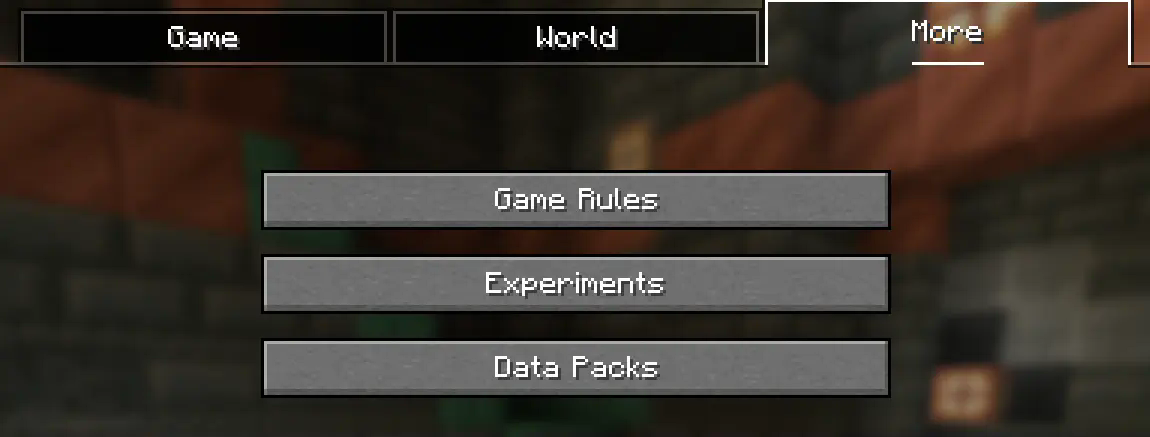
- Add the Datapack
Drag the datapack (a .zip file or directory) into the Minecraft window.
- A confirmation screen will appear. Click "Yes".
- Activate the Datapack
Move the datapack to the right-hand side of the screen by clicking the triangle on its icon (visible when hovering over it).
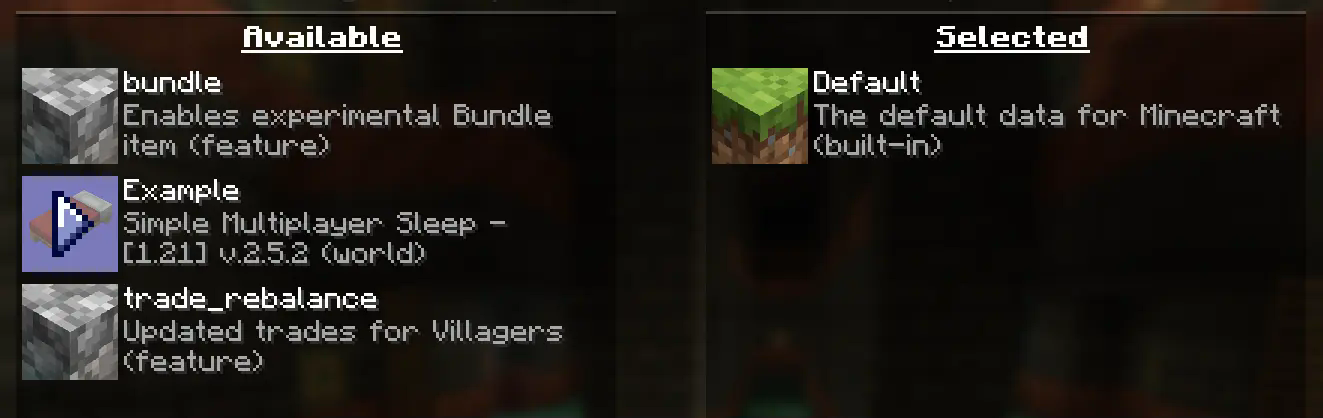
- Complete World Creation
- Click "Done" at the bottom of the screen.
- Continue creating your world and click "Create New World".
⚠️ IMPORTANT ⚠️
The datapack only works if cheats are enabled.
You can verify the datapack is active by typing: /datapack list enabled
This command should list an entry named [file/<your datapack file/directory name>].
In an Existing World
How to Install a Datapack in an Existing Singleplayer World
- Open Minecraft
Launch the game.
- Select Your World
- Choose the world you want to install the datapack for.
- Click "Edit", then "Open World Folder".
- Add the Datapack
- Open the folder named
datapacks. - Place the datapack into this folder. It should be a
.zipfile or a directory.
- Reload the World
- If you are in the world during installation, type
/reloadin the chat or press F3 + T to reload resources.
_(Make sure cheats are enabled.)_
⚠️ IMPORTANT ⚠️
The datapack only works if cheats are enabled.
You can verify the datapack is active by typing: /datapack list enabled
How to Enable Cheats Permanently After World Creation
If you encounter this issue, here is a step by step guide on how to enable Cheats/Admincommands permanently after you have already created a Minecraft world.
Highlights
From source dataGame versions
Supports 20 Minecraft versions, the newest being 26.3.
Loaders
Runs on Data pack, Fabric, Forge, NeoForge and Quilt.
Footprint
Rated a light load on a server.
What kind of mod it is
From the catalogCreatures & NPCs
Adds or changes creatures, NPCs and how they behave.
Runs on your server
From source side supportModrinth lists Custom Breed Cooldown as required on the server. Check its Modrinth page to see whether players need it too.
Compatibility
- Game
- Minecraft
- Loaders
- Data packFabricForgeNeoForgeQuilt
- Runs on
- Serverrequired on the server
- Game versions
- 26.3 and 19 earlier
Verified at the source
- ✓ModrinthOfficial listing, checked 2026-10-01Open ↗
- ✓AuthorJodek, as published on Modrinth
- ✓LicenseMITFree








