






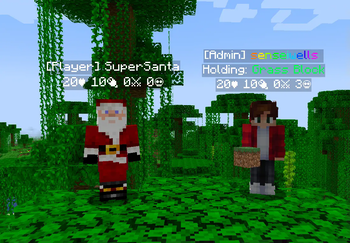

About CustomNameTags
From ModrinthThis mod provides you with a way to customize your player's name tags completely server-side with no need for any client mods.
 CustomNameTags
This mod provides you with a way to customize your player's name tags completely server-side with no need for any client mods.
> This documentation covers the latest version of the mod, for versions prior to 2.0.0 > please see the old documentation

Commands
You are able to manage your nametags from within the game with the /nametag command, this requires permission level 2 or if you are using a permissions mod you can have the permission "custom-nametags.commands.nametag".
Text arguments support the placeholders api, as well as formatting tags.
/nametag create <id> <text>Creates a nametag with the given id and text, shown on every player./nametag edit <id> text <text>Changes the text of an existing nametag./nametag edit <id> for <who>Changes the for selector of an existing nametag./nametag edit <id> priority <priority>Changes the priority of an existing nametag (higher priorities are displayed higher)./nametag delete <id>Deletes the nametag with the given id./nametag listLists all the defined nametags./nametag player <players> give <id>Gives the players the nametag, even if they wouldn't normally have it./nametag player <players> revoke <id>Hides the nametag from the players, even if they would normally have it./nametag player <players> set <id> <text>Sets the text of the nametag for just those players. If no nametag with
that id exists, this creates one that only those players have.
/nametag player <players> reset <id?>Removes the players' overrides for the given nametag, or all of their overrides./nametag reloadReloads the config file.
Examples
If you wanted to create a nametag that displays player's names but in rainbow you can run the following command:
/nametag create rainbow_name <rainbow>%player:displayname_visual%</rainbow>The id given here of rainbow_name can be any string of characters. The <rainbow> ... </rainbow> tags indicate that whatever is inbetween should be rainbow colored, this is a formatting tag. And %player:displayname_visual% means that the player's name should be inserted here, this is a placeholder. There are many more different formatting tags and placeholders that you can use.
By default, nametags are attached to everyone, if you only wanted that nametag to be displayed for operators only then you can run
/nametag edit rainbow_name for operatorsIn the case where you want to manually assign whether someone gets a nametag you can run
/nametag edit rainbow_name for nobodyWhich means by default nobody will have this nametag, you can then override this with the following:
/nametag player senseiwells give rainbow_nameThe player specified, in this case senseiwells, will always be given the nametag.
If you want to override the text of a specific nametag, or give a player a nametag only for them you can use:
/nametag player senseiwells set rainbow_name <red>Special Red Name</red>If a nametag with the id rainbow_name exists then the specified player's nametag will now display the override text "Special Red Name" which is red. If a nametag with that id doesn't exist it'll be created just for that specified player.
The commands allow you to create a basic nametag system, but for finer control the nametags config file must be manually edited...
Configuration
The configuration file for this mod is located in config/custom-nametags/config.json. The above image used the following configuration:
{
  "version": 2,
  "nametags": {
    "admin_name": {
      "text": "[Admin] <rainbow>%player:displayname_visual%</rainbow>",
      "update_interval": -1,
      "for": "operators"
    },
    "name": {
      "text": "[Player] %player:displayname_visual%",
      "update_interval": -1,
      "for": { "not": "operators" }
    },
    "held_item": {
      "text": "Holding: <green>%player:equipment_slot mainhand%</green>",
      "update_interval": 1
    },
    "data": {
      "text": "%player:health%♥ %player:hunger%🍖 %player:statistic minecraft:killed minecraft:player%⚔ %player:statistic minecraft:deaths%\uD83D\uDC80",
      "update_interval": 1
    }
  },
  "players": {}
}
> Configs from versions prior to 2.0.0 of the mod will automatically be upgraded to the > new format. Your original config will be backed up as config.old.json.
Nametags
The "nametags" object contains all the nametags that will be displayed for your players, keyed by their id. They are stacked in the order they are listed, the first being at the top.
Highlights
From source dataGame versions
Supports 24 Minecraft versions, the newest being 26.3.
Loaders
Runs on Fabric.
Footprint
Rated a light load on a server.
What kind of mod it is
From the catalogGameplay & overhauls
New mechanics, content and overhauls that change how the game plays.
Runs on your server
From source side supportModrinth lists CustomNameTags as required on the server. Check its Modrinth page to see whether players need it too.
Compatibility
- Game
- Minecraft
- Loaders
- Fabric
- Runs on
- Serverrequired on the server
- Game versions
- 26.3 and 23 earlier
Verified at the source
- ✓ModrinthOfficial listing, checked 2026-10-01Open ↗
- ✓Authorsenseiwells, as published on Modrinth
- ✓LicenseMITFree








