







About DungeonRooms
From HangarDungeonRooms lets server owners build guided dungeon runs where players unlock each room by defeating the required Mythi
DungeonRooms
> Guided dungeon runs powered by WorldGuard & MythicMobs
Overview
DungeonRooms lets server owners build guided dungeon runs where players unlock each room by defeating the required MythicMobs. Create dungeon areas with WorldGuard, set a safe spawn point, choose how many mobs each room requires, and let the plugin handle room locks, progress tracking, dungeon death returns, admin bypasses, and optional particle borders.
Compatibility
| Component | Required Version | |-----------|-----------------| | Paper | 1.21.1+ | | Java | 21 | | WorldGuard | 7.0+ | | WorldEdit | Required by WorldGuard | | MythicMobs | 5.6+ | | Player Data | Gson JSON (bundled in Paper — no extra dependency) |
Features
- Dungeon boundaries — Register a full dungeon WorldGuard region with
/dr create. - Spawn regions — Register a spawn region per dungeon before rooms can be added.
- Dungeon death override — Fatal dungeon damage is intercepted and the player is returned to the dungeon spawn.
- Per-dungeon progression — Room sequence is scoped to each dungeon.
- MythicMobs kill tracking — Only MythicMobs kills count toward room completion.
- JSON player data — Player kills and room unlocks stored in a flat Gson JSON file.
- Lightweight storage — Gson is provided by Paper. No database library is bundled.
- Atomic async saves — Writes use temp files before replacing JSON data. Safe on crash.
- Reset toggles — Death, dungeon exit, world change, and teleport resets can be toggled independently.
- Teleport pass-through protection — Ender pearls, chorus fruit, and other teleports cannot bypass locked rooms.
- Border visualization — Show current room, spawn region, or all dungeon/room borders privately via particles.
- Admin bypass — Bypass all rooms or specific dungeon rooms with permissions.
Installation
- Download
DungeonRooms-2.0.3.jar. - Place it in your server's
plugins/folder. - Install required dependencies:
- Start or restart the server.
- Edit
plugins/DungeonRooms/config.ymlif needed. - Run
/dr reloadafter configuration changes.
Commands
| Command | Permission | Default | Description | |---------|-----------|---------|-------------| | /dr create <world> <region> <dungeonName> | dungeonrooms.admin | OP | Register a dungeon boundary. | | /dr add spawn <world> <region> <dungeonName> | dungeonrooms.admin | OP | Register a spawn region for a dungeon. | | /dr setspawn <dungeonName> | dungeonrooms.admin | OP | Store current location as the dungeon return point. | | /dr add room <dungeonName> <region> <kills> | dungeonrooms.admin | OP | Register a room. Requires spawn region first. | | /dr remove <dungeonName> | dungeonrooms.admin | OP | Remove a dungeon and all its rooms. | | /dr remove room <dungeonName> <region> | dungeonrooms.admin | OP | Remove one room from a dungeon. | | /dr edit kills <dungeonName> <region> <kills> | dungeonrooms.admin | OP | Update a room's required kills. | | /dr list | dungeonrooms.admin | OP | List all registered dungeons and rooms. | | /dr status [player] | dungeonrooms.status | TRUE | Show your own progress. | | /dr status <other> | dungeonrooms.status.others | OP | Show another player's progress. | | /dr reset <player> [dungeon] | dungeonrooms.reset | OP | Reset all or one dungeon's progress. | | /dr reload | dungeonrooms.admin | OP | Reload config and refresh cached dungeon data. | | /dr showborder | dungeonrooms.showborder | TRUE | Toggle room border for the room you are inside. | | /dr showborder spawn | dungeonrooms.showborder | TRUE | Toggle spawn region border for the current dungeon. | | /dr showborder all | dungeonrooms.showborder | TRUE | Toggle all dungeon and room borders. | | /dr version | None | TRUE | Display plugin version, author, and GitHub link. |
Permissions
| Permission | Default | Description | |-----------|---------|-------------| | dungeonrooms.admin | OP | Dungeon setup, editing, removal, list, reload, and spawn setup. | | dungeonrooms.status | TRUE | Check your own progress. | | dungeonrooms.status.others | OP | Check another player's progress. | | dungeonrooms.reset | OP | Reset player progress. | | dungeonrooms.showborder | TRUE | Toggle border visualization. | | dungeonrooms.bypass | OP | Bypass all room progression requirements. | | dungeonrooms.bypass.<dungeon>.<region> | OP | Bypass one specific dungeon room. |
Scoped bypass example:
dungeonrooms.bypass.sample.room_2
Setup Guide
- Create a WorldGuard region for the whole dungeon boundary.
- Register it:
/dr create <world> <region> <dungeonName> - Create a WorldGuard region for the dungeon spawn area.
- Register the spawn region:
/dr add spawn <world> <region> <dungeonName> - Stand inside the spawn region and run:
/dr setspawn <dungeonName> - Create WorldGuard regions for each room.
- Add rooms in progression order:
/dr add room <dungeonName> <region> <kills> - Spawn MythicMobs inside rooms.
- Use
/dr statusto verify kill progress and unlocks.
Example:
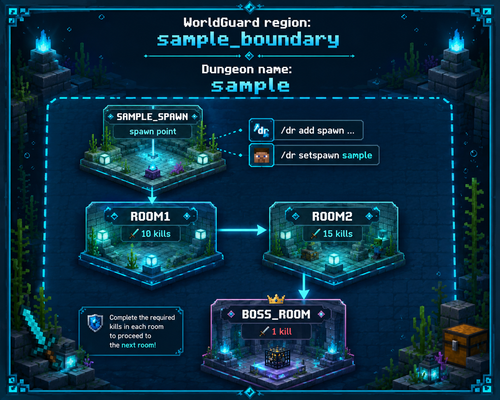
/dr create dungeon_world sample_boundary sample /dr add spawn dungeon_world sample_spawn sample /dr setspawn sample /dr add room sample room1 10 /dr add room sample room2 15 /dr add room sample boss_room 1
Region Layout
Highlights
From source dataGame versions
Supports 16 Minecraft versions, the newest being 26.2.
Loaders
Runs on Paper.
Footprint
Rated a light load on a server.
What kind of mod it is
From the catalogBuilding & decoration
Blocks, furniture, decorations and building tools.
Runs on your server
From source side supportHangar lists DungeonRooms as required on the server. Check its Hangar page to see whether players need it too.
Compatibility
- Game
- Minecraft
- Loaders
- Paper
- Runs on
- Serverrequired on the server
- Game versions
- 26.2 and 15 earlier
- Requires
- One-click install needs a Paper server.
Verified at the source
- ✓HangarOfficial listing, checked 2026-10-01Open ↗
- ✓Authorevnrca, as published on Hangar
- ✓LicenseUnspecifiedFree








