







About DupePlus
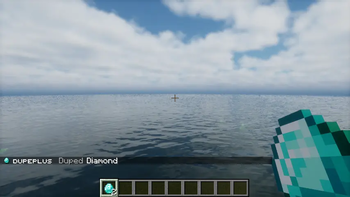
From ModrinthA highly modular Dupe Plugin Adds the /dupe command to your server.



DupePlus
The best duplication plugin for your Dupe server. DupePlus is a fully modular plugin that allows you to toggle any feature off or on! DupePlus also provides you with a user-friendly configuration with comments that help you understand what each section means in the YML. It will also make your survival easier just by duplicating. Just use "/dupe" in chat and let the magic happen!
Setup Guide
1. Installation
Download the plugin from the First Version in the Featured Versions or from the Versions Tab, then click Download and upload it to the /plugins folder in your Minecraft Server Files.
2. Configuration
The config file will be placed in the /plugins/DupePlus folder in your Minecraft Server Files.
Previous config versions will be renamed to old.config.yml or deleted.
If you ever manage to break the config.yml or accidentally erase it. Then here is the default config.yml
config.yml
# DupePlus's Settings
# Message Variables:
# <item_type> = The Duplicated item
# <item_name> = The Item's Display Name
# <old_item_count> = The Item Count before dupe
# <new_item_count> = The Item Count after dupe
# <item_count> = Item Count
# <prefix> = The default prefix or the prefix you set
# <max> = The maximum
# <min> = The minimum
# <world> = The world name
# <link> = Where you can download the new version
# <currentversion> = The current version installed in the server.
# <newversion> = The new version

# Use this website to help you customize your messages
# https://webui.advntr.dev

# If you want to request a feature or notice any issues with the Plugin. Then create an issue in the GitHub Repository.
# https://github.com/meme20200/dupeplus/issues
dupe:
  # The prefix that is added before each message.
  prefix: "<green>DupePlus</green> <dark_gray>|</dark_gray>"

  # Make it false to let everyone allowed to use this command (Default: false)
  # Permission: dupeplus.dupe
  permission: false

  # Settings to change the Dupe Command into a Custom command.
  custom-command:
    # Make it false to disable the custom command, make it true to enable it. (Default: false)
    enabled: false

    # The name used to create the custom command (Default: "dupe")
    # /<name>
    name: "dupe"

  # Other ways of using /dupe
  aliases: [ "duplicate" ]

  # The message sent to the player when try to execute dupe or reloadconfig no permission (Only if the above is true) (Default: "<prefix> <dark_gray>|</dark_gray> <red>You are not allowed to use this command</red>")
  # Allowed Message Variables: <prefix>
  # Leave blank for no message
  permission-message: "<prefix> <red>You are not allowed to use this command</red>"

  # The message sent to the player when you duplicate an item. (Default: "<prefix> <dark_gray>|</dark_gray> <gray>Duped <item_name></gray>")
  # Allowed Message Variables: <prefix>, <item_type>, <item_name>, <old_item_count>, <new_item_count>
  message: "<prefix> <gray>Duped <white><item_name></gray>"

  # The message sent whenever the player tries to dupe nothing (Air) (Default: "")
  # Leave blank for no message
  duping-nothing-message: ""

  # Settings to block or allow /dupe in specific worlds.
  worlds:
    # Make it false to disable this feature.
    enabled: false

    # Mode: whitelist, blacklist (Default: blacklist)
    # whitelist will block all worlds but only allow /dupe in the worlds list.
    # blacklist will allow all worlds but block /dupe in the worlds list.
    mode: blacklist

    # If the player tries to dupe in a blocked world. (Default: "<prefix> <dark_gray>|</dark_gray> <red>The world is banned from using /dupe!</red>")
    # Allowed message variable: <prefix>, <item_type>, <item_name>, <item_count>, <world>
    # Leave blank for no message
    blocked-message: "<prefix> <red>The world is banned from using /dupe!</red>"

    # Add or remove worlds to either block (blacklist) or allow (whitelist) it from players in the world from duping.
    worlds: [ ]

  # Checks if the item has a NBT Tag of "dupenotallowed", if it has, it will not dupe the item.
  custom-nbt-item:
    # Make it false to disable the Custom NBT feature, make it true to enable it (Default: true)
    enabled: true

    # Allowed message variable: <prefix>, <item_type>, <item_name>, <item_count> (Default: "<prefix> <dark_gray>|</dark_gray> <red>The item is blocked from being duped!</red>")
    # Leave blank for no message
    blocked-message: "<prefix> <red>The item is blocked from being duped!</red>"


  # When using /dupe, in which hand will it dupe? (Default: MainHand)
  # OffHand
  # MainHand
  dupe-on: MainHand

  # Message to the sender if they try to dupe as a non-player (Default: "DupePlus | You can't do that!")
  console-message: "DupePlus | You can't do that!"

  # Settings for blacklist / whitelist
  list:
    # Make it false to disable these features, make it true to enable it (Default: false)
enabled: falseHighlights
From source dataGame versions
Supports 33 Minecraft versions, the newest being 26.2.
Loaders
Runs on Bukkit, Folia, Paper, Purpur and Spigot.
Footprint
Rated a light load on a server.
What kind of mod it is
From the catalogGameplay & overhauls
New mechanics, content and overhauls that change how the game plays.
Runs on your server
From source side supportModrinth lists DupePlus as required on the server. Check its Modrinth page to see whether players need it too.
Compatibility
- Game
- Minecraft
- Loaders
- BukkitFoliaPaperPurpurSpigot
- Runs on
- Serverrequired on the server
- Game versions
- 26.2 and 32 earlier
Verified at the source
- ✓ModrinthOfficial listing, checked 2026-10-01Open ↗
- ✓Authorgalaxydevel0per, as published on Modrinth
- ✓LicenseMITFree








