






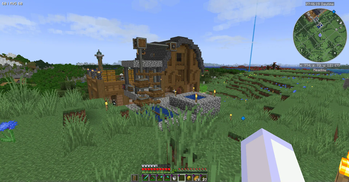

About EinsEinundzwanzigEins
From ModrinthMinecraft Create + QoL Building & Exploring
DISCONTINUED
The new Project is EinsEinundzwanzigElf for MC 1.21.11 (Fabric). There is "Create Fly" which ports Create to the newest Minecraft version.
This is old:
RoadWeaver mod added in 1.6.3
World generation takes longer. And world joining after the generation even takes more longer then. To a point where you think the game has crashed. As other road constructing mods I've tested this one does not consume FPS after the roads are layed. Your world just makes sense now. Consider adding modded villages and structures you like to the road config in the road map. A fresh installation only has the vanilla villages in it.Memory needed = 4GB
It is possible to play the Overworld with only 2GB (2048MB) of RAM. However, as soon as you enter the Nether due to the enhanced world height the game will start lagging and finally freeze. With 4096MB (4GB) the Nether runs smoothly.1.5.2 Create Up and Downs
About a week after the modpack was stable again Create was updated. Promising to be more stable and having fixed many issues. So Create 6.0.7 was packed in and BWG was back again. But - The new Create is not stable. We lost our server world when Bohzo made an elevator. The next issue was giving a straw to a blaze burner. Create is now back to 6.0.6 but BWG is updated and sends a lot of error messages to the server console. Petrol_s Parts are back. Big storage mods are not needed as Create and Tom's get everything done.1.4.1 Big Cut (about 100 mods gone)
After the server not starting up anymore I decided to give it a fresh start. I learned that Create could replace AE2 in it's own way. So I decided to stuck with Create and Tom's Simple Storage as the main mods.Version 1.3.1 fixed invulnerability bug
With a shield, you were invulnerable due to the config setting of negating 100% from incoming damage. Bohzo and I decided to allow the passive shield to destroy only 50% of the damage. This lets the shield still be an important piece of armor. We are already having more fun and more death notes with the new setting.Version 1.3.0 is online
New testserver setup will follow soon. Powah is still there as it proved stable when the optimization mods are gone. The only optimization mod now in the modpack is "I'm Fast" which shall switch off "moved too quickly" and "moved wrongly" errors. It is recommended to start a new world as the world generation has totally changed. Energized Power was in the pack during testing, now it is not any more. We have Pneumatic Craft instead.
How to set up a server (not required for single player)
If you have a MineCraft Server:Keep in mind that there are mods which are Single Player only and only belong to the client side. This explains why after uploading the mods and configs folder to your server you will start to delete mods from the mods folder.
- Install your server with the newest NeoForge version.
- Upload mods and config folder contents from your single player installation to the server's correct folders
- Delete some jar files from the mods folder:
- AdvancedBackup
- better-clouds
- BuildGuide
- journemap-webmap-neoforge
- lighty-neoforge
And that was it.
Hello
I do not like grinding. I do not want to do strip mining. I want to be able to craft my resources. But it shall not be too easy. Then I'll lose interest. And build some cool contraptions.
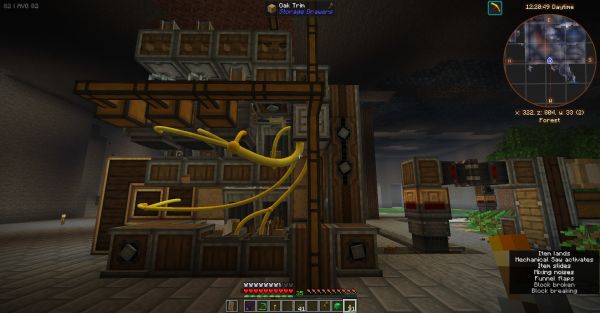
This modpack is centered around two main mods:
Create and Tom's Simple Storage
New to the Create mod?
Official Create Mod teaser video from the mod website:
<iframe width="560" height="315" src="https://www.youtube-nocookie.com/embed/rR8W-f9YhYA" title="YouTube video player" frameborder="0" allow="accelerometer; autoplay; clipboard-write; encrypted-media; gyroscope; picture-in-picture; web-share" allowfullscreen></iframe>
Here's an intro which helped me a lot. It is not made by me. I am not to blame for it. But I like it.
https://www.youtube.com/watch?v=bf4viR2cF1A (direct link)
<iframe width="560" height="315" src="https://www.youtube-nocookie.com/embed/bf4viR2cF1A" title="YouTube video player" frameborder="0" allow="accelerometer; autoplay; clipboard-write; encrypted-media; gyroscope; picture-in-picture; web-share" allowfullscreen></iframe>
And some quality-of-life mods
For example:
- 1024 Extended: World height and depth changed to 1024
- Accessories: More slots
- Multiple structure mods to borrow resources from
- Backup
- Anvil mods (cost, restauration, enchantment transfer)
- Automatic doors
- Bank & Tank storage
- Better Clouds
- Bibliocraft furniture
- Curvy Pipes
- Distracting Trims
- Emi & Jei (Recipes lookup mods)
- Enchanting Infuser, Enchantment Descriptions
- Everlasting Abilities
- Farmers Delight, Farming for Blockheads
- Storage Drawers, Functional Storage, Tom's simple Storage
- Geophilic
- Rotten flesh converting to leather in a furnace
- Iron Jetpacks (there are some more flight - mods inside for gliders and airplanes)
- Journeymap (Waypoint teleporting), Journeymap Webmap (A use for your 2nd monitor)
- Mineral Chance
- Modern Fix
- Modular Routers
... I'm out of ink here. There's more.
There are many Create-themed buildings all over the map w here you can "borrow" your first create-related resources from. With the "Mineral Chance" mod we avoid mining and get first iron, redstone and even diamonds from digging out the base.
Highlights
From source dataGame versions
Built for Minecraft 1.21.1.
Loaders
Runs on NeoForge.
Footprint
Rated a light load on a server.
What kind of mod it is
From the catalogBuilding & decoration
Blocks, furniture, decorations and building tools.
Runs on your server
From source side supportModrinth lists EinsEinundzwanzigEins as required on the server. Check its Modrinth page to see whether players need it too.
Compatibility
- Game
- Minecraft
- Loaders
- NeoForge
- Runs on
- Serverrequired on the server
- Game versions
- 1.21.1
Verified at the source
- ✓ModrinthOfficial listing, checked 2026-10-01Open ↗
- ✓AuthorKonitor, as published on Modrinth
- ✓LicenseMITFree








