






About Excavated Variants
From ModrinthAutomatically generated stone variants of ores
Excavated Variants
NeoForge version requires: Dynamic Asset Generator
Fabric/Quilt version requires: Dynamic Asset Generator and Fabric API/Quilted Fabric API
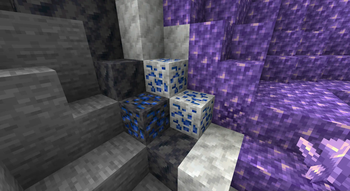
Adds automatically generated variants of ores based on various stones.
Details:
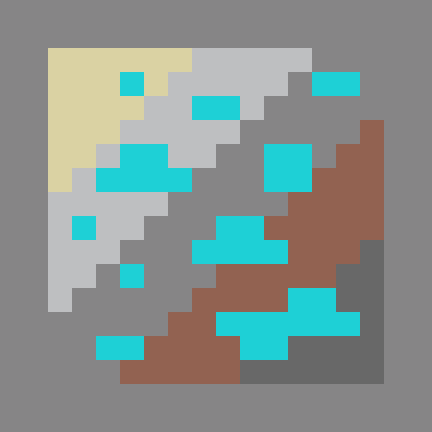
Many mods add new stones or new ores. _Excavated Variants_ automatically adds new ores for each combination of ore and stone variant. Additionally, _Excavated Variants_ attempts to set up world gen for these ore variants. The variants added can be changed in the config file; some mods are built in to the default configuration; others will have to be manually added. See _Images_ tab of _Curseforge_ page for examples of generated ores.
Troubleshooting:
Running into issues? Start here!
- If world or game loading times are slow, try turning on stronger asset and/or data caching in the config for _Dynamic Asset Generator_.
- Is the game crashing on launch? Do ore textures turn magenta and black? Something may be wrong with your config. Try removing and resetting it.
- Are you missing compatibility for a mod listed below? Delete your configs to reset them to the default.
Compatibility:
_Excavated Variants_ comes with default configs that include ore variants for the following mods, in addition to vanilla stones and ores:
- Quark
- Create
- Oh The Biomes You'll Go
- Tech Reborn
- Immersive Engineering
- Blockus
- Better End
- Better Nether
- Promenade
- Twigs
- Unearthed
- Bewitchment
- Mekanism
- Mystical Agriculture
- And more!
Config Format
The main config file, config/excavated_variants.json, contains several options:
- attempt\_worldgen\_replacement: Toggles ore-gen changes; without this, ores won't be replaced during world gen.
- add\_conversion\_recipes: Toggles whether to add recipes to convert variants back to the base ore.
All other configuration is loaded through the globalresources folder. You may add new config files there directly, but if you want to extract the built-in configs in order to edit them, open the defaultresources.json config file. It should look something like as follows:
{
  "extract": {
    "excavated_variants": "unextracted"
  }
}
Change unextracted to extract and load the game once. Now, the default configs will be available to edit in the globalresources folder.
Note: If you just want to add more configs, you do not need to (and should not) do this. You can add new config files without extracting existing ones.
Configs define four main data types:
- Ground Types: Ground types represent classes of ores and stones. They are used to determine which new ore/stone combinations (variants) should be created. For example:
excavated_variants:overworldis a category shared by normal minecraft stone, deepslate, and overworld ores. - Ores: Ores are types of blocks which can exist in any number of different stones. During worldgen, they are replaced with variants matching neighboring stones. For example:
excavated_variants:minecraft/iron_orerepresents both normal and deepslate iron ore, as well as any other variants generated. - Stones: Stones are blocks which ores generate within. For example:
excavated_variants:minecraft/graniterepresents granite, and contains information about which new variants to generate based off of granite. - Modifiers: Modifiers are used to modify the properties of variants. They can be used to add tags, change block properties, prevent variant creation, and more.
Except when changed by modifiers, variants are generated for all ore/stone combinations that share a ground type and do not already have a variant.
Ground Types
Placed in globalresources/[folder/pack]/globaldata/[namespace]/excavated_variants/ground_type. They are JSON files with the following structure:
- (nothing): these don't actually hold any data yet! Just use an empty JSON file:
{}.
Ores
Placed in globalresources/[folder/pack]/globaldata/[namespace]/excavated_variants/ore. They are JSON files with the following structure:
types: a list of ground types that this ore can generate in. For example:["excavated_variants:overworld"].translations: an object with locales as keys (such asen_us) and translated names of the ore as values. Translations will be prepended by the stone name, unless the translation contains%s, in which case the stone name will be inserted at that location.tags: a list of tags that variants of this ore will be added to, as both block and item tags.blocks: a map representing pairings of variants of this ore with stones. Each key is the identifier of a block representing an ore variant. Values take one of two forms:- a string representing the identifier of a stone. For example:
"excavated_variants:minecraft/granite". This variant will be assumed to exist if the mod who's mod ID is the namespace of the block ID is present. - an object with the following fields:
stone: a string representing the identifier of a stone. For example:"excavated_variants:minecraft/granite".required_mods: a list of mod IDs that must be present for this variant to be generated. For example:["spelunkery", "create"].generating: (optional, defaults to true) whether this variant can be used as a parent for new, generated variants.
Stones
Placed in globalresources/[folder/pack]/globaldata/[namespace]/excavated_variants/stone. They are JSON files with the following structure:
Highlights
From source dataGame versions
Supports 13 Minecraft versions, the newest being 1.21.1.
Loaders
Runs on Fabric, Forge, NeoForge and Quilt.
Footprint
Rated a light load on a server.
What kind of mod it is
From the catalogWorld generation
Changes or adds to how new terrain, biomes and structures are created.
Runs on your server
From source side supportModrinth lists Excavated Variants as required on the server. Check its Modrinth page to see whether players need it too.
Compatibility
- Game
- Minecraft
- Loaders
- FabricForgeNeoForgeQuilt
- Runs on
- Serverrequired on the server
- Game versions
- 1.21.1 and 12 earlier
Verified at the source
- ✓ModrinthOfficial listing, checked 2026-10-01Open ↗
- ✓Authorlukebemish, as published on Modrinth
- ✓LicenseLGPL-3.0-or-laterFree








