






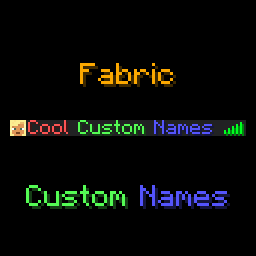
About Fabric Custom Names
From ModrinthCustom names (prefixes, suffixes and nicknames) for Fabric servers
Custom Names








This mod adds a /name, a /itemname and a /itemlore command to Minecraft, which players can use to set a prefix, suffix, or nickname, or give their items colourful names and lore. Mostly designed to be used in small, private servers, although through the use of name groups you can also limit which players can use which prefixes/suffixes/nicknames.
Optionally, the mod also has a feature to display custom names in-game, above a player's head. This also features options to customise the style (background colour and text opacity), as well as customising the lines of text shown.
Supports prefixes/suffixes set with LuckPerms as well!
Feel free to report any bugs, or suggest new features, at the issue tracker.
License
This mod is licensed under GNU LGPLv3.
Donating
If you like this mod, consider donating.
Discord
For support and/or any questions you may have, feel free to join my discord.
Version support
| Minecraft Version | Status | |-------------------|--------------| | 26.3.x | ✅ Current | | 26.2.x | ✔️ Available | | 26.1.x | ✔️ Available | | 1.21.11 | ✔️ Available | | 1.21.9+10 | ✔️ Available | | 1.21.6+7+8 | ✔️ Available | | 1.21.5 | ✔️ Available | | 1.21.4 | ✔️ Available | | 1.21.2+3 | ✔️ Available | | 1.21+1 | ✔️ Available | | 1.20.5+6 | ✔️ Available | | 1.20.4 | ✔️ Available | | 1.20.1 | ✔️ Available | | 1.19.4 | ✔️ Available | | 1.19.2 | ✔️ Available |
I try to keep support up for the latest drop of Minecraft. Updates to newer Minecraft versions may be delayed from time to time, as I do not always have the time to immediately update my mods.
Unsupported versions are still available to download, but they won't receive new features or bugfixes.
NeoForge ports are available for Minecraft 26.1 onwards.
Usage
Mod builds can be found on the releases page, as well as on Modrinth.
This mod is oriented at Fabric Minecraft servers, but works on the client as well. This mod requires the Fabric API.
The /name command can be used as follows:
/name prefix- sets a prefix for your name, or when no prefix is given, clears your prefix.- Requires operator or the
customname.prefixpermission. /name suffix- sets a suffix for your name, or when no suffix is given, clears your suffix.- Requires operator or the
customname.suffixpermission. /name nickname- sets a nickname that will appear instead of your IGN, or when no nickname is given, clears your nickname.- Requires operator or the
customname.nickpermission. /name other <prefix|suffix|nickname> <player>- Same syntax as their respective
/name <prefix|suffix|nickname>commands, but to set another player's prefix/suffix/nickname. Requires operator or thecustomname.otherpermission on top of the respectivecustomname.<nametype>permission.
When hovering over a player's name with advanced tooltips enabled, their real name will show up.
The /itemname command can be used to rename the item you're currently holding. Requires operator or the customname.itemname permission.
Similarly, the /itemlore can be used to set the lore of an item you're holding. Requires operator or the customname.itemlore permission. \n can be used to create new lines, \\ can be used to escape a backslash.
Similar to the /name commands, running these commands without arguments resets the item name/lore of the item you're holding.
Minecraft's formatting codes can be used to format your prefix, suffix, nickname, or your item names/lores. Instead of the § character, use & (to use & in an (item)name, type &&). Alongside Minecraft's default formatting codes, the &#<hex code> format can be used as well.
Useful tools to easily create formatted names are available here and here. Usage of formatting codes in names can be disabled in the config file.
Alongside the /name command, this mod also supports reading prefixes and suffixes from the LuckPerms mod.
API
Other Fabric or NeoForge mods can read names managed by Custom Names through the CustomNameApi class:
import net.minecraft.network.chat.Component;
import net.minecraft.server.level.ServerPlayer;
import xyz.eclipseisoffline.eclipsescustomname.api.CustomNameApi;
import xyz.eclipseisoffline.eclipsescustomname.api.CustomNameType;

Component prefix = CustomNameApi.getName(player, CustomNameType.PREFIX);
Component nickname = CustomNameApi.getName(player, CustomNameType.NICKNAME);
Component displayNickname = CustomNameApi.getDisplayNickname(player);
Component suffix = CustomNameApi.getName(player, CustomNameType.SUFFIX);
Component fullName = CustomNameApi.getFullName(player);Highlights
From source dataGame versions
Supports 26 Minecraft versions, the newest being 26.3.
Loaders
Runs on Fabric and NeoForge.
Footprint
Rated a light load on a server.
What kind of mod it is
From the catalogGameplay & overhauls
New mechanics, content and overhauls that change how the game plays.
Runs on your server
From source side supportModrinth lists Fabric Custom Names as required on the server. Check its Modrinth page to see whether players need it too.
Compatibility
- Game
- Minecraft
- Loaders
- FabricNeoForge
- Runs on
- Serverrequired on the server
- Game versions
- 26.3 and 25 earlier
Verified at the source
- ✓ModrinthOfficial listing, checked 2026-10-03Open ↗
- ✓Authoreclipseisoffline, as published on Modrinth
- ✓LicenseLGPL-3.0-onlyFree








