






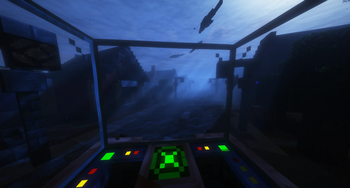

About Flooded City
From ModrinthSomething terrible has happened and the city is in ruins. When trying to gather your thoughts it seems you aren't too safe yet as the water levels are rising.
Flooded City by Forge Labs

Something terrible has happened and the city is in ruins. When trying to gather your thoughts it seems you aren't too safe yet as the water levels are rising. The water is full of terrific creatures that can tear you apart. What will you do to survive the rising water and the creatures within?
<iframe width="560" height="315" src="https://www.youtube-nocookie.com/embed/vRJtFetkA1Q" title="YouTube video player" frameborder="0" allow="accelerometer; autoplay; clipboard-write; encrypted-media; gyroscope; picture-in-picture; web-share" allowfullscreen></iframe>
Notice!
To add the rising water levels you will for now have to use Worldedit.
Please note that this is a very demanding process. This process replaces millions of blocks at a time. It is not recommended for low end hardware.
- Type in the following in chat //pos1 1174,62,903. This will set the first position to be one of the corners of the city.
- Then, type //pos2 -228,x,-70 where x represents the amount you want to raise the water level by. For example if you wanted to raise the water level by 10, you'd replace x with 72. This is because we have added 10 to the current water level value, which is 62.
- Finally, in chat you'll want to enter the command //replace 0 water. It will take some time depending on your PC, but you should notice an increase in the water level.
- When raising the water level again, you'll want to adjust the y value in both position commands to ensure that not you're covering blocks you've already filled. For pos1, set the y value to be the y value of pos2, which would be 72. For pos2, you'll want to set the y value to be this new y value plus however many blocks you want to raise the water level by. If we wanted to do 10 again, we'd do 82.
And that's it! Repeat this process every 10 days if you want the water level to increase regularly.
</br>
🔬 World used
Socials




</br>
🧪 Content Mods
Alex's Caves
Alex's Mobs
Aquamirae
Aquaculture 2
AquaticCraft
BadMobs
Biome Spawn Point
Born in Chaos
Embeddium
In Control!
Simple Inventory Sorter
Just Enough Items
Mouse Tweaks
Ok Zoomer
Physics Mod
Sinytra Connector
The Dawn Era
The Hordes
Untamed Wilds
Weather Storms & Tornadoes
What Are You Voting For? 2023
WorldEdit
</br>
🧬 Library Mods
Atlas Lib
AstemirLib
AzureLib
Citadel
Collective
CoroUtil
Forgified Fabric API
Geckolib
Obscure API
Oculus
SmartBrainLib
</br>
⚗️ Shader Packs
Highlights
From source dataGame versions
Built for Minecraft 1.20.1.
Loaders
Runs on Forge.
Footprint
Rated a light load on a server.
What kind of mod it is
From the catalogWorld generation
Changes or adds to how new terrain, biomes and structures are created.
Runs on your server
From source side supportModrinth lists Flooded City as required on the server. Check its Modrinth page to see whether players need it too.
Compatibility
- Game
- Minecraft
- Loaders
- Forge
- Runs on
- Serverrequired on the server
- Game versions
- 1.20.1
Verified at the source
- ✓ModrinthOfficial listing, checked 2026-10-01Open ↗
- ✓AuthorXircon, as published on Modrinth
- ✓LicenseLicenseRef-All-Rights-ReservedFree
More like Flooded City
Other Minecraft mods, same category first, ranked by real downloads.

Fabric API
Libraries & compatibility · Modrinth
Lightweight and modular API providing common hooks and intercompatibility measures utilized by mods using the Fabric toolchain.


Cloth Config API
Libraries & compatibility · Modrinth
Configuration Library for Minecraft Mods

FerriteCore
Performance · Modrinth
Memory usage optimizations

Lithium
Performance · Modrinth
No-compromises game logic optimization mod, useful for both single-player games and multi-player servers.


YetAnotherConfigLib (YACL)
Libraries & compatibility · Modrinth
A builder-based configuration library for Minecraft!

Fabric Language Kotlin
Gameplay & overhauls · Modrinth
This is a mod that enables usage of the Kotlin programming language for Fabric mods.

Architectury API
Libraries & compatibility · Modrinth
An intermediary api aimed to ease developing multiplatform mods.

AppleSkin
Quality of life & UI · Modrinth
Food/hunger-related HUD improvements
Flooded City, answered
Generated from the mod’s own source data.
Do my players need to install Flooded City?
Modrinth lists Flooded City as required on the server. Check its Modrinth page to see whether players need it too.
Which loaders does it support?
Forge.
Is it free?
Yes. Flooded City is free to download from Modrinth. Its license is LicenseRef-All-Rights-Reserved.
How do I add it to my Nxeon server?
Use “Add to a server” on this page, or open NxLabs from your dashboard. We install it, restart your server and switch it on.

Run Flooded City on a Minecraft server.
Deploy in about a minute from $4.20 a month, then add Flooded City in one click.