






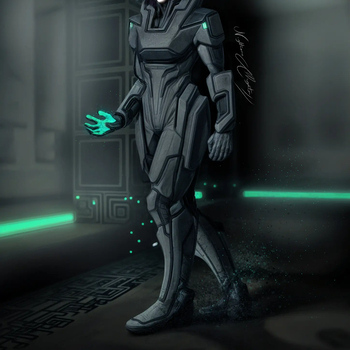

About Halo & MDE
From ModrinthGuns, Building blocks, Armory, Materials, New Dimension and More!
(Warning: Performance hungry)
_Are you a Youtuber?_
Spoiler
The Next 5 Youtubers to do a 12+ minute review of Halo & MDE will get a custom made armor set of any kind (Mjolnir Mk.V, Elite, Forerunner, Custodian?...) they want which will be linked to their Minecraft username.
Summit your video through The Halo & MDE Official Discord Server
RANK 0:
IronBrock
<iframe width="560" height="315" src="https://www.youtube-nocookie.com/embed/iYH0Yq0KVG8" title="IronBrock" frameborder="0" allow="accelerometer; autoplay; clipboard-write; encrypted-media; gyroscope; picture-in-picture; web-share" allowfullscreen></iframe>
RANK 1:
RANK 2:
RANK 3:
RANK 4:
RANK 5:
<iframe width="560" height="315" src="https://www.youtube-nocookie.com/embed/hc-qbPrkl8g" title="MOD Trailer" frameborder="0" allow="accelerometer; autoplay; clipboard-write; encrypted-media; gyroscope; picture-in-picture; web-share" allowfullscreen></iframe>
The latest Development Entry:
<iframe width="560" height="315" src="https://www.youtube-nocookie.com/embed/nSgk3xPY43o" title="YouTube video player" frameborder="0" allow="accelerometer; autoplay; clipboard-write; encrypted-media; gyroscope; picture-in-picture; web-share" allowfullscreen></iframe>
(Originally uploaded on CurseForge, I bring it here too!)
https://www.curseforge.com/minecraft/mc-mods/halo-mde
Sponsored by Sparked Host!
Do you want to setup your fresh, interesting, new Minecraft Server? Easy to setup, easy maintaining and customization, top speed and support? Sparked Host might be the light you need! Use my Link and code "MAEKRAN" for 25% off in your hosting!

_Don't know how to start your server afterwards? I use it too, here's how I did it:_
Spoiler
Here's the official tutorial, but down below I can explain to you my own experience (forge server)
It starts in billing, your client area. There's an horizontal set of tabs where "Services" is located. Click on there and in "My Services". You'll then find your server in the hard to miss list of purchased services. Click on wherever you like except on the yellow string of numbers/letters. Down below, on the "Hosting Information" tab, press the "Go to Panel" button.
Once inside, the panel scroll down through the column on the left until you see the "Minecraft" section with the "Versions" tab inside of it. Here, you can select the base software for your server.
You'll be presented with a large tab that lets you choose between different MC releases depending on the software (vanilla, paper, forge, fabric...). Likely if you still want to play with my mod (and others), click the Forge spoiler where it says "View Builds". You can select what you need, I'll select the latest 1.18.2 as that's where I usually play (and develop) anyways (Futurepack my beloved).
Once you click "Install", the software will begin to, you wouldn't believe it, install itself. Make sure to backup the server files if you used it before, because they can be replaced once a new version is installed (there's a "Wipe Server Files" slider button for it). This is usually fast to finish.
Once the installation is complete, Forge in my case, come back to the column on the left and go way down until you find "Configuration" and, just two slots below, "Settings". Take a look, it's almost complete. You can change the server's name and description there along other misc stuff like the timezone. Go all the way up still inside Configuration, the "Configs" tab. There, select "MINECRAFT JAVA: CONFIGURATION FILES" and down below select "server.properties" and install.
Start the server all the way up on the left. It will ask you to accept the Mojang EULA, accept it. Otherwise, you will not be able to play on the server and several other services. Once you accept the EULA, the server will complete its' inner workings and start for real once you try to run it again. Once it finishes this stage, you can use the IP just at the top of the display to join your server, but wait, you don't have any mods installed yet. Stop the server, let's fix that down below.
Scroll up on the left column to the "Basic" section, inside the "Files" tab. As you can see, much more files appeared. The two folders that you need to work on are the "mods" and "world" folder. If you want to exactly place the mods you tested in singleplayer and don't feel like looking for them in the server itself (like me fr): Open the "mods" folder and drop every mod you want the server to use on your own "mods" folder inside ".minecraft" or your modpack Instance/Profile.
Still inside the "Basic" section, the Apollo Panel has its own mods tab called "Launchpad" where you can browse mods and modpacks from well-known platforms like Modrinth or Curseforge! You can choose to install mods that way.
Mods like Optifine, Sodium/Embeddium or Torohealth are only client-side and can end up in errors, so make sure that mods uploaded are server-side or both (like Just Enough Items). Once you upload all the mod files, you can go back to the file manager's main directory.
Does any of your mods alter generation in any way? If that's the case, outright delete the "world" folder. That should make the server create a new one, and, by default, apply the mod changes the next time you run it.
Now, it's time to start your server for real. Run it, wait until it's done and play! Sparked Host, like in my RocketNode days, makes lots of things easier for you, I hope you enjoy your deserved service :)
Do you want to customize the server a little more?
I'm still here to help. I can teach you basic things like a logo for your server, the description and the maximum number of players that can join.
Highlights
From source dataGame versions
Supports 4 Minecraft versions, the newest being 1.20.1.
Loaders
Runs on Forge.
Footprint
Rated a light load on a server.
What kind of mod it is
From the catalogWeapons, items & crafting
New weapons, gear, items and the recipes to make them.
Runs on your server
From source side supportModrinth lists Halo & MDE as required on the server. Check its Modrinth page to see whether players need it too.
Compatibility
- Game
- Minecraft
- Loaders
- Forge
- Runs on
- Serverrequired on the server
- Game versions
- 1.20.1 and 3 earlier
Verified at the source
- ✓ModrinthOfficial listing, checked 2026-10-01Open ↗
- ✓AuthorMaekran, as published on Modrinth
- ✓LicenseLicenseRef-All-Rights-ReservedFree








