







About Into The Omniverse: AlienEvo AddonPack
From ModrinthInto The Omniverse is an Omniverse themed expansion pack for the Palladium based Ben 10 mod addon Alien Evolution! Currently, it adds in a new watch and a custom way of obtaining it! More to come later on...
How to obtain The Completed Omnitrix:
ITEMS NEEDED:
Spoiler
- Watch that lets you turn into aliens
- 1 Ancient Scroll
- 2 Lime Omni Crystals
- 6 Galvan Circuits
- 6 Redstone Dust
- 24 Raw Titanium
- 20 Galvan Scrap
- 20 Netherite Scrap
- 20 Nether Quartz
CRAFTING RECIPE PROCESS:
Spoiler
- Use Fourarms and Shift + Right Click with the designated items on a Grindstone to get the powder form of it. Items include: Netherite Scrap, Raw Titanium, Galvan Scrap and Nether Quartz.
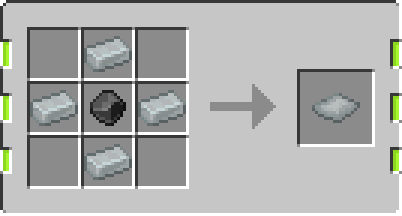
- Combine it together in either a 2x2 or 3x3 crafting grid to get Galvan Alloy Blend, doesn't matter in which order or what placement, it's a shapeless crafting recipe.
- Use Heatblast and Right Click the Galvan Alloy Blend in your hand to be turned into Galvan Alloy (Ingot form).
- Use Upgrade to make Advanced Galvan Circuits. Right Click with Redstone in offhand and Galvan Circuit in mainhand (Don't recommend looking at the ground while doing it, it'll place Redstone on the ground as well, which won't duplicate or anything just seems jarring).
- Use 4 Galvan Alloy and 1 Raw Titanium in the middle to craft a Reinforced Galvan Plate (Same recipe shape as normal Galvan Plate).
- Use Greymatter and Right Click with the Completed Core Blueprint, it will tell you what items are missing to be able to craft it (just like his mech blueprints). Once crafted, it will consume the designated items and blueprint and return give you the core.
- Completed Core Blueprint is gotten from the Galvanologist as one of it's last trades, as well as Randomizer Code Tablets. Blueprint costs 1 Ancient Scroll, Randomizer Tablets costs a sum of emeralds.
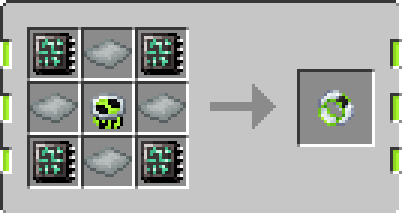
- Go to a crafting table and place the materials as if you'd make a Prototype Omnitrix (Core in the middle, Reinforced Galvan Plate in a plus shape, Advanced Galvan Circuit in an X shape).
The Completed Omnitrix and what it can do:
Spoiler
- The Completed Omnitrix runs off of a modified battery system, the user can freely detransform and transform whenever without any penalty.
- The Completed Omnitrix can be virtually used to never need to recharge if the player doesn't abuse the battery or give it a need to go into recharge mode.
- Taking damage in Alien Form drains the battery faster, causing a timeout sooner.
- Using Quick Change too much drains the battery faster, causing a timeout sooner.
- If the user fully depletes the battery, it will warn the user about the impending timeout (Trying to outsmart it by detransforming as it's beeping will still put the user in a timeout).
- Once timed out, the Completed Omnitrix enters into Recharge Mode. Attempting to transform while in Recharge Mode will display an Error icon where the Alien Selection should be, and attempting to transform will play an Error sound.
- The user will be notified once the Omnitrix is done recharging via an audio cue of 4 beeps and visually flashing on the faceplate (Reference to s1ep1 of Omniverse).
- Certain faceplates have different Recharge flash shapes, but most do the entirety of the faceplate and will dynamically match your glow color.
- In the Power UI, the player will be met with a new, fresh and revamped UI. You can customize the watch using sliders, which there are now 4 (Locked only to the Completed).
- Below the sliders are two buttons - Left one toggles spikes on and off (visually represented) and the right one changes faceplate design (visually represented).
- At the left of the UI, there is a new UI called "Preview". It displays the Omnitrix User with an auto-rotating 360 display (This can be paused/unpaused pressing the button right below it).
- The 6 decorative buttons over at the "Preview" side dynamically update with your glow colour, inner border updates with Tertiary.
- Clicking and dragging the Preview User will let you control rotation and better see how your customizations look on the player, without having to tab out constantly.
- The Completed Omnitrix has its own skillpoints, independant from the Prototype, but follows the same logic of "for every level 10 alien = 1 skillpoint". In total, 10 Skillpoints are needed.
- The Completed Omnitrix generates it's core with 2 playlists - all of the base Evo canon aliens split into 2 randomized playlists.
- The Completed Omnitrix Skillpoints icon in the UI dynamically updated depending on the Tertiary slider. Decoupling the watch will visually match the Skillpoints Icon.
- Having the Prototype Core in the offhand and Completed Core in the mainhand and pressing Right Click will copy ANY ALIEN (CUSTOM OR BASE EVO) from the Prototype over to the Completed IF the Completed does not already have it. (Note: After putting in the core again from Scrambling, RIGHT-CLICK WHILE ACTIVE TO UPDATE PLAYLISTS!).
- Modules placed into the Completed Omnitrix visually show up at the top 3 empty spaces in the Power UI. If left clicked, will remove them from the watch and restore it to the User's inventory.
- If the User dies in Alien Form, they will detransform. However, if they die in Baseform, they will be automatically turned into an alien, dependant on the situation. If Alien Failsafe is triggered, will go on a 10 minute cooldown.
(Note: Jetray is in the list of Aliens for dying due to falldamage, so don't be surprised if you turn into an "invisible" alien)
- Customs that haven't updated their Aliens to be compatible yet will have in place a backup sil instead, to prevent crashes.
Highlights
From source dataGame versions
Built for Minecraft 1.20.1.
Loaders
Runs on Fabric and Forge.
Footprint
Rated a light load on a server.
What kind of mod it is
From the catalogListed on Modrinth as “Mods”
Gameplay & overhauls
New mechanics, content and overhauls that change how the game plays.
Runs on your server
From source side supportModrinth lists Into The Omniverse: AlienEvo AddonPack as required on the server. Check its Modrinth page to see whether players need it too.
Compatibility
- Game
- Minecraft
- Loaders
- FabricForge
- Runs on
- Serverrequired on the server
- Game versions
- 1.20.1
Verified at the source
- ✓ModrinthOfficial listing, checked 2026-10-01Open ↗
- ✓AuthorAWildCanOfBeans, as published on Modrinth
- ✓LicenseLicenseRef-All-Rights-ReservedFree








