







About Lag Goggles: Legacy
From ModrinthA backport of TerminatorNL's LagGoggles to 1.7.10
LagGoggles Legacy
A backport of TerminatorNL's LagGoggles to 1.7.10.
Dependencies
Original description:
Intuitive lag hunting!
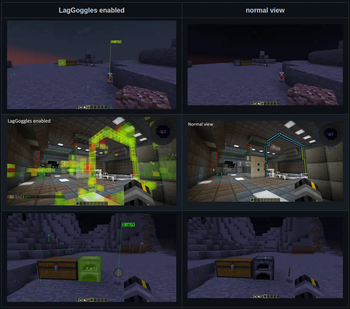
LagGoggles is a profiler where you can see timings in the world, visually. It comes with a custom GUI using a configurable keybind.
You can use LagGoggles as a player too! This is my attempt to create an understanding of what causes lag on a server to regular players.
I noticed some common misconceptions like having machines spread out over different chunks causes less lag than putting it in one chunk.
With LagGoggles, you can look around and see that alot of small things like pipes or cables cause a tiny bit of lag most of the time, often resulting in more lag than a machine right next to the source would.
Video explaining the concept
Massive thanks to Grok DuckFarmer for making this video.
Minecraft Talk 35 - LagGoggles and Better Server Play

Features
- Teleporting to sources of lag
- Client GUI, including overlay and clickable menus
- Colour scale for easy spotting of sources of lag.
- Calculations are done on the client, so each client can have a different colour scale.
- Clientside FPS support!
- Checks render time for Entities, Tile entities and event subscribers
- It's very young, but it should give some insight in what may cause FPS issues.
- Config for client:
- Custom gradients
- Colorblindess support
- Config for server
- Custom permissions for players (non-operators)
Configuration
- Drop the jar in the /mods folder
- Serverside configuration is not required and has no effect.
- Clients can edit the config to change the colour scale.
How it works
Entities, blocks and event-subscribers are timed using System.nanotime() before and after the tick() and update() methods. These times are being recorded and sent to the client when the profiler is done.
Benefits
- Visualisation of various sources of lag
- Learn your players to build lag-free bases.
Highlights
From source dataGame versions
Built for Minecraft 1.7.10.
Loaders
Runs on Forge.
Footprint
Rated a light load on a server.
What kind of mod it is
From the catalogPerformance
Makes the game or server run faster or lighter without changing how it plays.
Works on a server
From source side supportModrinth lists server-side support for Lag Goggles: Legacy as optional: it can run on a server, but isn’t required there.
Compatibility
- Game
- Minecraft
- Loaders
- Forge
- Runs on
- Serveroptional on the server
- Game versions
- 1.7.10
Verified at the source
- ✓ModrinthOfficial listing, checked 2026-10-01Open ↗
- ✓AuthorFalsePattern, as published on Modrinth
- ✓LicenseLGPL-3.0-onlyFree








