






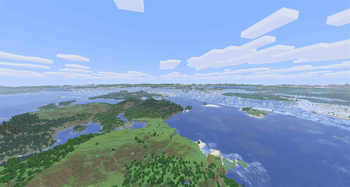

About LOD Server Support
From ModrinthVoxy multiplayer support (unofficial). See fully rendered chunks and players thousands of blocks away in multiplayer.
LOD Server Support
Enables players with Voxy to see fully rendered terrain out to hundreds of chunks on multiplayer servers without needing to explore the world first. Also includes far player rendering so you can also see other players far beyond the vanilla render distance.
Try it live: join lod-server-support.modrinth.gg with Voxy and this mod installed. Supports Minecraft 26.2, 26.1, 1.21.11, and 1.21.1.
<iframe width="560" height="315" src="https://www.youtube-nocookie.com/embed/C6TaZ9A7F9I" title="YouTube video player" frameborder="0" allow="accelerometer; autoplay; clipboard-write; encrypted-media; gyroscope; picture-in-picture; web-share" allowfullscreen></iframe>
Compatibility
Clients use the Fabric mod on every version; on 26.2, 26.1, and 1.21.1 a NeoForge client works as well. Supported servers:
| Minecraft | Fabric | Paper / Purpur | Folia | NeoForge | |---|---|---|---|---| | 26.2 | ✅ | ✅ | ✅ | ✅ | | 26.1 | ✅ | ✅ | ✅ | ✅ | | 1.21.11 | ✅ | ✅ | ✅ | - | | 1.21.10 | ✅ | ✅ | - | - | | 1.21.1 | ✅ | ✅ | - | ✅ |
Folia support is experimental. NeoForge support is best-effort, with far player rendering available on 1.21.1 only.
Compatible with AntiXray, Moonrise, C2ME, ViaVersion/ViaBackwards, and most other mods including Create. Can be run alongside Distant Horizons on the same server to support DH clients and Voxy clients simultaneously.
Can populate Xaero's World/Mini Map based on the LOD data, enable this in client Sodium settings, click Apply, then reconnect.
LOD Server Support is backwards and forwards compatible from v0.4.0 through the current version. Server operators can freely update to take advantage of improvements without breaking clients on older versions, and clients can update without breaking compatibility with older servers.
On NeoForge (26.2 and 26.1) the tested client path is our Foxy fork (get it from the releases page, it carries the Windows natives fix that stock Foxy lacks), which loads the regular Fabric Voxy jar on NeoForge. Tested with Sodium 0.9.1 + Voxy 0.2.18-beta on 26.2 and Sodium 0.8.12 + Voxy 0.2.16-beta on 26.1.2, exact pairings in the Foxy README.
On NeoForge (1.21.1) use Roxy to load the Fabric Voxy jar. Tested working with Roxy 0.2.0, Voxy 0.2.16-beta (the 1.21.11 build), Sodium 0.8.12, and Forgified Fabric API 0.116.15. If distant Voxy chunks do not show up, turn off environmental fog in your video settings.
Voxy Server Side is the same mod. Voxy Server Side clients are compatible with LOD Server Support servers and vice versa.
Installation
Install LOD Server Support on both the server (LOD Server Support Fabric mod, Paper plugin, or NeoForge mod) and every client that wants these features. Without LOD Server Support on both the connecting client and on the server it will not function. Clients without LOD Server Support can still join normally.
Configuration
Config files are generated during first run at config/lss-server-config.yaml on Fabric and NeoForge or plugins/LodServerSupport/lss-server-config.yaml on Paper. Client settings are in config/lss-client-config.yaml. Settings are grouped by feature and documented inline, including units and restart/reconnect requirements.
Edit the YAML and run /lsslod reload on the server or /lss reload on the client.
Commands
Server (Fabric, NeoForge, and Paper)
/lsslod stats- Show per-player transfer statistics/lsslod diag- Show detailed diagnostics (config, bandwidth, queue depths)/lsslod reload- Reload server settings from YAML; settings that still need a restart are reported/lsslod store status- Show LOD store status (state, hit/miss counters, size)/lsslod store backfill start|stop|status- Control the background pre-warm walk (not on Paper)/lsslod help- List all commands
Client (Fabric and NeoForge)
/lss reload- Reload client settings from YAML; settings that still need a reconnect are reported/lss clearcache- Clear the local column cache, forcing all chunks to be re-requested from the server/lss reset- Wipe this worlds's LODs (local cache and Voxy's stored data) and re-stream them fresh/lss diag- Show client-side diagnostics (connection, throughput, scan progress, request budget)
Server Performance Tuning
Turn the LOD store on. Set enabled: true under storage.lod_store (requires a restart). It caches the preprocessed LOD data to disk for CPU savings, with the drawback of extra disk usage that can be comparable to the size of your world files.
On Fabric and NeoForge, when the LOD store is enabled a backfill task will populate it. Maximum CPU savings are only achieved after the store is populated. Check the progress of the task with /lsslod store backfill status. If your world is much larger than the area players commonly visit you can save on disk space by setting enabled: false under storage.lod_store.backfill. Paper populates the store as it serves terrain.
Use the bandwidth and generation limiters to limit CPU. LOD Server Support's CPU cost is essentially how many columns per second it serves plus how many chunks it generates, and these configs cap exactly that:
Highlights
From source dataGame versions
Supports 9 Minecraft versions, the newest being 26.2.
Loaders
Runs on Fabric, Folia, NeoForge, Paper and Purpur.
Footprint
Rated a light load on a server.
What kind of mod it is
From the catalogBuilding & decoration
Blocks, furniture, decorations and building tools.
Works on a server
From source side supportModrinth lists server-side support for LOD Server Support as optional: it can run on a server, but isn’t required there.
Compatibility
- Game
- Minecraft
- Loaders
- FabricFoliaNeoForgePaperPurpur
- Runs on
- Serveroptional on the server
- Game versions
- 26.2 and 8 earlier
Verified at the source
- ✓ModrinthOfficial listing, checked 2026-10-01Open ↗
- ✓Authorbitvox, as published on Modrinth
- ✓LicenseMITFree








