







About M1 - Machine One AI Interface
From ModrinthOperate the Minecraft client through a local text interface, for automation and AI control.
M1 -- Machine One AI Interface
PLEASE review the branches above for the source code tree.
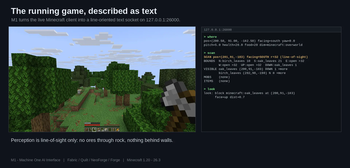
M1 is a Minecraft mod that exposes the real, running game client over a plain localhost text socket. It describes whatever screen or world is in front of the client as text, and accepts text commands to drive it -- so a human at a terminal, or an AI over a socket, can operate Minecraft entirely by typing. No GUI mouse/keyboard is required and nothing needs to be "looked at" on screen; the window is there purely for observability.
Ships as a Fabric, NeoForge, and Forge mod spanning Minecraft 1.20 through 26.x, as a client agent plus an optional server-side /m1srv command (needs neither side present).
Source code / build & setup guide | Report an issue / get support
> New here? Read the AI_Brain (00_Index.md) first. That is the file an AI agent > is expected to load before a play session. This README is the reference manual behind it.
1. Popular Uses for M1
Most "AI plays Minecraft" projects never actually run Minecraft. They are protocol bots that speak the server's network protocol from the outside (Mineflayer, and LLM agents built on it like Voyager), or research stacks pinned to ancient versions (Malmo, MineRL). Because they never load the real client, they are blind to anything the client draws -- mod GUIs simply do not exist to them, and a version or mod mismatch breaks them.
M1 is the real client. It loads as an ordinary Fabric / NeoForge / Forge mod, reads every real screen, and drives the game the way you would. That unlocks what the protocol bots cannot touch:
- Mod development & real-client testing. Test your mod the way a player actually experiences
it -- open its screens, click its buttons, read its inventories, drive its menus, grab screenshots -- all by text. M1 has served as the live test harness across 20+ release builds spanning many Minecraft versions and all three loaders, so you validate a mod across the whole range, not one pinned version.
- AI agents that genuinely play. Point any LLM at a text socket and let it go -- proven
end-to-end: spawn, find a tree, mine, craft, and build a wooden axe, entirely over the wire -- and because it is the real client, your agent can operate mod GUIs too, not just vanilla movement.
- Hands-free / accessible play. Run the whole game -- menus, worlds, inventory, crafting -- by
typing. Nothing on screen needs to be looked at.
- Automation & scripting. Repeatable command sequences for the tedious stuff (gather, craft,
navigate, set up a world), from any language, in plain text -- with auto armor-upgrade built in.
No protocol reverse-engineering, no pixel pipeline, no RL training, no lock-in to one AI model or one Minecraft version -- just plain text into the real game.
M1 plays fair -- it does not cheat or x-ray. A scan perceives only what a player looking at the screen could: it never sees raw ores buried inside unexposed rock, and -- apart from living entities, which it detects all around -- it reports only what is in front of the player, never through or behind walls. An AI driving M1 works from exactly the information a human at the keyboard would have.
2. Getting M1 running
M1 is client-side only (no server mod). Drop the jar for your loader + MC version in your instance's mods/ folder, launch a world, and on load M1 opens its text socket on 127.0.0.1:26000 and extracts the AI_Brain docs.
To drive it from Claude Desktop (or any MCP client) you also run the small MCP-Minecraft bridge shipped in the source repo. Full step-by-step setup -- install, the bridge, and the Claude Desktop wiring -- is in the build & setup guide on the minecraft-1.20-26.3 branch.
3. Connecting
When the modded client starts, M1 opens a TCP server on 127.0.0.1:26000 on the machine running the client. It binds loopback only -- there is no new inbound network surface; only processes already on that machine can reach it. Run one modded client at a time (every build binds the same port).
The channel is the same whether a person types it or an AI sends it -- one grammar, one code path. Anything an AI does is reproducible by hand and vice versa.
Wire protocol
Highlights
From source dataGame versions
Supports 29 Minecraft versions, the newest being 26.3.
Loaders
Runs on Fabric, Forge, NeoForge and Quilt.
Footprint
Rated a light load on a server.
M1 - Machine One AI Interface on Nxeon
From our catalogue- One-click install
- Supported on Nxeon Minecraft servers. We download it from Modrinth, place it, and restart the server.
- Server side
- Optional on the server
- Server type needed
- Fabric, Forge, NeoForge, Quilt
- Server load
- light
- Smallest plan we suggest
- Minecraft — 1.5 GB (2 GB RAM). This follows our own load rating above, not a benchmark.
- Latest build
- 0.17.5+26.3-neoforge, released 2026-09-18
Game versions by loader
| Loader | Game versions | Newest |
|---|---|---|
| NeoForge | 26.1 to 26.3 (5 versions) | 26.3 |
| Fabric | 26.2 to 26.3 (2 versions) | 26.3 |
From 5 recorded builds of M1 - Machine One AI Interface.
Recent builds
| Build | Released | Game versions | Loaders |
|---|---|---|---|
| 0.17.5+26.3-neoforge | 2026-09-18 | 26.3 | NeoForge |
| 0.17.5+26.3 | 2026-09-18 | 26.3 | Fabric |
| 0.17.5+26.2-neoforge | 2026-09-18 | 26.2 | NeoForge |
| 0.17.5+26.2 | 2026-09-18 | 26.2 | Fabric |
| 0.17.5+26.1-neoforge | 2026-09-18 | 26.1 to 26.1.2 (3 versions) | NeoForge |
Dependencies
- Required: modrinth project P7dR8mSH (modrinth, not in our catalogue)
Declared by the newest build that lists any. Required ones are installed with it on one-click installs.
Run M1 - Machine One AI Interface on a Minecraft server
Pick a server or deploy a new one above; it is installed in one click.
What kind of mod it is
From the catalogTechnology & automation
Machines, power, logistics and automation.
Works on a server
From source side supportModrinth lists server-side support for M1 - Machine One AI Interface as optional: it can run on a server, but isn’t required there.
Compatibility
- Game
- Minecraft
- Loaders
- FabricForgeNeoForgeQuilt
- Runs on
- Serveroptional on the server
- Game versions
- 26.3 and 28 earlier
Verified at the source
- ✓ModrinthOfficial listing, checked 2026-10-17Open ↗
- ✓AuthorKishku7, as published on Modrinth
- ✓LicenseLicenseRef-All-Rights-ReservedFree









