







About Item Model Browser
From ModrinthAdds a widget to the anvil GUI showing every model currently loaded by any resource packs. Clicking an item automatically sets its name in the anvil, making it easy to apply models using the Model Applier datapack.
Model Browser
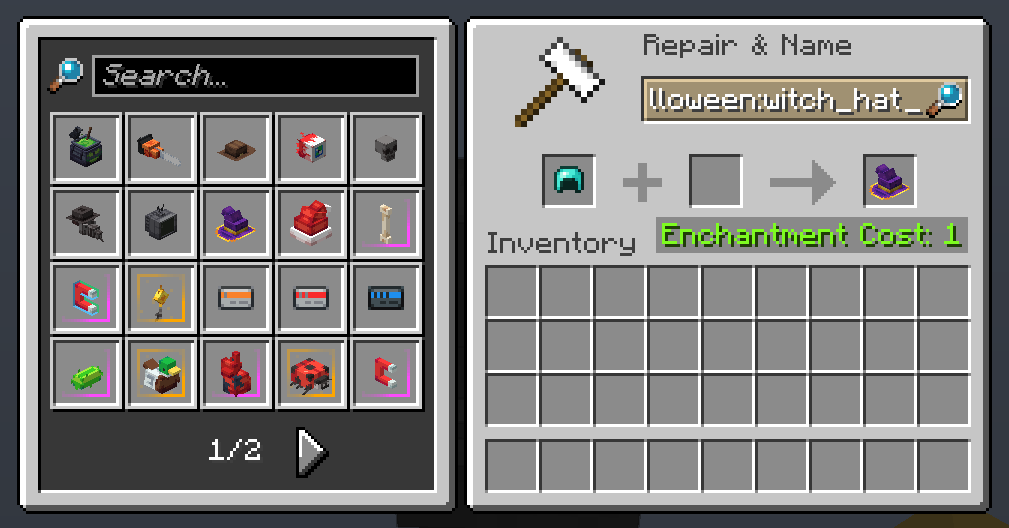
Get any resource pack-loaded item model in survival or creative with ease!
Usage
The mod adds a widget to the anvil GUI displaying every model currently loaded by any resource packs. If installed on the server-side, clicking an item automatically sets its item model and makes the item equippable on the player's head.
The mod also adds a tab in the Creative inventory for convenient access to every loaded model in Creative Mode.
## Made with ❤️ by deborn

Highlights
From source dataGame versions
Supports 7 Minecraft versions, the newest being 26.3.
Loaders
Runs on Fabric.
Footprint
Rated a light load on a server.
What kind of mod it is
From the catalogWeapons, items & crafting
New weapons, gear, items and the recipes to make them.
Works on a server
From source side supportModrinth lists server-side support for Item Model Browser as optional: it can run on a server, but isn’t required there.
Compatibility
- Game
- Minecraft
- Loaders
- Fabric
- Runs on
- Serveroptional on the server
- Game versions
- 26.3 and 6 earlier
Verified at the source
- ✓ModrinthOfficial listing, checked 2026-10-01Open ↗
- ✓Authordeborn, as published on Modrinth
- ✓LicenseLicenseRef-All-Rights-ReservedFree








