






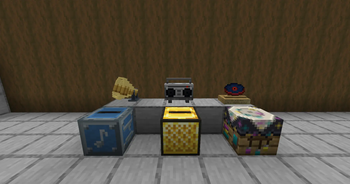

About Music Disc Maker
From ModrinthCraft playable music discs from YouTube, Spotify, SoundCloud, and other audio links.
Turn a music link into a disc for your jukebox, carry it in a Boombox, or play it across your build through linked Speakers.
<a href="https://www.patreon.com/KURONAMI333?utm_source=mr&utm_medium=mod-description&utm_campaign=support&utm_content=music-disc-maker">

Make a disc
Craft a Music Disc Maker, then make a Blank Disc with lapis lazuli and iron. Open the maker, paste a track URL, and insert the blank disc. Take your finished Custom Music Disc and play it in an ordinary jukebox.
Use links from YouTube, Spotify, SoundCloud, Bandcamp, or a direct audio URL. Discs show the track title, artist, duration, source, and cover art in their tooltip. You can also rename them on an anvil.
Build your collection
- Album: Keep up to nine custom discs together. Right-click to arrange them, check the contents in its tooltip, and dye the cover to tell your collections apart. Dyeing preserves the discs, their order, and the Album's name.
- Disc Dyeing Table: Recolor a custom disc's surface and accent separately. Change either color or both.
- Disc Pedestal: Put a favorite disc on display with its track title and artist. Swap the displayed disc in one interaction.
Listen at home or on the move
The Boombox plays a custom disc or an Album while carried or placed. Pause, skip between tracks, shuffle an Album, repeat, seek, and adjust the volume from its controls.
The Golden Jukebox gives you control over a listening area: set the range from 16 to 256 blocks, adjust the volume from 0 to 200%, and choose positional sound or an even volume throughout the area. It also has playback controls, including track skipping and shuffle for Albums.
Link Speakers to a Golden Jukebox to bring its music to other rooms or parts of a build. Mount them on floors, walls, ceilings, or fence posts, and turn each horn straight, left, or right. Each Speaker has its own volume; the jukebox sets their range. Apply a redstone signal to mute a Speaker.
Radio and shared listening
Icecast/SHOUTcast streams and YouTube live links become live radio discs. They show LIVE instead of a track length and reconnect after brief interruptions.
On servers, playback is synchronized so players joining an ongoing track hear the same part. Play up to 64 custom tracks at once without changing settings; devices with fewer available audio channels use a lower limit automatically.
Compatibility
- Additional Additions: Custom discs work in Albums and the Pocket Jukebox.
- Sophisticated Backpacks and Traveler's Backpack: Custom discs work with their jukebox upgrades.
- Create: Golden Jukebox audio follows moving contraptions on NeoForge 1.21.1 and Forge 1.20.1. Create Aeronautics airships are supported on NeoForge 1.21.1.
- Valkyrien Skies 2, Eureka!, and Clockwork: Audio follows ships on 1.20.1.
Before you play
Audio streams from its source rather than being stored inside the disc, so playback needs an internet connection. Spotify links use the song and artist to find a matching track on YouTube. Some tracks may be unavailable, region-locked, or blocked by a login or bot check. Try a direct audio link, SoundCloud, or Bandcamp if that happens. Twitch is not supported.
Use the same Music Disc Maker version on the server and every client.
Bugs and questions: comment on the CurseForge page, or DM @kuronami333 on X.
All Rights Reserved. Free to include in modpacks, including monetized packs. No permission or credit is required. Source code.
Highlights
From source dataGame versions
Supports 5 Minecraft versions, the newest being 26.2.
Loaders
Runs on Fabric, Forge and NeoForge.
Footprint
Rated a light load on a server.
What kind of mod it is
From the catalogCosmetics, visuals & audio
Skins, textures, shaders, models and sound — how the game looks and sounds.
Runs on your server
From source side supportModrinth lists Music Disc Maker as required on the server. Check its Modrinth page to see whether players need it too.
Compatibility
- Game
- Minecraft
- Loaders
- FabricForgeNeoForge
- Runs on
- Serverrequired on the server
- Game versions
- 26.2 and 4 earlier
Verified at the source
- ✓ModrinthOfficial listing, checked 2026-10-01Open ↗
- ✓AuthorKURONAMI, as published on Modrinth
- ✓LicenseLicenseRef-All-Rights-ReservedFree








