







About Penchant
From ModrinthA rework of enchanting, centered around leveling up enchantments through usage
⚠️ Penchant is still in beta. Please report any bugs or balance issues to help improve the mod!
The core feature of Penchant is that all enchantments start off from level one and players must level up their enchantments through usage. Usage means any action that would normally reduce durability, such as mining, attacking, and taking damage (for armor).
You can view a progress bar for each enchantment by holding <kbd>Left Ctrl</kbd> (configurable). Once the bar is filled, the enchantment increases by one level and the bar resets, until the enchantment is maxed out.

This means that instead of grinding for a ton of XP and hoping for good RNG, all you need to do to improve your tools is go out and use them, like you were going to do anyway.
Modules
The remaining features of Penchant are organized into modules that can be disabled individually per-world via datapacks.
Configuring Modules
Datapacks can be enabled and disabled in the world creation menu, and after world creation using the /datapack command. You can also install Datapack/Gamerule Menus to configure datapacks with a menu after world creation.

Note: Some modules don't make sense without other modules enabled, these soft dependencies are listed at the start of each module.
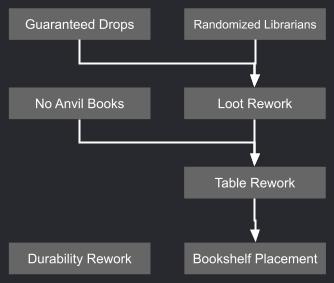

Table Rework
Strongly recommend Bookshelf Placement. This module includes advancements to guide you through the reworked enchanting.
The enchanting table now lets you choose individual enchantments. Each enchantment has an xp cost and a required number of books near the table, and costs 1 lapis lazuli.

Enchantments that are not in the table by default can be unlocked by placing enchanted books in nearby bookshelves.


If you place a grindstone within the bookshelf radius, you can remove enchantments from items onto books. This makes enchanted equipment you find more useful as you can unlock more rare enchantments.


Bookshelf Placement
Chiseled bookshelves and lecterns count towards the enchanting table bookshelf count depending on how many books they hold. 3 books = 1 vanilla bookshelf.

Additionally, there is no longer a requirement to have no blocks between the shelf & table, and shelves can be placed in a 7x4x7 area centered on the table (1 below, 2 above).


Durability Rework
Mending is removed. Instead, Unbreaking has 5 levels and Unbreaking V makes the tool unbreakable (but you have to work your way there!)

| Level | Damage chance | | ----- | ------------- | | None | 100% | | 1 | 100% | | 2 | 75% | | 3 | 50% | | 4 | 25% | | 5 | 0% (unreakable) |
Items in the world that already have Mending don't lose it but it no longer functions.

Loot Rework
Recommend Table Rework
Reorganizes enchantments and where they can be acquired so that basic enchantments are readily avaiilable but more important and special ones are harder to get. Enchantments are organized into the following categories:
Common
- The basic enchantments that directly increase the effectiveness of the tool
- In enchanting table by default
- Can be found on random loot equipment
- Can be found on traded equipment
- Can be found on mob equipment
Highlights
From source dataGame versions
Supports 11 Minecraft versions, the newest being 26.3.
Loaders
Runs on Fabric and NeoForge.
Footprint
Rated a light load on a server.
What kind of mod it is
From the catalogGameplay & overhauls
New mechanics, content and overhauls that change how the game plays.
Runs on your server
From source side supportModrinth lists Penchant as required on the server. Check its Modrinth page to see whether players need it too.
Compatibility
- Game
- Minecraft
- Loaders
- FabricNeoForge
- Runs on
- Serverrequired on the server
- Game versions
- 26.3 and 10 earlier
Verified at the source
- ✓ModrinthOfficial listing, checked 2026-10-01Open ↗
- ✓AuthorThePotatoArchivist, as published on Modrinth
- ✓LicenseLGPL-3.0-or-laterFree








