






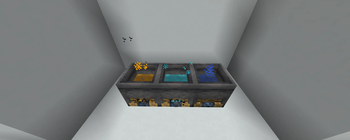

About Potion Blender
From ModrinthPotion Blender is a small mod to merge potion effects into one item, allowing for interesting combinations.
Potion Blender ==================
Overview
Potion Blender is a small mod to merge potion effects into one item, allowing for interesting combinations.
How to use
1 - Cauldron
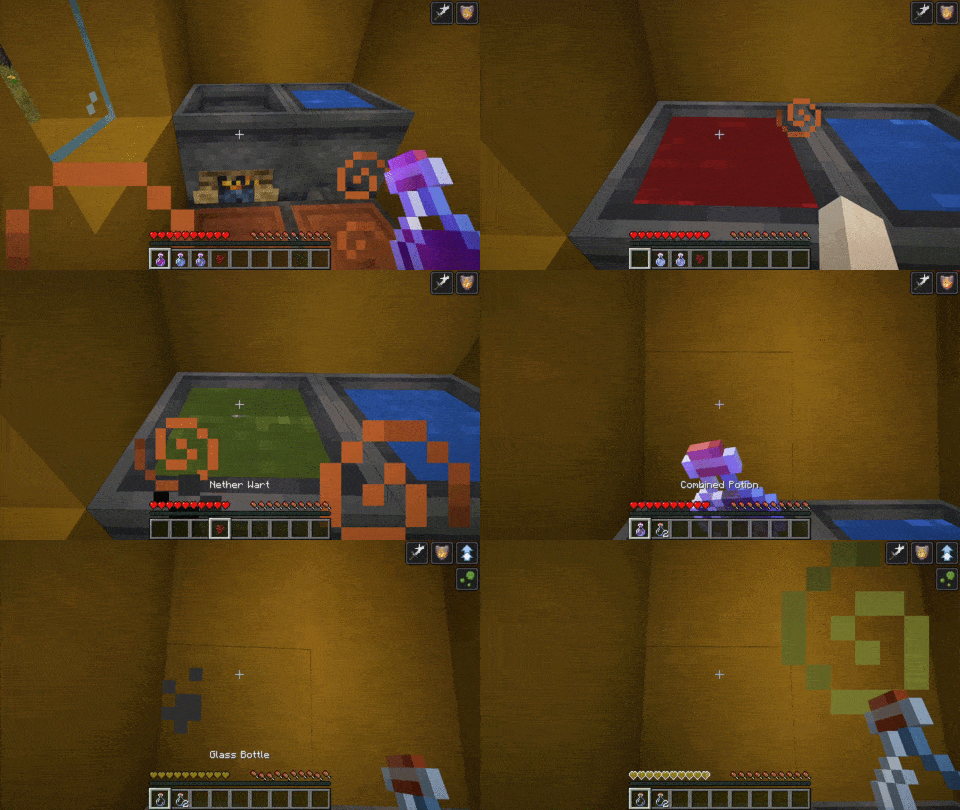
First, you need to make a special cauldron. Do so by right-clicking a campfire with a vanilla cauldron.
2 - Starting to blend
Then, throw a potion into the cauldron. It can be any vanilla potion that is not Splash or Lingering. The potion effects will be the base of your combined brew. You can then add up to two more potions (neither splash nor lingering) to add their effects to the final product.
Note that throwing any combined potion into the cauldron is strongly discouraged
3 - The final ingredient
It is time to finish the brewing and choose your desired potion. You may choose one of these three ingredients :
- Nether wart -> Normal potion
- Gunpowder -> Splash potion
- Dragon Breath -> Lingering potion
Please wait for the brewing cauldron to perform its magic and grab your combined brew!
4 - Using arrows
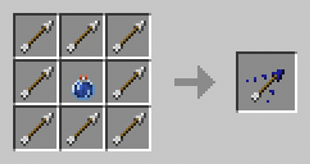
You can craft tipped arrows with multiple effects using a combined lingering potion. It follow the same pattern as the vanilla craft:
5 - Cancelling the blend
You can reset the cauldron anytime by right-clicking on the cauldron to get back your ingredients.
Effect stacking
Adding the same effect to a potion multiple times results in effects adding. It, however, comes with a price as each additional effect decreases the added time. The first stacked effect adds 50% of its duration, and the 2nd one 25%.
Instant Effects does not stack as duplicated effects are lost.
Configuration
See the wiki for the most up to date information
Since version 2.0.0
The config is in ``.minecraft/config/potionblender/potion_blender_config.json``
- configVersion: DO NOT TOUCH. This value is managed by the mod
- maxNbOfEffects : the maximum number of potions you can combine in a single brew
- brewbrewingTime: the delay in tick before brewing the potion (default to 140 ticks or 7s)
- normalPotionIngredient, splashPotionIngredient, lingeringPotionIngredient define the ingredient corresponding to each potion. Make sure to type the name right, or you will get a warning, and the item will not be recognized.
Here is the default configuration:
{
  "configVersion": 1,
  "maxNbOfEffects": 3,
  "brewingTime": 140,
  "normalPotionIngredient": "minecraft:nether_wart",
  "splashPotionIngredient": "minecraft:gunpowder",
  "lingeringPotionIngredient": "minecraft:dragon_breath"
}
Prior to version 2.0.0:
The configuration file is in your ``.minecraft/potionblender/potion_blender_config.json``
The configurable options are:
- max_effects: The maximum number of potions in a cauldron. Be careful when updating this value in an existing world, as it may cause desync on an already placed cauldron.
FAQ
Will this work with X potion mod?
Any mod that adds potion via the vanilla system is compatible. Typically these potions use the vanilla flask or appear in the vanilla potion tab. However, some mod implements their own potion system, such as Botania. These potions are incompatible and will not work. Compatibility has been tested with Dave's Potioneering since version 2.0.0
Known issues
- Sodium breaks the cauldron rendering, causing it to appear with water instead of the potion's colors. Setting biome blend to 0 fixes the issues. This is a long-standing bug on sodium end.
- Versions before 1.0.3 break vanilla lingering potion. Please use the latest version!
License
This mod is available under the GPLv3 license.
======
If you encounter a bug or have a suggestion, feel free to leave a comment or open an issue on GitHub
Highlights
From source dataGame versions
Supports 10 Minecraft versions, the newest being 1.21.1.
Loaders
Runs on Fabric, Forge and NeoForge.
Footprint
Rated a light load on a server.
What kind of mod it is
From the catalogWeapons, items & crafting
New weapons, gear, items and the recipes to make them.
Runs on your server
From source side supportModrinth lists Potion Blender as required on the server. Check its Modrinth page to see whether players need it too.
Compatibility
- Game
- Minecraft
- Loaders
- FabricForgeNeoForge
- Runs on
- Serverrequired on the server
- Game versions
- 1.21.1 and 9 earlier
Verified at the source
- ✓ModrinthOfficial listing, checked 2026-10-01Open ↗
- ✓Authormotivational-dragon, as published on Modrinth
- ✓LicenseGPL-3.0-onlyFree








