







About ProtectionStones
From HangarThe easiest grief prevention method that players will enjoy!






Get support for this plugin on the M.O.S.S. Discord! https://discord.gg/cqM96tcJRx
Warning: ProtectionStones only supports 1.21.10+! Please check below for versions for older versions of Minecraft.
Ever needed an easy, yet powerful way to prevent grief, and protect a certain area?
This plugin allows players to protect land using a block that they place down. It creates a WorldGuard region at a set radius (configurable) around where the block is placed. The plugin also allows players to add and remove people to the region, as well as set flags (defined in the config).
Requirements:
- WorldGuard 7+
- WorldEdit 7+
- Vault (Optional)
- PlaceholderAPI (Optional)
- Spigot 1.21.10+
1.20.6 - 1.21.9 (NOT MAINTAINED):
Use v2.10.5.
1.17 - 1.20.5 (NOT MAINTAINED):
Use v2.10.4.
1.13 - 1.16 (NOT MAINTAINED):
Use v2.8.5.
1.8 - 1.12 (NOT MAINTAINED):
I did port one version of ProtectionStones backwards, but I do not provide support or updates for this version: https://github.com/espidev/ProtectionStones/releases/tag/2.7.6-pre1.13

Make sure you first have the requirements listed above.
Simply add the plugin to the plugins folder, and it will generate the default configuration.
By default, no permissions are given to players, so you have to add them explicitly.
Adding new blocks:
To add new protection blocks, go into plugins/ProtectionStones/blocks, and copy and paste the default block1.toml file and rename it (ex. block2.toml). Then, you have to change the "type" and "alias" fields in the new block config, since there cannot be duplicates.
Configuring flags:
Flags allow for customization of region behaviour. ProtectionStones uses WorldGuard flags, meaning that WorldGuard is actually doing the protecting, not ProtectionStones. You can view the list of WorldGuard flags here.
It is also possible to use other plugins that add flags to WorldGuard, such as WorldGuard Extra Flags and use them in ProtectionStones.
Other Recommendations:
WorldGuard by default prevents hoppers from going between regions, and prevents hopper minecarts from working. I recommend setting "ignore-hopper-item-move-events" in WorldGuard's config to true to fix this.
If you want to protect against water and lava flow into regions, you can set "high-frequency-flags" and "protect-against-liquid-flow" to true in WorldGuard's config.
View the WorldGuard config here.
Default Config Files:
View the default configuration here.
Translations:
View user contributed translations here. Contact me on the Discord, or file a GitHub issue if you would like to contribute your translation to the page! Thank you!

Get a protection block with the /ps get command. Simply placing it down will create a protection region centered around the block. Breaking the block will remove the region.
Permissions:
View the permission list here. View the recommended permissions to give for commands here.
Commands:
View the list of commands here.
Placeholders:
ProtectionStones has support for PlaceholderAPI! View them here.

Read the FAQ here.
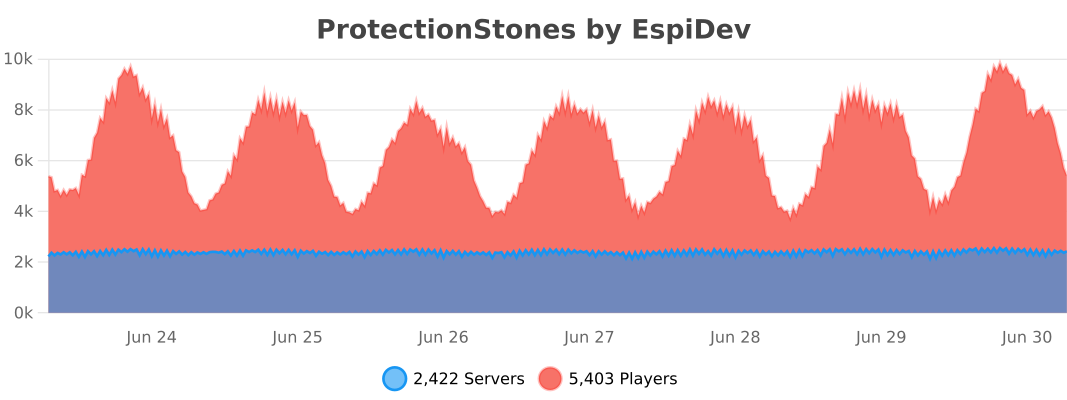
Usage Statistics: https://bstats.org/plugin/bukkit/ProtectionStones/4071
This plugin is based off of the original ProtectionStones.
Migrating from older versions of ProtectionStones (<2.x.x)
The transition from older versions should be seamless, so just drag the plugin in to the plugins folder and enjoy! The plugin will automatically update your configs and regions.
You can find the original plugin here:
Highlights
From source dataGame versions
Supports 20 Minecraft versions, the newest being 1.21.11.
Loaders
Runs on Paper.
Footprint
Rated a light load on a server.
ProtectionStones on Nxeon
From our catalogue- One-click install
- Supported on Nxeon Minecraft servers, for Paper servers. We download it from Hangar, place it, and restart the server.
- Server side
- Required on the server
- Server type needed
- Paper
- Server load
- light
- Smallest plan we suggest
- Minecraft — 1.5 GB (2 GB RAM). This follows our own load rating above, not a benchmark.
- Latest build
- 2.10.6, released 2026-01-30
Game versions by loader
| Loader | Game versions | Newest |
|---|---|---|
| Paper | 1.17 to 1.21.11 (20 versions) | 1.21.11 |
From 4 recorded builds of ProtectionStones.
Recent builds
| Build | Released | Game versions | Loaders |
|---|---|---|---|
| 2.10.6 | 2026-01-30 | 1.21.10 to 1.21.11 (2 versions) | Paper |
| 2.10.5 | 2024-07-05 | 1.20.6 to 1.21 (2 versions) | Paper |
| 2.10.4 | 2023-11-13 | 1.17 to 1.20.5 (16 versions) | Paper |
| 2.10.3 | 2023-05-10 | 1.17 to 1.20 (11 versions) | Paper |
Run ProtectionStones on a Minecraft server
Pick a server or deploy a new one above; it is installed in one click.
What kind of mod it is
From the catalogAdmin & protection
Permissions, moderation, anti-cheat and land protection for the people running the server.
Runs on your server
From source side supportHangar lists ProtectionStones as required on the server. Check its Hangar page to see whether players need it too.
Compatibility
- Game
- Minecraft
- Loaders
- Paper
- Runs on
- Serverrequired on the server
- Game versions
- 1.21.11 and 19 earlier
- Requires
- One-click install needs a Paper server.
Verified at the source
- ✓HangarOfficial listing, checked 2026-10-08Open ↗
- ✓Authorespidev, as published on Hangar
- ✓LicenseGPLFree









