







About RPG Inventory
From ModrinthThis mod adds new equipment slots and other mechanics found in popular RPGs.
RPG Inventory
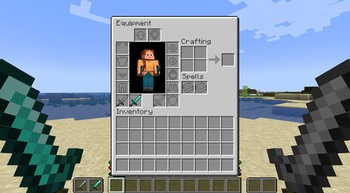
Adds a new inventory screen with more equipment slots and other equipment related mechanics.
Expanded Inventory Screen
The expanded inventory screen is the most prominent feature of this mod.
However, it can be disabled in the server config. This will also disable all other features that depend on it.
New equipment slots
These new equipment slots work similar to the existing four armor slots.
All slots can be configured individually. These options include:
- whether the slot is enabled
- whether the slot is visible
- whether items can be manually placed into the slot
- whether items can be manually taken out of the slot
- the position of the slot
The new slots accessible in the inventory are:
- 1 belt slot
- 1 necklace slot
- 2 ring slots (the second one is disabled by default)
- 1 gloves slot
- 1 shoulders slot
- 1 relic slot
- 1 class item slot (not visible or manually interactable by default)
"Spell" Slots
There are also 8 "spell" slots, which are directly controlled by the "rpginventory:active_spell_slot_amount" entity attribute. Its value determines how many slots are enabled.
The "default_spell_slot_amount" server config option controls the amount of spell slots each player has active by default.
_The spell slots were originally designed to be used with spell books powered by Spell Engine, but they work with other items as well._
Hand Slot Overhaul
This is an extension to the existing offhand slot. The new "hand slot" is "replacing" the currently selected hotbar slot.
Items in both hand slots can be "sheathed" (by pressing a hotkey), which gives access to the hotbar slots again. When pressed again, teh items are unsheathed.
Sheathed items are rendered on the player model. The exact position can be configured in the client config and items in the "rpginventory:not_shown_when_in_sheathed_hand" and "rpginventory:not_shown_when_in_sheathed_offhand" item tags are not rendered when in those slots.
> The vanilla "Swap Hands" hotkey is disabled while the Hand Slot Overhaul is active. Swapping inventory items into the hotbar using the number keys still works.
Two-handed Stance
This is a special case, where only the offhand is sheathed. This leads to the unique situation where the mainhand slot is occupied, but the offhand slot is empty. The two-handed stance can be toggled by pressing a hotkey. This is not possible, if the item in the main hand slot is iin the "rpginventory:non_two_handed_items" item tag.
The two-handed stance enables no new functionality on its own, but mods like Better Combat Extension can utilise it.
Empty hand items
When a hand is not sheathed, but the corresponding slot contains no item, the players hand is not empty. The item in the corresponding "empty hand slot" is held instead.
The empty hand slots always contain a item called "Empty Hand Weapon". This is technically a weapon. When Better Combat is installed, this allows for unarmed combat.
Alternative Hand Slots
These two slots can hold the same items as the regular hand slots, but the held items do not count as "equipped" (no attribute modifiers/enchantments/etc take effect).
Items in the hand slots can be swapped with the items in the corresponding alternative hand slots by pressing hotkeys. There are individual keys for the main and the offhand. There is also a hotkey that swaps both hands at the same time.
Technical equipment slots
The mechanics of the Hand Slot Overhaul use various "hidden" equipment slots:
- 1 sheathed hand slot
- 1 sheathed offhand slot
- 1 empty hand slot
- 1 empty offhand slot
- 1 alternative hand slot
- 1 alternative offhand slot
Additional Hotkey Settings
All hotkey actions of the Hand Slot Overhaul have configurable, additional effects:
- applying cooldowns to the items in the corresponding slot
- stamina requirements/costs (if Stamina Attributes is installed)
Status Effect screen
Active and visible status effects are listed on the right side of the inventory screen. They are sorted by their category (harmful, beneficial and neutral). Effects can have a description (added by assigning a value to <effect_translation_key>.description in the lang files), which is also displayed.
Effects in the "rpginventory:food_effects" effect tag are displayed in a separate list.
Slot Tooltips
Equipment slots can now have a tooltip. It is only shown when the slot and the cursor stack are empty. This feature can be disabled in the client config.
Additional settings and features
The 2x2 crafting grid in the player inventory can be disabled.
Additional Features
These features work independently of the Expanded Inventory Screen.
Advancement Locked Items
An item stack that has the "rpginventory:advancement_locked" component has one of 3 different 'status' modes, which is saved in the component.
The different modes are:
- 'not_unlocked'
- 'unlocked', this has the lowest priority. The item can only be equipped and used if the item is in this mode.
- 'locked', this has the highest priority
The "advancement_locked" component has 5 string fields:
- "unlock_advancement": the id of the 'unlock advancement'. If the player has this advancement unlocked, the status is changed to 'unlocked', if not the status is 'not_unlocked'. If this field is an empty string, the item can't be 'not_unlocked'.
- "lock_advancement": the id of the 'lock advancement'. If the player has this advancement unlocked, the status is 'locked'. If this field is an empty string, the item can't be 'locked'.
Highlights
From source dataGame versions
Supports 6 Minecraft versions, the newest being 26.1.2.
Loaders
Runs on Fabric.
Footprint
Rated a light load on a server.
What kind of mod it is
From the catalogQuality of life & UI
Small conveniences, tweaks and interface improvements players notice straight away.
Runs on your server
From source side supportModrinth lists RPG Inventory as required on the server. Check its Modrinth page to see whether players need it too.
Compatibility
- Game
- Minecraft
- Loaders
- Fabric
- Runs on
- Serverrequired on the server
- Game versions
- 26.1.2 and 5 earlier
Verified at the source
- ✓ModrinthOfficial listing, checked 2026-10-01Open ↗
- ✓AuthorTheRedBrain, as published on Modrinth
- ✓LicenseMITFree








