







About RS Integration
From ModrinthA major core optimization release featuring improved recursive crafting scheduling, recipe-index warm-up, safer transaction settlement, rewritten pinyin search, and optional Project MMO salvage integration.
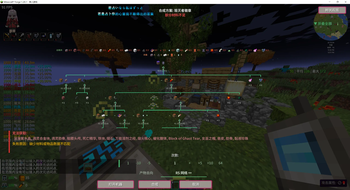
RS Integration lets Refined Storage operate machines from other mods. Choose an item in JEI and it checks materials, resolves prerequisite recipes, operates bound machines, and returns the result to the RS network.
Requirements
| Dependency | Requirement | | ------------------ | ------------------------------------------------------------ | | Minecraft | 1.20.1 | | Forge | 47+ | | Refined Storage | 1.12+; Optional | | JEI | Required on the client for recipe actions and plan previews | | Other integrations | Optional; modules load only when their target mod is present |
Main Features
Recursive remote crafting
Ordinary recipes can be crafted recursively from the player's inventory even without an RS wireless terminal.
- Click the RSI action in JEI to preview and start crafting.
- Resolves crafting-table, modded-machine, virtual-exchange, and multiblock prerequisites.
- Shows the full step list, missing materials, alternative recipes, and a zoomable dependency graph before execution.
- Runs independent graph nodes concurrently and load-balances repeated work across compatible machines.
- Tracks material provenance and performs transactional reservation, rollback, refund, and output delivery.
- Keeps one physical machine input slot on one concrete item variant, while separate crafting-grid slots may mix tag-compatible materials such as different planks.
- Press
Pto inspect progress; cancel from the progress screen, chat action, or/rsi cancel.
Machine binding and remote access
- Shift-right-click a supported block with the Network Linker to bind or unbind it.
- Bindings retain dimension and position information and remove stale entries when blocks are broken.
- Open compatible machine GUIs remotely from RS screens and return to the terminal after closing them.
- Use the searchable Machine Management Center for status, output collection, GUI access, and number-key selection.
- Machine tabs can insert held items into input slots; shift operations can also replenish fuel.
- Multiple compatible machines are load-balanced and can distribute repeated work where the machine contract permits it.
- Remote operations respect FTB Chunks and Cadmus claims and do not force-load an unloaded target chunk.
JEI and RS interface tools
- Drag-select JEI ingredients for batch bookmark/hide actions.
- Alt-click an ingredient to filter JEI by mod; Alt-middle-click clears search.
Ctrl+Ttransfers the visible JEI recipe to an RS crafting grid.Ctrl+ left-drag across RS slots extracts one item from each visited slot.- A draggable side panel exposes RS contents and machine tabs from other screens, with pinyin-aware search.
Auto Eat
Open an RS crafting grid to consume food directly from the network:
- Dietary Diversity works with SolCarrot and chooses foods not yet recorded.
- Stack Feast consumes one selected food until full or the per-use limit is reached.
- Balanced Diet works with Diet and chooses food for lower nutrition groups.
- Food and status-effect blacklists prevent unwanted consumption.
- Bowls, bottles, and other remainders return to the RS network when possible.
- Servers can configure activation requirements, execution cost, and per-use limits.
Replenishment and item management
- Villager restock: select a trade and press Space to fill its costs from inventory and RS; missing items are bookmarked in JEI.
- Reforging restock: press Space in Apotheosis or Ancient Reforging screens to pull reforging materials from RS; missing items are bookmarked in JEI.
- Remote side panel: press
Yto browse and search RS contents from other screens and open JEI uses or recipes.
Apotheosis Spawner Upgrades
- Hold a valid RS network item and shift-right-click an Apotheosis spawner to open the upgrade screen.
- The screen lists applicable positive upgrades, current completion, required materials, and available RS stock.
- Select multiple upgrades and preview the complete dependency plan before confirming.
- Available materials are extracted from the linked RS network; missing upgrade materials are crafted recursively when a valid recipe graph exists.
- Every scan and execution is validated server-side against the player, network, dimension, distance, spawner state, and the previewed selection.
One-key container transfer
- Press
Fin a chest, machine input, or other container to transfer its contents to the current target. - Press
Gto switch the target between a bound RS network and a Sophisticated Backpack. - Transfers respect filters, item blacklists, and destination capacity; rejected items remain in the source container.
- Transfer keys are suppressed while typing in chat, search boxes, and other text fields.
RS side panel and Machine Management Center
- Press
Yto show or hide the side panel without leaving the current screen. - Browse RS item counts and bound machines.
- Search by name, pinyin, number, or item ID, which remains practical in large modpacks.
- Hover an item and press
Ufor uses orRfor recipes to open JEI directly. - Open machine screens remotely from machine tabs; stale or destroyed bindings are removed automatically.
- Press
Hfor searchable machine status, output collection, GUI access, and number-key selection. - When the network contains a Resonance Disk, its Resonance Backpack can be opened from the Machine Management Center.
Mouse and shortcut operations
Highlights
From source dataGame versions
Built for Minecraft 1.20.1.
Loaders
Runs on Forge.
Footprint
Rated a light load on a server.
What kind of mod it is
From the catalogPerformance
Makes the game or server run faster or lighter without changing how it plays.
Runs on your server
From source side supportModrinth lists RS Integration as required on the server. Check its Modrinth page to see whether players need it too.
Compatibility
- Game
- Minecraft
- Loaders
- Forge
- Runs on
- Serverrequired on the server
- Game versions
- 1.20.1
Verified at the source
- ✓ModrinthOfficial listing, checked 2026-10-02Open ↗
- ✓AuthorElten-huanghuang, as published on Modrinth
- ✓LicenseLicenseRef-All-Rights-ReservedFree








