







About Sable CleanUp
From ModrinthFind every Sable sub-level on your server — loaded or not — and teleport, freeze, schematic, disassemble, delete it, and view it in 3D from one GUI.
Sable Cleanup Tools
(new demo vid coming soon)
An operator toolkit for finding, inspecting, and cleaning up Sable sub-levels — the physics contraptions behind Create: Aeronautics and other Sable-based content.
Airships, rovers, and other contraptions pile up over a server's lifetime: abandoned builds, runaways, half-finished projects drifting in chunks nobody's loaded in weeks. Sable Cleanup Tools gives operators one GUI to see every sub-level in the dimension — including ones sitting in unloaded chunks — and act on them safely.
> Works with any Sable-based contraption, not just Create: Aeronautics. It only talks to Sable's own API.
✨ New in 0.3.0
- Multi-select + bulk actions — checkboxes on every row (Ctrl+A selects all); delete, freeze, or boot a whole batch at once.
- Schematic browser — browse, preview, and manage the schematics you've exported, right in the GUI.
- Sort & search — sort by Age, Name, Last Active, Size, orve by name.- Teleport variants — jump to a contraption's plot or it Move Here to bring the sub-level to you.
- Save-schematic bearing warning — warns before exporting a contraption with an active bearing.
What it does
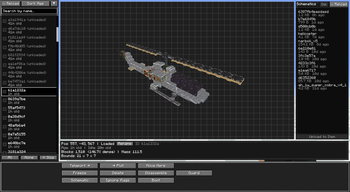
Run /sablecleanup (operator / permission level 2), or bind a key under Controls → Sable Cleanup Tools, to open the panel:
- A scrollable list of every sub-level in the current dimension — id, name, and a lifetime / created-at counter. - At-a-glance moderation coloring: orange once a sub-level 7 days), red if it's also gone that long without moving,green if you've flagged it "ignore". - A live 3D diagram preview with drag-to-orbit and scroll-ion actually is before you touch it.
- Unloaded sub-levels show up too (marked
(unloaded)). Clicking any action transparently force-loads its chunk just long enough to act, then lego back to sleep.
## Actions
- Teleport — jump to the contraption (plot or current visu
- Delete — remove a sub-level. Refuses if something's still physically attached or an active Create contraption is inside, so you can't silently destroy those too.
- Freeze / Unfreeze — pin it in place with a real physics constraint that survives restarts.
- Boot / Un-boot — moderation lockdown: forces Freeze on ae / un-Freeze (and block-breaking inside) until un-booted, soanything a staff member is actively reviewing can't move or vanish out from under them.
- Rename — set the sub-level's display name.
- Save as schematic — export its blocks to a Create-compatible
.nbtschematic (needs Create; everything else works without it). - Disassemble — move the blocks back into the plain world he reverse of assembling a contraption. Guards againstdestroying attached contraptions or in-plot entities.
- Ignore flags — mark a sub-level as reviewed and fine to
- Hold shift over an option for a description of what it does
Requirements
- Minecraft 1.21.1, NeoForge 21.1.228+
- Sable 1.2.2+ (and whatever Sable itself needs — Create, Veil)
Installation
Drop the jar in your mods folder alongside Sable. No config needed beyond two client-side list-coloring thresholds (LONG_LIFE_DAYS / NO_MOVEMENT_DAYS) in the generated config.
Known limitations
- Single-dimension — lists the dimension the command was r
- Shafts / cogwheels render with a cosmetic doubled look in the diagram (a rotated copy over the static model). Cosmetic only — it doesn't affect
anything.
- With an Iris shaderpack active, the diagram may show some blocks as invisible. Switch to internal/vanilla shaders while using
/sablecleanupas a
workaround.
- Freeze is a soft physics-constraint pin, not a true engine-level pause (Sable has no per-body pause).
License & credits
MIT. Built against Sable by ryanhcode — this mod only links to Sable's public API and doesn't bundle or modify it.
Highlights
From source dataGame versions
Built for Minecraft 1.21.1.
Loaders
Runs on NeoForge.
Footprint
Rated a light load on a server.
What kind of mod it is
From the catalogGameplay & overhauls
New mechanics, content and overhauls that change how the game plays.
Runs on your server
From source side supportModrinth lists Sable CleanUp as required on the server. Check its Modrinth page to see whether players need it too.
Compatibility
- Game
- Minecraft
- Loaders
- NeoForge
- Runs on
- Serverrequired on the server
- Game versions
- 1.21.1
Verified at the source
- ✓ModrinthOfficial listing, checked 2026-10-01Open ↗
- ✓AuthorSwigBox, as published on Modrinth
- ✓LicenseMITFree








