







About ServerPress
From ModrinthServerPress is a multiplayer news mod for roleplay servers with a newsroom GUI, reporter accounts, article publishing, search, follows, bookmarks, reactions, image uploads, and admin moderation.
ServerPress
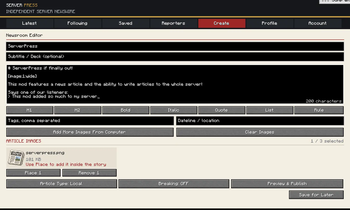
ServerPress adds an in-game news system to Minecraft, allowing players to write, publish, read, follow, comment, and react to server news directly from inside the game.
Instead of relying only on Discord messages, signs, or chat announcements, ServerPress gives your server a proper news platform where events can be documented as they happen. Wars, political drama, economy changes, community updates, scandals, discoveries, and player-made stories can all become part of the server’s history.
What It Adds
ServerPress introduces a News Article item that opens a polished news interface when used. From there, players can browse articles, read server-wide posts, follow reporters, and interact with published news.
Players can also create reporter accounts and publish their own articles, depending on the server’s configuration and moderation settings.
Main Features
- In-game news articles that everyone on the server can read
- Reporter accounts with login, password, and display name support
- Article creation system for writing and publishing server news
- Image support for adding visuals to articles
- Reporter following so players can keep up with specific writers
- Article reactions for community interaction
- Admin moderation tools to help control spam, abuse, or unwanted posts
- Configurable settings for permissions, moderation, limits, behavior, and more
- Clean GUI designed to feel like a real Minecraft news platform, not a plain text menu
Crafting
The News Article item is crafted using:
- 1 Book
- 1 Paper
The recipe is shapeless, so the items can be placed anywhere in the crafting grid.
Best Used For
ServerPress works especially well on:
Roleplay servers
Nation and civilization servers
War servers
SMP communities
Economy servers
Political servers
Story-based survival servers
Why ServerPress?
ServerPress is built for servers where players create stories, conflicts, alliances, updates, and events worth remembering.
It gives players a way to report what happens, follow trusted reporters, react to major articles, and keep the server’s history inside Minecraft itself.
Create the news. Read the stories. Follow the server.
Config
Config is in each world folder in the "serverconfig" folder, there you can change everything.
Commands:
- /news: Opens the news feed.
- /news latest: Shows latest articles.
- /news bookmarks: Shows saved articles.
- /news search <query>: Searches articles.
- /news article <id>: Opens an article.
- /news reporter <player>: Shows reporter info.
Admin:
- /news approve <player>: Approves a reporter.
- /news deny <player>: Denies a reporter.
- /news revoke <player>: Revokes reporter access.
- /news manage: Opens reporter management.
- /news verify <player>: Verifies a reporter.
- /news unverify <player>: Removes verification.
- /news review: Reviews pending articles.
- /news reports: Opens article reports.
- /news userreports: Opens user reports.
- /news resetpassword <player>: Resets a password.
- /news blockreporter <player>: Blocks reporter access.
- /news unblockreporter <player>: Restores reporter access.
- /news blockreports <player>: Blocks reports.
- /news unblockreports <player>: Restores reports.
- /news breaking block/unblock: Manages breaking news access.
- /news pin <id>: Pins an article.
- /news delete <id>: Deletes an article.
- /news official <id>: Marks article official.
Highlights
From source dataGame versions
Supports 7 Minecraft versions, the newest being 26.2.
Loaders
Runs on Fabric, Forge and NeoForge.
Footprint
Rated a light load on a server.
What kind of mod it is
From the catalogAdmin & protection
Permissions, moderation, anti-cheat and land protection for the people running the server.
Runs on your server
From source side supportModrinth lists ServerPress as required on the server. Check its Modrinth page to see whether players need it too.
Compatibility
- Game
- Minecraft
- Loaders
- FabricForgeNeoForge
- Runs on
- Serverrequired on the server
- Game versions
- 26.2 and 6 earlier
Verified at the source
- ✓ModrinthOfficial listing, checked 2026-10-01Open ↗
- ✓AuthorDroper1133, as published on Modrinth
- ✓LicenseLicenseRef-All-Rights-ReservedFree








